|
|
| # 消息的发送 |
|
|
| ## 被动消息 |
|
|
| 被动消息指的是机器人被动回复消息。 |
|
|
| ```python |
| @filter.command("helloworld") |
| async def helloworld(self, event: AstrMessageEvent): |
| yield event.plain_result("Hello!") |
| yield event.plain_result("你好!") |
| |
| yield event.image_result("path/to/image.jpg") # 发送图片 |
| yield event.image_result("https://example.com/image.jpg") # 发送 URL 图片,务必以 http 或 https 开头 |
| ``` |
|
|
| ## 主动消息 |
|
|
| 主动消息指的是机器人主动推送消息。某些平台可能不支持主动消息发送。 |
|
|
| 如果是一些定时任务或者不想立即发送消息,可以使用 `event.unified_msg_origin` 得到一个字符串并将其存储,然后在想发送消息的时候使用 `self.context.send_message(unified_msg_origin, chains)` 来发送消息。 |
|
|
| ```python |
| from astrbot.api.event import MessageChain |
| |
| @filter.command("helloworld") |
| async def helloworld(self, event: AstrMessageEvent): |
| umo = event.unified_msg_origin |
| message_chain = MessageChain().message("Hello!").file_image("path/to/image.jpg") |
| await self.context.send_message(event.unified_msg_origin, message_chain) |
| ``` |
|
|
| 通过这个特性,你可以将 unified_msg_origin 存储起来,然后在需要的时候发送消息。 |
|
|
| > [!TIP] |
| > 关于 unified_msg_origin。 |
| > unified_msg_origin 是一个字符串,记录了一个会话的唯一 ID,AstrBot 能够据此找到属于哪个消息平台的哪个会话。这样就能够实现在 `send_message` 的时候,发送消息到正确的会话。有关 MessageChain,请参见接下来的一节。 |
| |
| ## 富媒体消息 |
| |
| AstrBot 支持发送富媒体消息,比如图片、语音、视频等。使用 `MessageChain` 来构建消息。 |
| |
| ```python |
| import astrbot.api.message_components as Comp |
|
|
| @filter.command("helloworld") |
| async def helloworld(self, event: AstrMessageEvent): |
| chain = [ |
| Comp.At(qq=event.get_sender_id()), # At 消息发送者 |
| Comp.Plain("来看这个图:"), |
| Comp.Image.fromURL("https://example.com/image.jpg"), # 从 URL 发送图片 |
| Comp.Image.fromFileSystem("path/to/image.jpg"), # 从本地文件目录发送图片 |
| Comp.Plain("这是一个图片。") |
| ] |
| yield event.chain_result(chain) |
| ``` |
| |
| 上面构建了一个 `message chain`,也就是消息链,最终会发送一条包含了图片和文字的消息,并且保留顺序。 |
|
|
| > [!TIP] |
| > 在 aiocqhttp 消息适配器中,对于 `plain` 类型的消息,在发送中会使用 `strip()` 方法去除空格及换行符,可以在消息前后添加零宽空格 `\u200b` 以解决这个问题。 |
|
|
| 类似地, |
|
|
| **文件 File** |
|
|
| ```py |
| Comp.File(file="path/to/file.txt", name="file.txt") # 部分平台不支持 |
| ``` |
|
|
| **语音 Record** |
|
|
| ```py |
| path = "path/to/record.wav" # 暂时只接受 wav 格式,其他格式请自行转换 |
| Comp.Record(file=path, url=path) |
| ``` |
|
|
| **视频 Video** |
|
|
| ```py |
| path = "path/to/video.mp4" |
| Comp.Video.fromFileSystem(path=path) |
| Comp.Video.fromURL(url="https://example.com/video.mp4") |
| ``` |
|
|
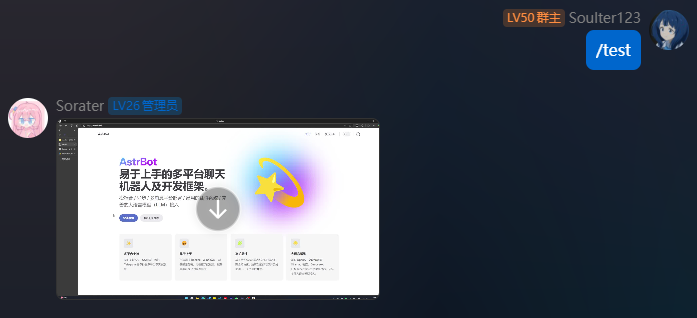
| ## 发送视频消息 |
|
|
| ```python |
| from astrbot.api.event import filter, AstrMessageEvent |
| |
| @filter.command("test") |
| async def test(self, event: AstrMessageEvent): |
| from astrbot.api.message_components import Video |
| # fromFileSystem 需要用户的协议端和机器人端处于一个系统中。 |
| music = Video.fromFileSystem( |
| path="test.mp4" |
| ) |
| # 更通用 |
| music = Video.fromURL( |
| url="https://example.com/video.mp4" |
| ) |
| yield event.chain_result([music]) |
| ``` |
|
|
|  |
|
|
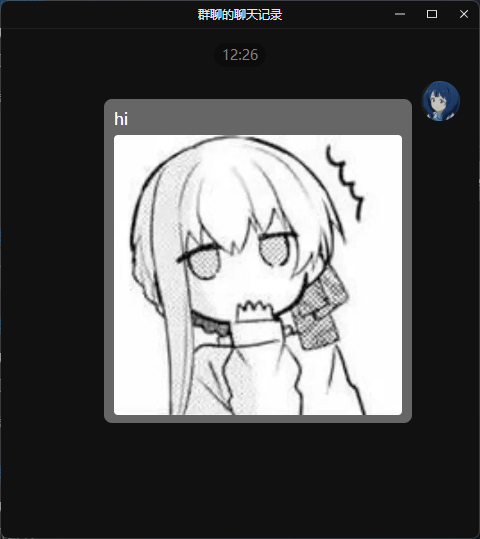
| ## 发送群合并转发消息 |
|
|
| > 大多数平台都不支持此种消息类型,当前适配情况:OneBot v11 |
|
|
| 可以按照如下方式发送群合并转发消息。 |
|
|
| ```py |
| from astrbot.api.event import filter, AstrMessageEvent |
| |
| @filter.command("test") |
| async def test(self, event: AstrMessageEvent): |
| from astrbot.api.message_components import Node, Plain, Image |
| node = Node( |
| uin=905617992, |
| name="Soulter", |
| content=[ |
| Plain("hi"), |
| Image.fromFileSystem("test.jpg") |
| ] |
| ) |
| yield event.chain_result([node]) |
| ``` |
|
|
|  |
|
|

