

File size: 4,328 Bytes
8ede856 | 1 2 3 4 5 6 7 8 9 10 11 12 13 14 15 16 17 18 19 20 21 22 23 24 25 26 27 28 29 30 31 32 33 34 35 36 37 38 39 40 41 42 43 44 45 46 47 48 49 50 51 52 53 54 55 56 57 58 59 60 61 62 63 64 65 66 67 68 69 70 71 72 73 74 75 76 77 78 79 80 81 82 83 84 85 86 87 88 89 90 91 92 93 94 95 96 97 98 99 100 101 102 103 104 105 106 107 108 109 110 111 112 113 114 115 116 117 118 119 120 121 122 123 124 125 126 127 128 129 130 131 132 |
# 消息的发送
## 被动消息
被动消息指的是机器人被动回复消息。
```python
@filter.command("helloworld")
async def helloworld(self, event: AstrMessageEvent):
yield event.plain_result("Hello!")
yield event.plain_result("你好!")
yield event.image_result("path/to/image.jpg") # 发送图片
yield event.image_result("https://example.com/image.jpg") # 发送 URL 图片,务必以 http 或 https 开头
```
## 主动消息
主动消息指的是机器人主动推送消息。某些平台可能不支持主动消息发送。
如果是一些定时任务或者不想立即发送消息,可以使用 `event.unified_msg_origin` 得到一个字符串并将其存储,然后在想发送消息的时候使用 `self.context.send_message(unified_msg_origin, chains)` 来发送消息。
```python
from astrbot.api.event import MessageChain
@filter.command("helloworld")
async def helloworld(self, event: AstrMessageEvent):
umo = event.unified_msg_origin
message_chain = MessageChain().message("Hello!").file_image("path/to/image.jpg")
await self.context.send_message(event.unified_msg_origin, message_chain)
```
通过这个特性,你可以将 unified_msg_origin 存储起来,然后在需要的时候发送消息。
> [!TIP]
> 关于 unified_msg_origin。
> unified_msg_origin 是一个字符串,记录了一个会话的唯一 ID,AstrBot 能够据此找到属于哪个消息平台的哪个会话。这样就能够实现在 `send_message` 的时候,发送消息到正确的会话。有关 MessageChain,请参见接下来的一节。
## 富媒体消息
AstrBot 支持发送富媒体消息,比如图片、语音、视频等。使用 `MessageChain` 来构建消息。
```python
import astrbot.api.message_components as Comp
@filter.command("helloworld")
async def helloworld(self, event: AstrMessageEvent):
chain = [
Comp.At(qq=event.get_sender_id()), # At 消息发送者
Comp.Plain("来看这个图:"),
Comp.Image.fromURL("https://example.com/image.jpg"), # 从 URL 发送图片
Comp.Image.fromFileSystem("path/to/image.jpg"), # 从本地文件目录发送图片
Comp.Plain("这是一个图片。")
]
yield event.chain_result(chain)
```
上面构建了一个 `message chain`,也就是消息链,最终会发送一条包含了图片和文字的消息,并且保留顺序。
> [!TIP]
> 在 aiocqhttp 消息适配器中,对于 `plain` 类型的消息,在发送中会使用 `strip()` 方法去除空格及换行符,可以在消息前后添加零宽空格 `\u200b` 以解决这个问题。
类似地,
**文件 File**
```py
Comp.File(file="path/to/file.txt", name="file.txt") # 部分平台不支持
```
**语音 Record**
```py
path = "path/to/record.wav" # 暂时只接受 wav 格式,其他格式请自行转换
Comp.Record(file=path, url=path)
```
**视频 Video**
```py
path = "path/to/video.mp4"
Comp.Video.fromFileSystem(path=path)
Comp.Video.fromURL(url="https://example.com/video.mp4")
```
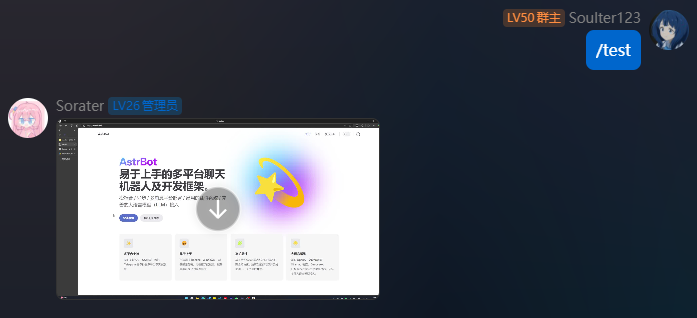
## 发送视频消息
```python
from astrbot.api.event import filter, AstrMessageEvent
@filter.command("test")
async def test(self, event: AstrMessageEvent):
from astrbot.api.message_components import Video
# fromFileSystem 需要用户的协议端和机器人端处于一个系统中。
music = Video.fromFileSystem(
path="test.mp4"
)
# 更通用
music = Video.fromURL(
url="https://example.com/video.mp4"
)
yield event.chain_result([music])
```
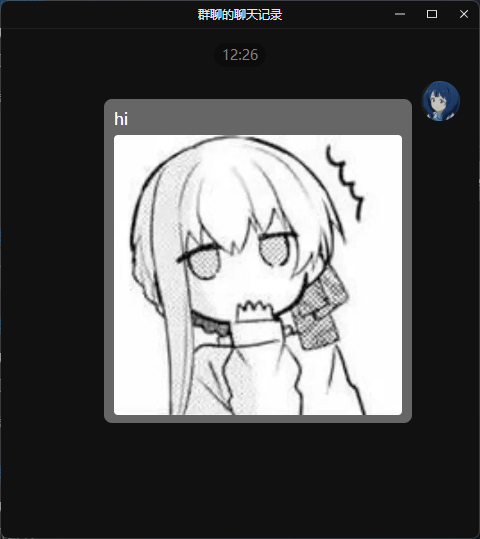
## 发送群合并转发消息
> 大多数平台都不支持此种消息类型,当前适配情况:OneBot v11
可以按照如下方式发送群合并转发消息。
```py
from astrbot.api.event import filter, AstrMessageEvent
@filter.command("test")
async def test(self, event: AstrMessageEvent):
from astrbot.api.message_components import Node, Plain, Image
node = Node(
uin=905617992,
name="Soulter",
content=[
Plain("hi"),
Image.fromFileSystem("test.jpg")
]
)
yield event.chain_result([node])
```
|