|
|
| # 插件配置 |
|
|
| 随着插件功能的增加,可能需要定义一些配置以让用户自定义插件的行为。 |
|
|
| AstrBot 提供了”强大“的配置解析和可视化功能。能够让用户在管理面板上直接配置插件,而不需要修改代码。 |
|
|
| ## 配置定义 |
|
|
| 要注册配置,首先需要在您的插件目录下添加一个 `_conf_schema.json` 的 json 文件。 |
|
|
| 文件内容是一个 `Schema`(模式),用于表示配置。Schema 是 json 格式的,例如上图的 Schema 是: |
|
|
| ```json |
| { |
| "token": { |
| "description": "Bot Token", |
| "type": "string", |
| }, |
| "sub_config": { |
| "description": "测试嵌套配置", |
| "type": "object", |
| "hint": "xxxx", |
| "items": { |
| "name": { |
| "description": "testsub", |
| "type": "string", |
| "hint": "xxxx" |
| }, |
| "id": { |
| "description": "testsub", |
| "type": "int", |
| "hint": "xxxx" |
| }, |
| "time": { |
| "description": "testsub", |
| "type": "int", |
| "hint": "xxxx", |
| "default": 123 |
| } |
| } |
| } |
| } |
| ``` |
|
|
| - `type`: **此项必填**。配置的类型。支持 `string`, `text`, `int`, `float`, `bool`, `object`, `list`, `dict`, `template_list`。当类型为 `text` 时,将会可视化为一个更大的可拖拽宽高的 textarea 组件,以适应大文本。 |
| - `description`: 可选。配置的描述。建议一句话描述配置的行为。 |
| - `hint`: 可选。配置的提示信息,表现在上图中右边的问号按钮,当鼠标悬浮在问号按钮上时显示。 |
| - `obvious_hint`: 可选。配置的 hint 是否醒目显示。如上图的 `token`。 |
| - `default`: 可选。配置的默认值。如果用户没有配置,将使用默认值。int 是 0,float 是 0.0,bool 是 False,string 是 "",object 是 {},list 是 []。 |
| - `items`: 可选。如果配置的类型是 `object`,需要添加 `items` 字段。`items` 的内容是这个配置项的子 Schema。理论上可以无限嵌套,但是不建议过多嵌套。 |
| - `invisible`: 可选。配置是否隐藏。默认是 `false`。如果设置为 `true`,则不会在管理面板上显示。 |
| - `options`: 可选。一个列表,如 `"options": ["chat", "agent", "workflow"]`。提供下拉列表可选项。 |
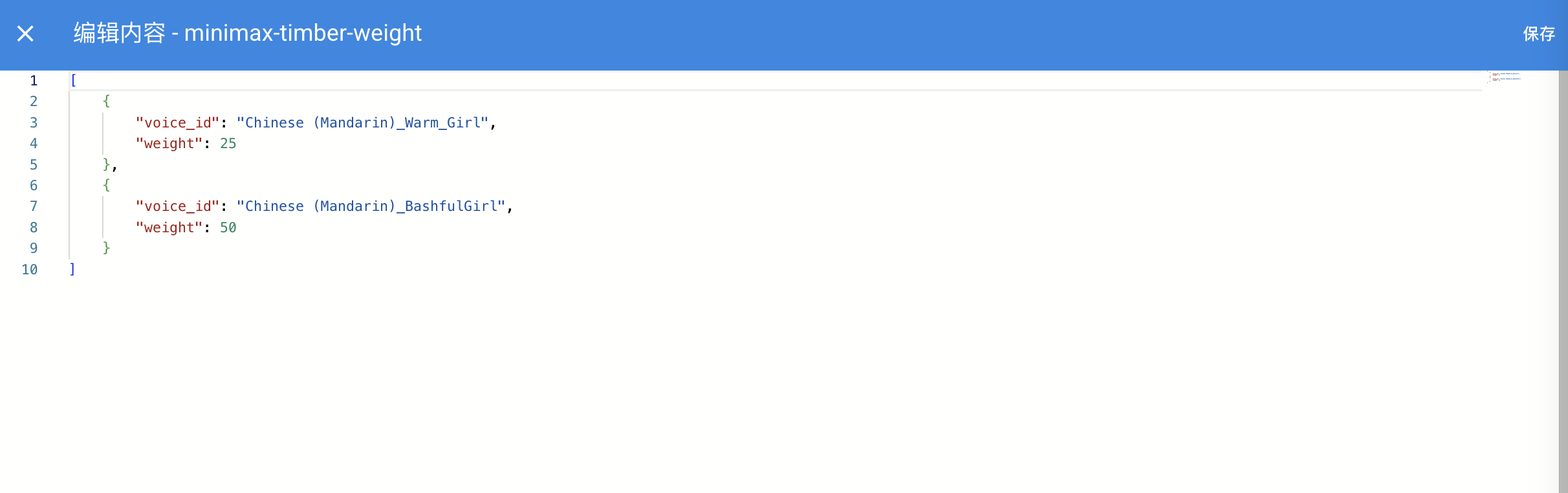
| - `editor_mode`: 可选。是否启用代码编辑器模式。需要 AstrBot >= `v3.5.10`, 低于这个版本不会报错,但不会生效。默认是 false。 |
| - `editor_language`: 可选。代码编辑器的代码语言,默认为 `json`。 |
| - `editor_theme`: 可选。代码编辑器的主题,可选值有 `vs-light`(默认), `vs-dark`。 |
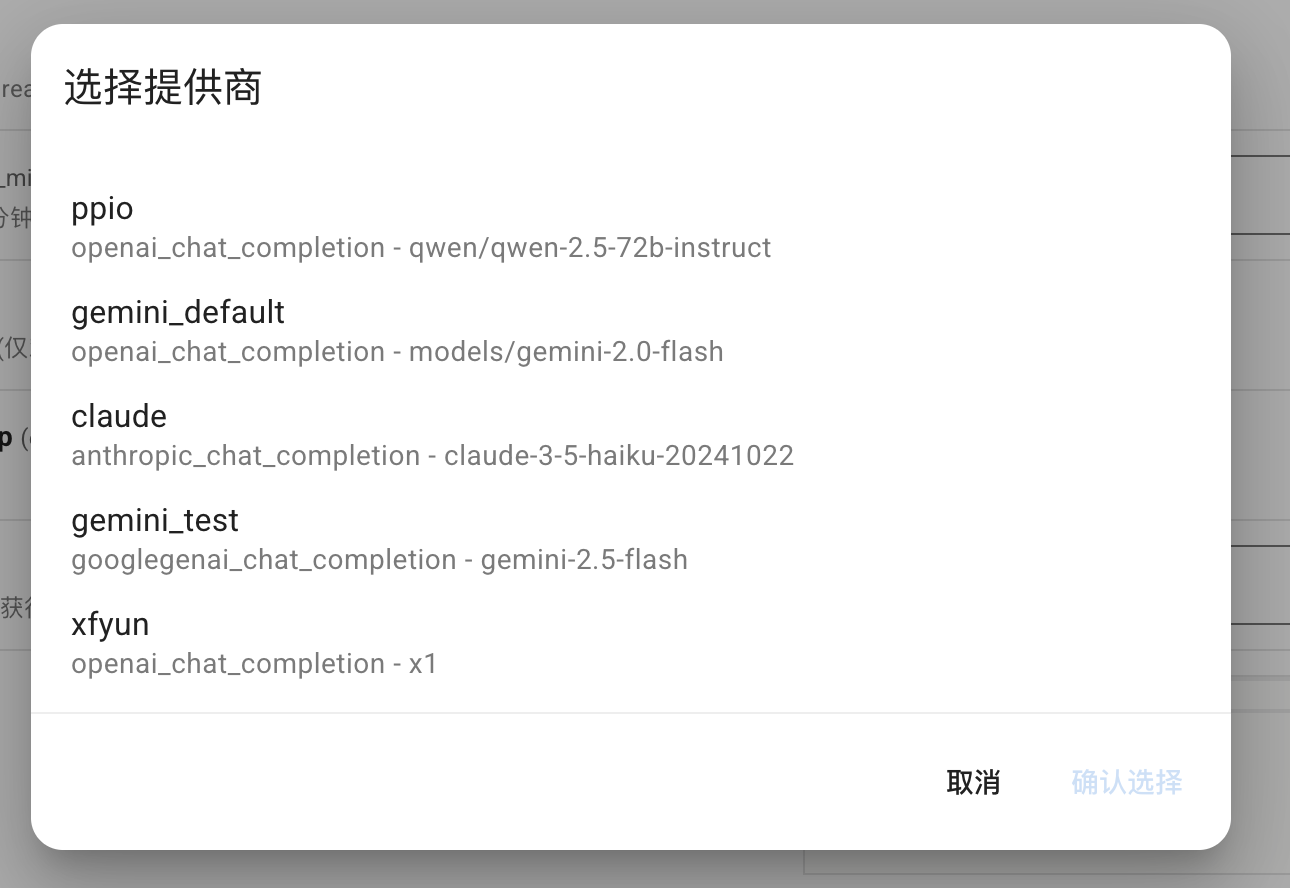
| - `_special`: 可选。用于调用 AstrBot 提供的可视化提供商选取、人格选取、知识库选取等功能,详见下文。 |
|
|
| 其中,如果启用了代码编辑器,效果如下图所示: |
|
|
|  |
|
|
|  |
|
|
| **_special** 字段仅 v4.0.0 之后可用。目前支持填写 `select_provider`, `select_provider_tts`, `select_provider_stt`, `select_persona`,用于让用户快速选择用户在 WebUI 上已经配置好的模型提供商、人设等数据。结果均为字符串。以 select_provider 为例,将呈现以下效果: |
| |
|  |
| |
| ### file 类型的 schema |
| |
| 在 v4.13.0 之后引入,允许插件定义文件上传配置项,引导用户上传插件所需的文件。 |
| |
| ```json |
| { |
| "demo_files": { |
| "type": "file", |
| "description": "Uploaded files for demo", |
| "default": [], // 支持多文件上传,默认值为一个空列表 |
| "file_types": ["pdf", "docx"] // 允许上传的文件类型列表 |
| } |
| } |
| ``` |
| |
| ### dict 类型的 schema |
| |
| 用于可视化编辑一个 Python 的 dict 类型的配置。如 AstrBot Core 中的自定义请求体参数配置项: |
| |
| ```py |
| "custom_extra_body": { |
| "description": "自定义请求体参数", |
| "type": "dict", |
| "items": {}, |
| "hint": "用于在请求时添加额外的参数,如 temperature、top_p、max_tokens 等。", |
| "template_schema": { # 可选填写 template schema,当设置之后,用户可以透过 WebUI 快速编辑。 |
| "temperature": { |
| "name": "Temperature", |
| "description": "温度参数", |
| "hint": "控制输出的随机性,范围通常为 0-2。值越高越随机。", |
| "type": "float", |
| "default": 0.6, |
| "slider": {"min": 0, "max": 2, "step": 0.1}, |
| }, |
| "top_p": { |
| "name": "Top-p", |
| "description": "Top-p 采样", |
| "hint": "核采样参数,范围通常为 0-1。控制模型考虑的概率质量。", |
| "type": "float", |
| "default": 1.0, |
| "slider": {"min": 0, "max": 1, "step": 0.01}, |
| }, |
| "max_tokens": { |
| "name": "Max Tokens", |
| "description": "最大令牌数", |
| "hint": "生成的最大令牌数。", |
| "type": "int", |
| "default": 8192, |
| }, |
| }, |
| } |
| ``` |
| |
| ### template_list 类型的 schema |
| |
| > [!NOTE] |
| > v4.10.4 引入。更多信息请查看:[#4208](https://github.com/AstrBotDevs/AstrBot/pull/4208) |
| |
| 插件开发者可以在_conf_schema中按照以下格式添加模板配置项(有点类似于原有的嵌套配置) |
| |
| ```json |
| "field_id": { |
| "type": "template_list", |
| "description": "Template List Field", |
| "templates": { |
| "template_1": { |
| "name": "Template One", |
| "hint":"hint", |
| "items": { |
| "attr_a": { |
| "description": "Attribute A", |
| "type": "int", |
| "default": 10 |
| }, |
| "attr_b": { |
| "description": "Attribute B", |
| "hint": "This is a boolean attribute", |
| "type": "bool", |
| "default": true |
| } |
| } |
| }, |
| "template_2": { |
| "name": "Template Two", |
| "hint":"hint", |
| "items": { |
| "attr_c": { |
| "description": "Attribute A", |
| "type": "int", |
| "default": 10 |
| }, |
| "attr_d": { |
| "description": "Attribute B", |
| "hint": "This is a boolean attribute", |
| "type": "bool", |
| "default": true |
| } |
| } |
| } |
| } |
| } |
| ``` |
| |
| 保存后的 config 为 |
| |
| ```json |
| "field_id": [ |
| { |
| "__template_key": "template_1", |
| "attr_a": 10, |
| "attr_b": true |
| }, |
| { |
| "__template_key": "template_2", |
| "attr_c": 10, |
| "attr_d": true |
| } |
| ] |
| ``` |
| |
| <img width="1000" alt="image" src="https://github.com/user-attachments/assets/74876d30-11a4-491b-a7a0-8ebe8d603782" /> |
| |
| ## 在插件中使用配置 |
| |
| AstrBot 在载入插件时会检测插件目录下是否有 `_conf_schema.json` 文件,如果有,会自动解析配置并保存在 `data/config/<plugin_name>_config.json` 下(依照 Schema 创建的配置文件实体),并在实例化插件类时传入给 `__init__()`。 |
| |
| ```py |
| from astrbot.api import AstrBotConfig |
| |
| class ConfigPlugin(Star): |
| def __init__(self, context: Context, config: AstrBotConfig): # AstrBotConfig 继承自 Dict,拥有字典的所有方法 |
| super().__init__(context) |
| self.config = config |
| print(self.config) |
| |
| # 支持直接保存配置 |
| # self.config.save_config() # 保存配置 |
| ``` |
| |
| ## 配置更新 |
| |
| 您在发布不同版本更新 Schema 时,AstrBot 会递归检查 Schema 的配置项,自动为缺失的配置项添加默认值、移除不存在的配置项。 |
| |

