

File size: 7,533 Bytes
8ede856 | 1 2 3 4 5 6 7 8 9 10 11 12 13 14 15 16 17 18 19 20 21 22 23 24 25 26 27 28 29 30 31 32 33 34 35 36 37 38 39 40 41 42 43 44 45 46 47 48 49 50 51 52 53 54 55 56 57 58 59 60 61 62 63 64 65 66 67 68 69 70 71 72 73 74 75 76 77 78 79 80 81 82 83 84 85 86 87 88 89 90 91 92 93 94 95 96 97 98 99 100 101 102 103 104 105 106 107 108 109 110 111 112 113 114 115 116 117 118 119 120 121 122 123 124 125 126 127 128 129 130 131 132 133 134 135 136 137 138 139 140 141 142 143 144 145 146 147 148 149 150 151 152 153 154 155 156 157 158 159 160 161 162 163 164 165 166 167 168 169 170 171 172 173 174 175 176 177 178 179 180 181 182 183 184 185 186 187 188 189 190 191 192 193 194 195 196 197 198 199 200 201 202 203 204 205 206 207 208 209 210 211 |
# 插件配置
随着插件功能的增加,可能需要定义一些配置以让用户自定义插件的行为。
AstrBot 提供了”强大“的配置解析和可视化功能。能够让用户在管理面板上直接配置插件,而不需要修改代码。
## 配置定义
要注册配置,首先需要在您的插件目录下添加一个 `_conf_schema.json` 的 json 文件。
文件内容是一个 `Schema`(模式),用于表示配置。Schema 是 json 格式的,例如上图的 Schema 是:
```json
{
"token": {
"description": "Bot Token",
"type": "string",
},
"sub_config": {
"description": "测试嵌套配置",
"type": "object",
"hint": "xxxx",
"items": {
"name": {
"description": "testsub",
"type": "string",
"hint": "xxxx"
},
"id": {
"description": "testsub",
"type": "int",
"hint": "xxxx"
},
"time": {
"description": "testsub",
"type": "int",
"hint": "xxxx",
"default": 123
}
}
}
}
```
- `type`: **此项必填**。配置的类型。支持 `string`, `text`, `int`, `float`, `bool`, `object`, `list`, `dict`, `template_list`。当类型为 `text` 时,将会可视化为一个更大的可拖拽宽高的 textarea 组件,以适应大文本。
- `description`: 可选。配置的描述。建议一句话描述配置的行为。
- `hint`: 可选。配置的提示信息,表现在上图中右边的问号按钮,当鼠标悬浮在问号按钮上时显示。
- `obvious_hint`: 可选。配置的 hint 是否醒目显示。如上图的 `token`。
- `default`: 可选。配置的默认值。如果用户没有配置,将使用默认值。int 是 0,float 是 0.0,bool 是 False,string 是 "",object 是 {},list 是 []。
- `items`: 可选。如果配置的类型是 `object`,需要添加 `items` 字段。`items` 的内容是这个配置项的子 Schema。理论上可以无限嵌套,但是不建议过多嵌套。
- `invisible`: 可选。配置是否隐藏。默认是 `false`。如果设置为 `true`,则不会在管理面板上显示。
- `options`: 可选。一个列表,如 `"options": ["chat", "agent", "workflow"]`。提供下拉列表可选项。
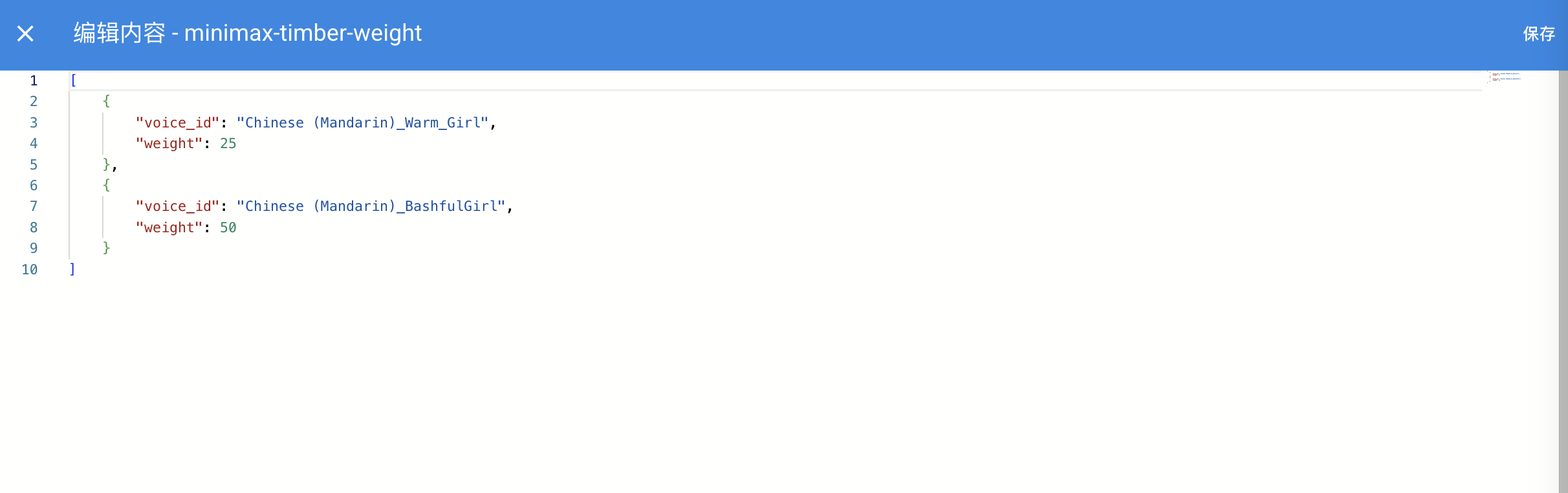
- `editor_mode`: 可选。是否启用代码编辑器模式。需要 AstrBot >= `v3.5.10`, 低于这个版本不会报错,但不会生效。默认是 false。
- `editor_language`: 可选。代码编辑器的代码语言,默认为 `json`。
- `editor_theme`: 可选。代码编辑器的主题,可选值有 `vs-light`(默认), `vs-dark`。
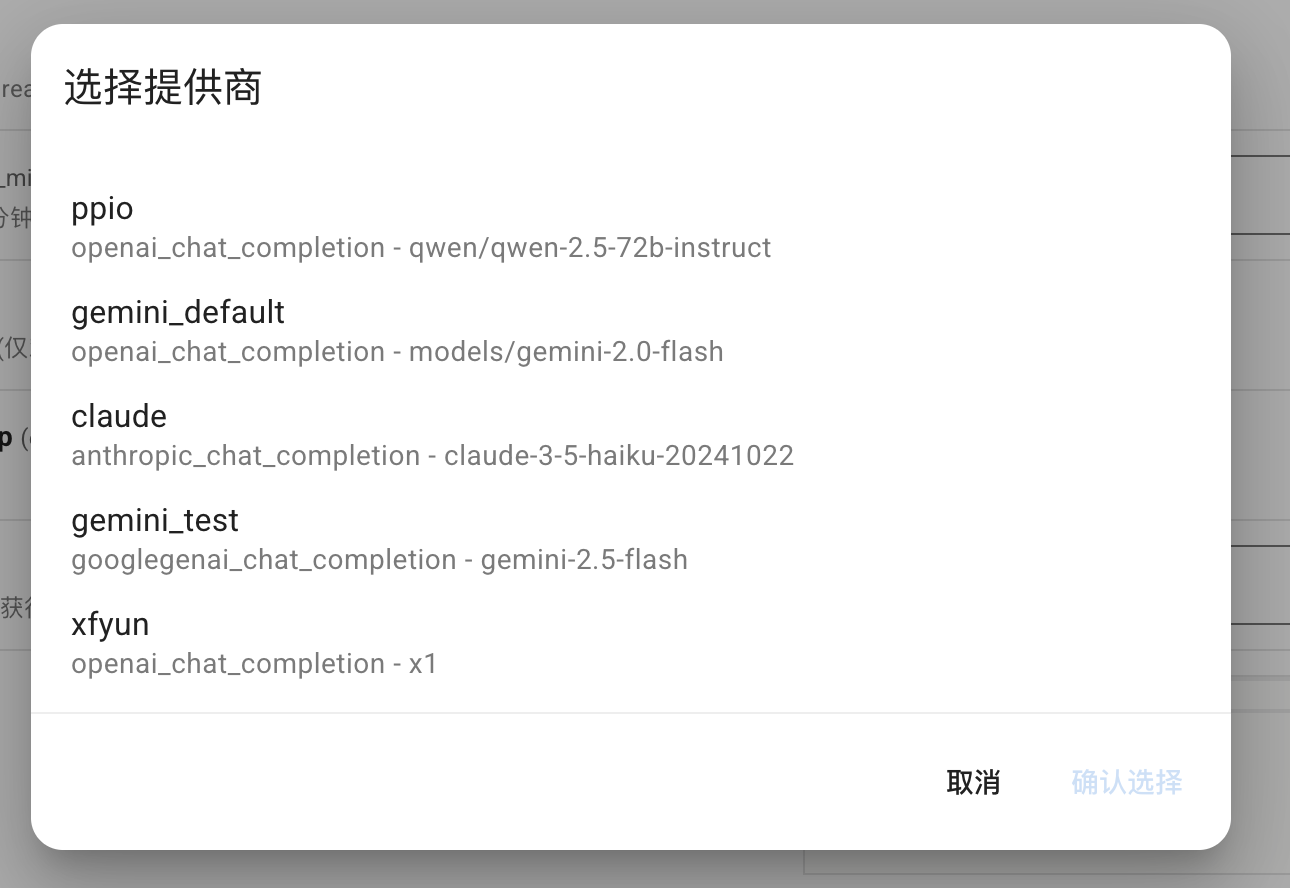
- `_special`: 可选。用于调用 AstrBot 提供的可视化提供商选取、人格选取、知识库选取等功能,详见下文。
其中,如果启用了代码编辑器,效果如下图所示:

**_special** 字段仅 v4.0.0 之后可用。目前支持填写 `select_provider`, `select_provider_tts`, `select_provider_stt`, `select_persona`,用于让用户快速选择用户在 WebUI 上已经配置好的模型提供商、人设等数据。结果均为字符串。以 select_provider 为例,将呈现以下效果:
### file 类型的 schema
在 v4.13.0 之后引入,允许插件定义文件上传配置项,引导用户上传插件所需的文件。
```json
{
"demo_files": {
"type": "file",
"description": "Uploaded files for demo",
"default": [], // 支持多文件上传,默认值为一个空列表
"file_types": ["pdf", "docx"] // 允许上传的文件类型列表
}
}
```
### dict 类型的 schema
用于可视化编辑一个 Python 的 dict 类型的配置。如 AstrBot Core 中的自定义请求体参数配置项:
```py
"custom_extra_body": {
"description": "自定义请求体参数",
"type": "dict",
"items": {},
"hint": "用于在请求时添加额外的参数,如 temperature、top_p、max_tokens 等。",
"template_schema": { # 可选填写 template schema,当设置之后,用户可以透过 WebUI 快速编辑。
"temperature": {
"name": "Temperature",
"description": "温度参数",
"hint": "控制输出的随机性,范围通常为 0-2。值越高越随机。",
"type": "float",
"default": 0.6,
"slider": {"min": 0, "max": 2, "step": 0.1},
},
"top_p": {
"name": "Top-p",
"description": "Top-p 采样",
"hint": "核采样参数,范围通常为 0-1。控制模型考虑的概率质量。",
"type": "float",
"default": 1.0,
"slider": {"min": 0, "max": 1, "step": 0.01},
},
"max_tokens": {
"name": "Max Tokens",
"description": "最大令牌数",
"hint": "生成的最大令牌数。",
"type": "int",
"default": 8192,
},
},
}
```
### template_list 类型的 schema
> [!NOTE]
> v4.10.4 引入。更多信息请查看:[#4208](https://github.com/AstrBotDevs/AstrBot/pull/4208)
插件开发者可以在_conf_schema中按照以下格式添加模板配置项(有点类似于原有的嵌套配置)
```json
"field_id": {
"type": "template_list",
"description": "Template List Field",
"templates": {
"template_1": {
"name": "Template One",
"hint":"hint",
"items": {
"attr_a": {
"description": "Attribute A",
"type": "int",
"default": 10
},
"attr_b": {
"description": "Attribute B",
"hint": "This is a boolean attribute",
"type": "bool",
"default": true
}
}
},
"template_2": {
"name": "Template Two",
"hint":"hint",
"items": {
"attr_c": {
"description": "Attribute A",
"type": "int",
"default": 10
},
"attr_d": {
"description": "Attribute B",
"hint": "This is a boolean attribute",
"type": "bool",
"default": true
}
}
}
}
}
```
保存后的 config 为
```json
"field_id": [
{
"__template_key": "template_1",
"attr_a": 10,
"attr_b": true
},
{
"__template_key": "template_2",
"attr_c": 10,
"attr_d": true
}
]
```
<img width="1000" alt="image" src="https://github.com/user-attachments/assets/74876d30-11a4-491b-a7a0-8ebe8d603782" />
## 在插件中使用配置
AstrBot 在载入插件时会检测插件目录下是否有 `_conf_schema.json` 文件,如果有,会自动解析配置并保存在 `data/config/<plugin_name>_config.json` 下(依照 Schema 创建的配置文件实体),并在实例化插件类时传入给 `__init__()`。
```py
from astrbot.api import AstrBotConfig
class ConfigPlugin(Star):
def __init__(self, context: Context, config: AstrBotConfig): # AstrBotConfig 继承自 Dict,拥有字典的所有方法
super().__init__(context)
self.config = config
print(self.config)
# 支持直接保存配置
# self.config.save_config() # 保存配置
```
## 配置更新
您在发布不同版本更新 Schema 时,AstrBot 会递归检查 Schema 的配置项,自动为缺失的配置项添加默认值、移除不存在的配置项。
|