|
|
| # AI |
|
|
| AstrBot 内置了对多种大语言模型(LLM)提供商的支持,并且提供了统一的接口,方便插件开发者调用各种 LLM 服务。 |
|
|
| 您可以使用 AstrBot 提供的 LLM / Agent 接口来实现自己的智能体。 |
|
|
| 我们在 `v4.5.7` 版本之后对 LLM 提供商的调用方式进行了较大调整,推荐使用新的调用方式。新的调用方式更加简洁,并且支持更多的功能。当然,您仍然可以使用[旧的调用方式](/dev/star/plugin#ai)。 |
|
|
| ## 获取当前会话使用的聊天模型 ID |
|
|
| > [!TIP] |
| > 在 v4.5.7 时加入 |
|
|
| ```py |
| umo = event.unified_msg_origin |
| provider_id = await self.context.get_current_chat_provider_id(umo=umo) |
| ``` |
|
|
| ## 调用大模型 |
|
|
| > [!TIP] |
| > 在 v4.5.7 时加入 |
|
|
| ```py |
| llm_resp = await self.context.llm_generate( |
| chat_provider_id=provider_id, # 聊天模型 ID |
| prompt="Hello, world!", |
| ) |
| # print(llm_resp.completion_text) # 获取返回的文本 |
| ``` |
|
|
| ## 定义 Tool |
|
|
| Tool 是大语言模型调用外部工具的能力。 |
|
|
| ```py |
| from pydantic import Field |
| from pydantic.dataclasses import dataclass |
| |
| from astrbot.core.agent.run_context import ContextWrapper |
| from astrbot.core.agent.tool import FunctionTool, ToolExecResult |
| from astrbot.core.astr_agent_context import AstrAgentContext |
| |
| |
| @dataclass |
| class BilibiliTool(FunctionTool[AstrAgentContext]): |
| name: str = "bilibili_videos" # 工具名称 |
| description: str = "A tool to fetch Bilibili videos." # 工具描述 |
| parameters: dict = Field( |
| default_factory=lambda: { |
| "type": "object", |
| "properties": { |
| "keywords": { |
| "type": "string", |
| "description": "Keywords to search for Bilibili videos.", |
| }, |
| }, |
| "required": ["keywords"], |
| } |
| ) |
| |
| async def call( |
| self, context: ContextWrapper[AstrAgentContext], **kwargs |
| ) -> ToolExecResult: |
| return "1. 视频标题:如何使用AstrBot\n视频链接:xxxxxx" |
| ``` |
|
|
| ## 注册 Tool 到 AstrBot |
|
|
| 在上面定义好 Tool 之后,如果你需要实现的功能是让用户在使用 AstrBot 进行对话时自动调用该 Tool,那么你需要在插件的 __init__ 方法中将 Tool 注册到 AstrBot 中: |
|
|
| ```py |
| class MyPlugin(Star): |
| def __init__(self, context: Context): |
| super().__init__(context) |
| # >= v4.5.1 使用: |
| self.context.add_llm_tools(BilibiliTool(), SecondTool(), ...) |
| |
| # < v4.5.1 之前使用: |
| tool_mgr = self.context.provider_manager.llm_tools |
| tool_mgr.func_list.append(BilibiliTool()) |
| ``` |
|
|
| ### 通过装饰器定义 Tool 和注册 Tool |
|
|
| 除了上述的通过 `@dataclass` 定义 Tool 的方式之外,你也可以使用装饰器的方式注册 tool 到 AstrBot。如果请务必按照以下格式编写一个工具(包括函数注释,AstrBot 会解析该函数注释,请务必将注释格式写对) |
|
|
| ```py{3,4,5,6,7} |
| @filter.llm_tool(name="get_weather") # 如果 name 不填,将使用函数名 |
| async def get_weather(self, event: AstrMessageEvent, location: str) -> MessageEventResult: |
| '''获取天气信息。 |
| |
| Args: |
| location(string): 地点 |
| ''' |
| resp = self.get_weather_from_api(location) |
| yield event.plain_result("天气信息: " + resp) |
| ``` |
|
|
| 在 `location(string): 地点` 中,`location` 是参数名,`string` 是参数类型,`地点` 是参数描述。 |
|
|
| 支持的参数类型有 `string`, `number`, `object`, `boolean`, `array`。在 v4.5.7 之后,支持对 `array` 类型参数指定子类型,例如 `array[string]`。 |
|
|
| ## 调用 Agent |
|
|
| > [!TIP] |
| > 在 v4.5.7 时加入 |
|
|
| Agent 可以被定义为 system_prompt + tools + llm 的结合体,可以实现更复杂的智能体行为。 |
| |
| 在上面定义好 Tool 之后,可以通过以下方式调用 Agent: |
| |
| ```py |
| llm_resp = await self.context.tool_loop_agent( |
| event=event, |
| chat_provider_id=prov_id, |
| prompt="搜索一下 bilibili 上关于 AstrBot 的相关视频。", |
| tools=ToolSet([BilibiliTool()]), |
| max_steps=30, # Agent 最大执行步骤 |
| tool_call_timeout=60, # 工具调用超时时间 |
| ) |
| # print(llm_resp.completion_text) # 获取返回的文本 |
| ``` |
| |
| `tool_loop_agent()` 方法会自动处理工具调用和大模型请求的循环,直到大模型不再调用工具或者达到最大步骤数为止。 |
|
|
| ## Multi-Agent |
|
|
| > [!TIP] |
| > 在 v4.5.7 时加入 |
|
|
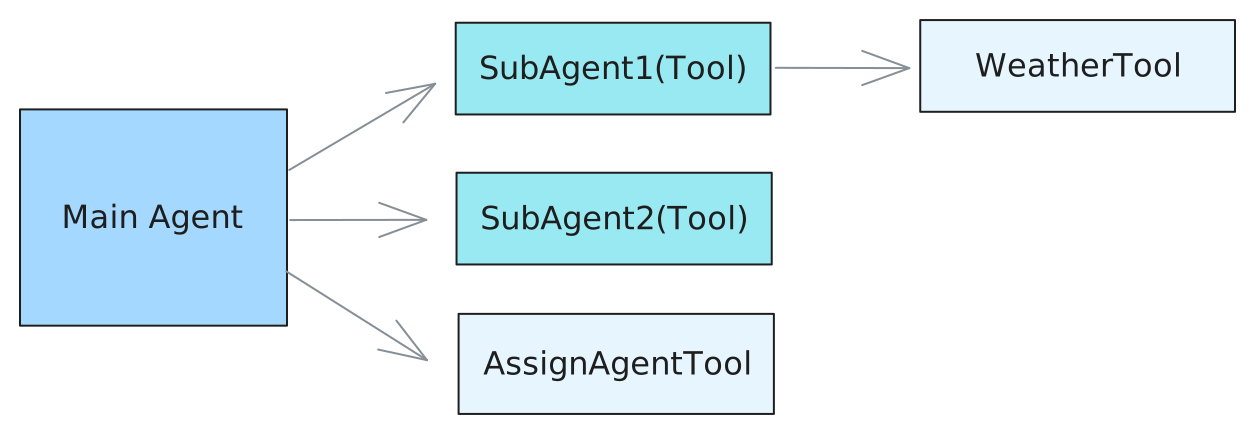
| Multi-Agent(多智能体)系统将复杂应用分解为多个专业化智能体,它们协同解决问题。不同于依赖单个智能体处理每一步,多智能体架构允许将更小、更专注的智能体组合成协调的工作流程。我们使用 `agent-as-tool` 模式来实现多智能体系统。 |
|
|
| 在下面的例子中,我们定义了一个主智能体(Main Agent),它负责根据用户查询将任务分配给不同的子智能体(Sub-Agents)。每个子智能体专注于特定任务,例如获取天气信息。 |
|
|
|  |
|
|
| 定义 Tools: |
|
|
| ```py |
| from pydantic import Field |
| from pydantic.dataclasses import dataclass |
| |
| from astrbot.core.agent.run_context import ContextWrapper |
| from astrbot.core.agent.tool import FunctionTool, ToolExecResult |
| from astrbot.core.astr_agent_context import AstrAgentContext |
| |
| @dataclass |
| class AssignAgentTool(FunctionTool[AstrAgentContext]): |
| """Main agent uses this tool to decide which sub-agent to delegate a task to.""" |
| |
| name: str = "assign_agent" |
| description: str = "Assign an agent to a task based on the given query" |
| parameters: dict = Field( |
| default_factory=lambda: { |
| "type": "object", |
| "properties": { |
| "query": { |
| "type": "string", |
| "description": "The query to call the sub-agent with.", |
| }, |
| }, |
| "required": ["query"], |
| } |
| ) |
| |
| async def call( |
| self, context: ContextWrapper[AstrAgentContext], **kwargs |
| ) -> ToolExecResult: |
| # Here you would implement the actual agent assignment logic. |
| # For demonstration purposes, we'll return a dummy response. |
| return "Based on the query, you should assign agent 1." |
| |
| |
| @dataclass |
| class WeatherTool(FunctionTool[AstrAgentContext]): |
| """In this example, sub agent 1 uses this tool to get weather information.""" |
| |
| name: str = "weather" |
| description: str = "Get weather information for a location" |
| parameters: dict = Field( |
| default_factory=lambda: { |
| "type": "object", |
| "properties": { |
| "city": { |
| "type": "string", |
| "description": "The city to get weather information for.", |
| }, |
| }, |
| "required": ["city"], |
| } |
| ) |
| |
| async def call( |
| self, context: ContextWrapper[AstrAgentContext], **kwargs |
| ) -> ToolExecResult: |
| city = kwargs["city"] |
| # Here you would implement the actual weather fetching logic. |
| # For demonstration purposes, we'll return a dummy response. |
| return f"The current weather in {city} is sunny with a temperature of 25°C." |
| |
| |
| @dataclass |
| class SubAgent1(FunctionTool[AstrAgentContext]): |
| """Define a sub-agent as a function tool.""" |
| |
| name: str = "subagent1_name" |
| description: str = "subagent1_description" |
| parameters: dict = Field( |
| default_factory=lambda: { |
| "type": "object", |
| "properties": { |
| "query": { |
| "type": "string", |
| "description": "The query to call the sub-agent with.", |
| }, |
| }, |
| "required": ["query"], |
| } |
| ) |
| |
| async def call( |
| self, context: ContextWrapper[AstrAgentContext], **kwargs |
| ) -> ToolExecResult: |
| ctx = context.context.context |
| event = context.context.event |
| logger.info(f"the llm context messages: {context.messages}") |
| llm_resp = await ctx.tool_loop_agent( |
| event=event, |
| chat_provider_id=await ctx.get_current_chat_provider_id( |
| event.unified_msg_origin |
| ), |
| prompt=kwargs["query"], |
| tools=ToolSet([WeatherTool()]), |
| max_steps=30, |
| ) |
| return llm_resp.completion_text |
| |
| |
| @dataclass |
| class SubAgent2(FunctionTool[AstrAgentContext]): |
| """Define a sub-agent as a function tool.""" |
| |
| name: str = "subagent2_name" |
| description: str = "subagent2_description" |
| parameters: dict = Field( |
| default_factory=lambda: { |
| "type": "object", |
| "properties": { |
| "query": { |
| "type": "string", |
| "description": "The query to call the sub-agent with.", |
| }, |
| }, |
| "required": ["query"], |
| } |
| ) |
| |
| async def call( |
| self, context: ContextWrapper[AstrAgentContext], **kwargs |
| ) -> ToolExecResult: |
| return "I am useless :(, you shouldn't call me :(" |
| ``` |
|
|
| 然后,同样地,通过 `tool_loop_agent()` 方法调用 Agent: |
|
|
| ```py |
| @filter.command("test") |
| async def test(self, event: AstrMessageEvent): |
| umo = event.unified_msg_origin |
| prov_id = await self.context.get_current_chat_provider_id(umo) |
| llm_resp = await self.context.tool_loop_agent( |
| event=event, |
| chat_provider_id=prov_id, |
| prompt="Test calling sub-agent for Beijing's weather information.", |
| system_prompt=( |
| "You are the main agent. Your task is to delegate tasks to sub-agents based on user queries." |
| "Before delegating, use the 'assign_agent' tool to determine which sub-agent is best suited for the task." |
| ), |
| tools=ToolSet([SubAgent1(), SubAgent2(), AssignAgentTool()]), |
| max_steps=30, |
| ) |
| yield event.plain_result(llm_resp.completion_text) |
| ``` |
|
|
| ## 对话管理器 |
|
|
| ### 获取会话当前的 LLM 对话历史 `get_conversation` |
| |
| ```py |
| from astrbot.core.conversation_mgr import Conversation |
|
|
| uid = event.unified_msg_origin |
| conv_mgr = self.context.conversation_manager |
| curr_cid = await conv_mgr.get_curr_conversation_id(uid) |
| conversation = await conv_mgr.get_conversation(uid, curr_cid) # Conversation |
| ``` |
| |
| ::: details Conversation 类型定义 |
| |
| ```py |
| @dataclass |
| class Conversation: |
| """The conversation entity representing a chat session.""" |
| |
| platform_id: str |
| """The platform ID in AstrBot""" |
| user_id: str |
| """The user ID associated with the conversation.""" |
| cid: str |
| """The conversation ID, in UUID format.""" |
| history: str = "" |
| """The conversation history as a string.""" |
| title: str | None = "" |
| """The title of the conversation. For now, it's only used in WebChat.""" |
| persona_id: str | None = "" |
| """The persona ID associated with the conversation.""" |
| created_at: int = 0 |
| """The timestamp when the conversation was created.""" |
| updated_at: int = 0 |
| """The timestamp when the conversation was last updated.""" |
| ``` |
| |
| ::: |
|
|
| ### 快速添加 LLM 记录到对话 `add_message_pair` |
|
|
| ```py |
| from astrbot.core.agent.message import ( |
| AssistantMessageSegment, |
| UserMessageSegment, |
| TextPart, |
| ) |
| |
| curr_cid = await conv_mgr.get_curr_conversation_id(event.unified_msg_origin) |
| user_msg = UserMessageSegment(content=[TextPart(text="hi")]) |
| llm_resp = await self.context.llm_generate( |
| chat_provider_id=provider_id, # 聊天模型 ID |
| contexts=[user_msg], # 当未指定 prompt 时,使用 contexts 作为输入;同时指定 prompt 和 contexts 时,prompt 会被添加到 LLM 输入的最后 |
| ) |
| await conv_mgr.add_message_pair( |
| cid=curr_cid, |
| user_message=user_msg, |
| assistant_message=AssistantMessageSegment( |
| content=[TextPart(text=llm_resp.completion_text)] |
| ), |
| ) |
| ``` |
|
|
| ### 主要方法 |
|
|
| #### `new_conversation` |
| |
| - __Usage__ |
| 在当前会话中新建一条对话,并自动切换为该对话。 |
| - __Arguments__ |
| - `unified_msg_origin: str` – 形如 `platform_name:message_type:session_id` |
| - `platform_id: str | None` – 平台标识,默认从 `unified_msg_origin` 解析 |
| - `content: list[dict] | None` – 初始历史消息 |
| - `title: str | None` – 对话标题 |
| - `persona_id: str | None` – 绑定的 persona ID |
| - __Returns__ |
| `str` – 新生成的 UUID 对话 ID |
|
|
| #### `switch_conversation` |
| |
| - __Usage__ |
| 将会话切换到指定的对话。 |
| - __Arguments__ |
| - `unified_msg_origin: str` |
| - `conversation_id: str` |
| - __Returns__ |
| `None` |
|
|
| #### `delete_conversation` |
| |
| - __Usage__ |
| 删除会话中的某条对话;若 `conversation_id` 为 `None`,则删除当前对话。 |
| - __Arguments__ |
| - `unified_msg_origin: str` |
| - `conversation_id: str | None` |
| - __Returns__ |
| `None` |
|
|
| #### `get_curr_conversation_id` |
| |
| - __Usage__ |
| 获取当前会话正在使用的对话 ID。 |
| - __Arguments__ |
| - `unified_msg_origin: str` |
| - __Returns__ |
| `str | None` – 当前对话 ID,不存在时返回 `None` |
| |
| #### `get_conversation` |
|
|
| - __Usage__ |
| 获取指定对话的完整对象;若不存在且 `create_if_not_exists=True` 则自动创建。 |
| - __Arguments__ |
| - `unified_msg_origin: str` |
| - `conversation_id: str` |
| - `create_if_not_exists: bool = False` |
| - __Returns__ |
| `Conversation | None` |
|
|
| #### `get_conversations` |
| |
| - __Usage__ |
| 拉取用户或平台下的全部对话列表。 |
| - __Arguments__ |
| - `unified_msg_origin: str | None` – 为 `None` 时不过滤用户 |
| - `platform_id: str | None` |
| - __Returns__ |
| `List[Conversation]` |
|
|
| #### `update_conversation` |
| |
| - __Usage__ |
| 更新对话的标题、历史记录或 persona_id。 |
| - __Arguments__ |
| - `unified_msg_origin: str` |
| - `conversation_id: str | None` – 为 `None` 时使用当前对话 |
| - `history: list[dict] | None` |
| - `title: str | None` |
| - `persona_id: str | None` |
| - __Returns__ |
| `None` |
|
|
| ## 人格设定管理器 |
|
|
| `PersonaManager` 负责统一加载、缓存并提供所有人格(Persona)的增删改查接口,同时兼容 AstrBot 4.x 之前的旧版人格格式(v3)。 |
| 初始化时会自动从数据库读取全部人格,并生成一份 v3 兼容数据,供旧代码无缝使用。 |
|
|
| ```py |
| persona_mgr = self.context.persona_manager |
| ``` |
|
|
| ### 主要方法 |
|
|
| #### `get_persona` |
| |
| - __Usage__ |
| 获取根据人格 ID 获取人格数据。 |
| - __Arguments__ |
| - `persona_id: str` – 人格 ID |
| - __Returns__ |
| `Persona` – 人格数据,若不存在则返回 None |
| - __Raises__ |
| `ValueError` – 当不存在时抛出 |
|
|
| #### `get_all_personas` |
|
|
| - __Usage__ |
| 一次性获取数据库中所有人格。 |
| - __Returns__ |
| `list[Persona]` – 人格列表,可能为空 |
|
|
| #### `create_persona` |
| |
| - __Usage__ |
| 新建人格并立即写入数据库,成功后自动刷新本地缓存。 |
| - __Arguments__ |
| - `persona_id: str` – 新人格 ID(唯一) |
| - `system_prompt: str` – 系统提示词 |
| - `begin_dialogs: list[str]` – 可选,开场对话(偶数条,user/assistant 交替) |
| - `tools: list[str]` – 可选,允许使用的工具列表;`None`=全部工具,`[]`=禁用全部 |
| - __Returns__ |
| `Persona` – 新建后的人格对象 |
| - __Raises__ |
| `ValueError` – 若 `persona_id` 已存在 |
|
|
| #### `update_persona` |
| |
| - __Usage__ |
| 更新现有人格的任意字段,并同步到数据库与缓存。 |
| - __Arguments__ |
| - `persona_id: str` – 待更新的人格 ID |
| - `system_prompt: str` – 可选,新的系统提示词 |
| - `begin_dialogs: list[str]` – 可选,新的开场对话 |
| - `tools: list[str]` – 可选,新的工具列表;语义同 `create_persona` |
| - __Returns__ |
| `Persona` – 更新后的人格对象 |
| - __Raises__ |
| `ValueError` – 若 `persona_id` 不存在 |
|
|
| #### `delete_persona` |
| |
| - __Usage__ |
| 删除指定人格,同时清理数据库与缓存。 |
| - __Arguments__ |
| - `persona_id: str` – 待删除的人格 ID |
| - __Raises__ |
| `Valueable` – 若 `persona_id` 不存在 |
|
|
| #### `get_default_persona_v3` |
| |
| - __Usage__ |
| 根据当前会话配置,获取应使用的默认人格(v3 格式)。 |
| 若配置未指定或指定的人格不存在,则回退到 `DEFAULT_PERSONALITY`。 |
| - __Arguments__ |
| - `umo: str | MessageSession | None` – 会话标识,用于读取用户级配置 |
| - __Returns__ |
| `Personality` – v3 格式的默认人格对象 |
|
|
| ::: details Persona / Personality 类型定义 |
|
|
| ```py |
| |
| class Persona(SQLModel, table=True): |
| """Persona is a set of instructions for LLMs to follow. |
| |
| It can be used to customize the behavior of LLMs. |
| """ |
| |
| __tablename__ = "personas" |
| |
| id: int = Field(primary_key=True, sa_column_kwargs={"autoincrement": True}) |
| persona_id: str = Field(max_length=255, nullable=False) |
| system_prompt: str = Field(sa_type=Text, nullable=False) |
| begin_dialogs: Optional[list] = Field(default=None, sa_type=JSON) |
| """a list of strings, each representing a dialog to start with""" |
| tools: Optional[list] = Field(default=None, sa_type=JSON) |
| """None means use ALL tools for default, empty list means no tools, otherwise a list of tool names.""" |
| created_at: datetime = Field(default_factory=lambda: datetime.now(timezone.utc)) |
| updated_at: datetime = Field( |
| default_factory=lambda: datetime.now(timezone.utc), |
| sa_column_kwargs={"onupdate": datetime.now(timezone.utc)}, |
| ) |
| |
| __table_args__ = ( |
| UniqueConstraint( |
| "persona_id", |
| name="uix_persona_id", |
| ), |
| ) |
| |
| |
| class Personality(TypedDict): |
| """LLM 人格类。 |
| |
| 在 v4.0.0 版本及之后,推荐使用上面的 Persona 类。并且, mood_imitation_dialogs 字段已被废弃。 |
| """ |
| |
| prompt: str |
| name: str |
| begin_dialogs: list[str] |
| mood_imitation_dialogs: list[str] |
| """情感模拟对话预设。在 v4.0.0 版本及之后,已被废弃。""" |
| tools: list[str] | None |
| """工具列表。None 表示使用所有工具,空列表表示不使用任何工具""" |
| ``` |
|
|
| ::: |
|
|

