

File size: 18,008 Bytes
8ede856 | 1 2 3 4 5 6 7 8 9 10 11 12 13 14 15 16 17 18 19 20 21 22 23 24 25 26 27 28 29 30 31 32 33 34 35 36 37 38 39 40 41 42 43 44 45 46 47 48 49 50 51 52 53 54 55 56 57 58 59 60 61 62 63 64 65 66 67 68 69 70 71 72 73 74 75 76 77 78 79 80 81 82 83 84 85 86 87 88 89 90 91 92 93 94 95 96 97 98 99 100 101 102 103 104 105 106 107 108 109 110 111 112 113 114 115 116 117 118 119 120 121 122 123 124 125 126 127 128 129 130 131 132 133 134 135 136 137 138 139 140 141 142 143 144 145 146 147 148 149 150 151 152 153 154 155 156 157 158 159 160 161 162 163 164 165 166 167 168 169 170 171 172 173 174 175 176 177 178 179 180 181 182 183 184 185 186 187 188 189 190 191 192 193 194 195 196 197 198 199 200 201 202 203 204 205 206 207 208 209 210 211 212 213 214 215 216 217 218 219 220 221 222 223 224 225 226 227 228 229 230 231 232 233 234 235 236 237 238 239 240 241 242 243 244 245 246 247 248 249 250 251 252 253 254 255 256 257 258 259 260 261 262 263 264 265 266 267 268 269 270 271 272 273 274 275 276 277 278 279 280 281 282 283 284 285 286 287 288 289 290 291 292 293 294 295 296 297 298 299 300 301 302 303 304 305 306 307 308 309 310 311 312 313 314 315 316 317 318 319 320 321 322 323 324 325 326 327 328 329 330 331 332 333 334 335 336 337 338 339 340 341 342 343 344 345 346 347 348 349 350 351 352 353 354 355 356 357 358 359 360 361 362 363 364 365 366 367 368 369 370 371 372 373 374 375 376 377 378 379 380 381 382 383 384 385 386 387 388 389 390 391 392 393 394 395 396 397 398 399 400 401 402 403 404 405 406 407 408 409 410 411 412 413 414 415 416 417 418 419 420 421 422 423 424 425 426 427 428 429 430 431 432 433 434 435 436 437 438 439 440 441 442 443 444 445 446 447 448 449 450 451 452 453 454 455 456 457 458 459 460 461 462 463 464 465 466 467 468 469 470 471 472 473 474 475 476 477 478 479 480 481 482 483 484 485 486 487 488 489 490 491 492 493 494 495 496 497 498 499 500 501 502 503 504 505 506 507 508 509 510 511 512 513 514 515 516 517 518 519 520 521 522 523 524 525 526 527 528 529 530 531 532 533 534 535 536 537 538 539 540 541 542 543 544 545 546 547 548 549 550 551 552 553 554 |
# AI
AstrBot 内置了对多种大语言模型(LLM)提供商的支持,并且提供了统一的接口,方便插件开发者调用各种 LLM 服务。
您可以使用 AstrBot 提供的 LLM / Agent 接口来实现自己的智能体。
我们在 `v4.5.7` 版本之后对 LLM 提供商的调用方式进行了较大调整,推荐使用新的调用方式。新的调用方式更加简洁,并且支持更多的功能。当然,您仍然可以使用[旧的调用方式](/dev/star/plugin#ai)。
## 获取当前会话使用的聊天模型 ID
> [!TIP]
> 在 v4.5.7 时加入
```py
umo = event.unified_msg_origin
provider_id = await self.context.get_current_chat_provider_id(umo=umo)
```
## 调用大模型
> [!TIP]
> 在 v4.5.7 时加入
```py
llm_resp = await self.context.llm_generate(
chat_provider_id=provider_id, # 聊天模型 ID
prompt="Hello, world!",
)
# print(llm_resp.completion_text) # 获取返回的文本
```
## 定义 Tool
Tool 是大语言模型调用外部工具的能力。
```py
from pydantic import Field
from pydantic.dataclasses import dataclass
from astrbot.core.agent.run_context import ContextWrapper
from astrbot.core.agent.tool import FunctionTool, ToolExecResult
from astrbot.core.astr_agent_context import AstrAgentContext
@dataclass
class BilibiliTool(FunctionTool[AstrAgentContext]):
name: str = "bilibili_videos" # 工具名称
description: str = "A tool to fetch Bilibili videos." # 工具描述
parameters: dict = Field(
default_factory=lambda: {
"type": "object",
"properties": {
"keywords": {
"type": "string",
"description": "Keywords to search for Bilibili videos.",
},
},
"required": ["keywords"],
}
)
async def call(
self, context: ContextWrapper[AstrAgentContext], **kwargs
) -> ToolExecResult:
return "1. 视频标题:如何使用AstrBot\n视频链接:xxxxxx"
```
## 注册 Tool 到 AstrBot
在上面定义好 Tool 之后,如果你需要实现的功能是让用户在使用 AstrBot 进行对话时自动调用该 Tool,那么你需要在插件的 __init__ 方法中将 Tool 注册到 AstrBot 中:
```py
class MyPlugin(Star):
def __init__(self, context: Context):
super().__init__(context)
# >= v4.5.1 使用:
self.context.add_llm_tools(BilibiliTool(), SecondTool(), ...)
# < v4.5.1 之前使用:
tool_mgr = self.context.provider_manager.llm_tools
tool_mgr.func_list.append(BilibiliTool())
```
### 通过装饰器定义 Tool 和注册 Tool
除了上述的通过 `@dataclass` 定义 Tool 的方式之外,你也可以使用装饰器的方式注册 tool 到 AstrBot。如果请务必按照以下格式编写一个工具(包括函数注释,AstrBot 会解析该函数注释,请务必将注释格式写对)
```py{3,4,5,6,7}
@filter.llm_tool(name="get_weather") # 如果 name 不填,将使用函数名
async def get_weather(self, event: AstrMessageEvent, location: str) -> MessageEventResult:
'''获取天气信息。
Args:
location(string): 地点
'''
resp = self.get_weather_from_api(location)
yield event.plain_result("天气信息: " + resp)
```
在 `location(string): 地点` 中,`location` 是参数名,`string` 是参数类型,`地点` 是参数描述。
支持的参数类型有 `string`, `number`, `object`, `boolean`, `array`。在 v4.5.7 之后,支持对 `array` 类型参数指定子类型,例如 `array[string]`。
## 调用 Agent
> [!TIP]
> 在 v4.5.7 时加入
Agent 可以被定义为 system_prompt + tools + llm 的结合体,可以实现更复杂的智能体行为。
在上面定义好 Tool 之后,可以通过以下方式调用 Agent:
```py
llm_resp = await self.context.tool_loop_agent(
event=event,
chat_provider_id=prov_id,
prompt="搜索一下 bilibili 上关于 AstrBot 的相关视频。",
tools=ToolSet([BilibiliTool()]),
max_steps=30, # Agent 最大执行步骤
tool_call_timeout=60, # 工具调用超时时间
)
# print(llm_resp.completion_text) # 获取返回的文本
```
`tool_loop_agent()` 方法会自动处理工具调用和大模型请求的循环,直到大模型不再调用工具或者达到最大步骤数为止。
## Multi-Agent
> [!TIP]
> 在 v4.5.7 时加入
Multi-Agent(多智能体)系统将复杂应用分解为多个专业化智能体,它们协同解决问题。不同于依赖单个智能体处理每一步,多智能体架构允许将更小、更专注的智能体组合成协调的工作流程。我们使用 `agent-as-tool` 模式来实现多智能体系统。
在下面的例子中,我们定义了一个主智能体(Main Agent),它负责根据用户查询将任务分配给不同的子智能体(Sub-Agents)。每个子智能体专注于特定任务,例如获取天气信息。
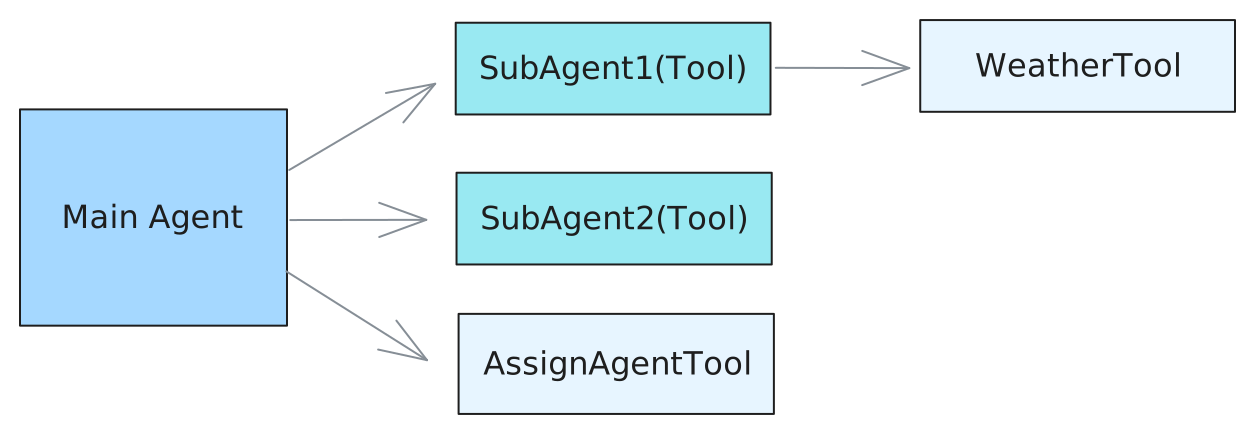
定义 Tools:
```py
from pydantic import Field
from pydantic.dataclasses import dataclass
from astrbot.core.agent.run_context import ContextWrapper
from astrbot.core.agent.tool import FunctionTool, ToolExecResult
from astrbot.core.astr_agent_context import AstrAgentContext
@dataclass
class AssignAgentTool(FunctionTool[AstrAgentContext]):
"""Main agent uses this tool to decide which sub-agent to delegate a task to."""
name: str = "assign_agent"
description: str = "Assign an agent to a task based on the given query"
parameters: dict = Field(
default_factory=lambda: {
"type": "object",
"properties": {
"query": {
"type": "string",
"description": "The query to call the sub-agent with.",
},
},
"required": ["query"],
}
)
async def call(
self, context: ContextWrapper[AstrAgentContext], **kwargs
) -> ToolExecResult:
# Here you would implement the actual agent assignment logic.
# For demonstration purposes, we'll return a dummy response.
return "Based on the query, you should assign agent 1."
@dataclass
class WeatherTool(FunctionTool[AstrAgentContext]):
"""In this example, sub agent 1 uses this tool to get weather information."""
name: str = "weather"
description: str = "Get weather information for a location"
parameters: dict = Field(
default_factory=lambda: {
"type": "object",
"properties": {
"city": {
"type": "string",
"description": "The city to get weather information for.",
},
},
"required": ["city"],
}
)
async def call(
self, context: ContextWrapper[AstrAgentContext], **kwargs
) -> ToolExecResult:
city = kwargs["city"]
# Here you would implement the actual weather fetching logic.
# For demonstration purposes, we'll return a dummy response.
return f"The current weather in {city} is sunny with a temperature of 25°C."
@dataclass
class SubAgent1(FunctionTool[AstrAgentContext]):
"""Define a sub-agent as a function tool."""
name: str = "subagent1_name"
description: str = "subagent1_description"
parameters: dict = Field(
default_factory=lambda: {
"type": "object",
"properties": {
"query": {
"type": "string",
"description": "The query to call the sub-agent with.",
},
},
"required": ["query"],
}
)
async def call(
self, context: ContextWrapper[AstrAgentContext], **kwargs
) -> ToolExecResult:
ctx = context.context.context
event = context.context.event
logger.info(f"the llm context messages: {context.messages}")
llm_resp = await ctx.tool_loop_agent(
event=event,
chat_provider_id=await ctx.get_current_chat_provider_id(
event.unified_msg_origin
),
prompt=kwargs["query"],
tools=ToolSet([WeatherTool()]),
max_steps=30,
)
return llm_resp.completion_text
@dataclass
class SubAgent2(FunctionTool[AstrAgentContext]):
"""Define a sub-agent as a function tool."""
name: str = "subagent2_name"
description: str = "subagent2_description"
parameters: dict = Field(
default_factory=lambda: {
"type": "object",
"properties": {
"query": {
"type": "string",
"description": "The query to call the sub-agent with.",
},
},
"required": ["query"],
}
)
async def call(
self, context: ContextWrapper[AstrAgentContext], **kwargs
) -> ToolExecResult:
return "I am useless :(, you shouldn't call me :("
```
然后,同样地,通过 `tool_loop_agent()` 方法调用 Agent:
```py
@filter.command("test")
async def test(self, event: AstrMessageEvent):
umo = event.unified_msg_origin
prov_id = await self.context.get_current_chat_provider_id(umo)
llm_resp = await self.context.tool_loop_agent(
event=event,
chat_provider_id=prov_id,
prompt="Test calling sub-agent for Beijing's weather information.",
system_prompt=(
"You are the main agent. Your task is to delegate tasks to sub-agents based on user queries."
"Before delegating, use the 'assign_agent' tool to determine which sub-agent is best suited for the task."
),
tools=ToolSet([SubAgent1(), SubAgent2(), AssignAgentTool()]),
max_steps=30,
)
yield event.plain_result(llm_resp.completion_text)
```
## 对话管理器
### 获取会话当前的 LLM 对话历史 `get_conversation`
```py
from astrbot.core.conversation_mgr import Conversation
uid = event.unified_msg_origin
conv_mgr = self.context.conversation_manager
curr_cid = await conv_mgr.get_curr_conversation_id(uid)
conversation = await conv_mgr.get_conversation(uid, curr_cid) # Conversation
```
::: details Conversation 类型定义
```py
@dataclass
class Conversation:
"""The conversation entity representing a chat session."""
platform_id: str
"""The platform ID in AstrBot"""
user_id: str
"""The user ID associated with the conversation."""
cid: str
"""The conversation ID, in UUID format."""
history: str = ""
"""The conversation history as a string."""
title: str | None = ""
"""The title of the conversation. For now, it's only used in WebChat."""
persona_id: str | None = ""
"""The persona ID associated with the conversation."""
created_at: int = 0
"""The timestamp when the conversation was created."""
updated_at: int = 0
"""The timestamp when the conversation was last updated."""
```
:::
### 快速添加 LLM 记录到对话 `add_message_pair`
```py
from astrbot.core.agent.message import (
AssistantMessageSegment,
UserMessageSegment,
TextPart,
)
curr_cid = await conv_mgr.get_curr_conversation_id(event.unified_msg_origin)
user_msg = UserMessageSegment(content=[TextPart(text="hi")])
llm_resp = await self.context.llm_generate(
chat_provider_id=provider_id, # 聊天模型 ID
contexts=[user_msg], # 当未指定 prompt 时,使用 contexts 作为输入;同时指定 prompt 和 contexts 时,prompt 会被添加到 LLM 输入的最后
)
await conv_mgr.add_message_pair(
cid=curr_cid,
user_message=user_msg,
assistant_message=AssistantMessageSegment(
content=[TextPart(text=llm_resp.completion_text)]
),
)
```
### 主要方法
#### `new_conversation`
- __Usage__
在当前会话中新建一条对话,并自动切换为该对话。
- __Arguments__
- `unified_msg_origin: str` – 形如 `platform_name:message_type:session_id`
- `platform_id: str | None` – 平台标识,默认从 `unified_msg_origin` 解析
- `content: list[dict] | None` – 初始历史消息
- `title: str | None` – 对话标题
- `persona_id: str | None` – 绑定的 persona ID
- __Returns__
`str` – 新生成的 UUID 对话 ID
#### `switch_conversation`
- __Usage__
将会话切换到指定的对话。
- __Arguments__
- `unified_msg_origin: str`
- `conversation_id: str`
- __Returns__
`None`
#### `delete_conversation`
- __Usage__
删除会话中的某条对话;若 `conversation_id` 为 `None`,则删除当前对话。
- __Arguments__
- `unified_msg_origin: str`
- `conversation_id: str | None`
- __Returns__
`None`
#### `get_curr_conversation_id`
- __Usage__
获取当前会话正在使用的对话 ID。
- __Arguments__
- `unified_msg_origin: str`
- __Returns__
`str | None` – 当前对话 ID,不存在时返回 `None`
#### `get_conversation`
- __Usage__
获取指定对话的完整对象;若不存在且 `create_if_not_exists=True` 则自动创建。
- __Arguments__
- `unified_msg_origin: str`
- `conversation_id: str`
- `create_if_not_exists: bool = False`
- __Returns__
`Conversation | None`
#### `get_conversations`
- __Usage__
拉取用户或平台下的全部对话列表。
- __Arguments__
- `unified_msg_origin: str | None` – 为 `None` 时不过滤用户
- `platform_id: str | None`
- __Returns__
`List[Conversation]`
#### `update_conversation`
- __Usage__
更新对话的标题、历史记录或 persona_id。
- __Arguments__
- `unified_msg_origin: str`
- `conversation_id: str | None` – 为 `None` 时使用当前对话
- `history: list[dict] | None`
- `title: str | None`
- `persona_id: str | None`
- __Returns__
`None`
## 人格设定管理器
`PersonaManager` 负责统一加载、缓存并提供所有人格(Persona)的增删改查接口,同时兼容 AstrBot 4.x 之前的旧版人格格式(v3)。
初始化时会自动从数据库读取全部人格,并生成一份 v3 兼容数据,供旧代码无缝使用。
```py
persona_mgr = self.context.persona_manager
```
### 主要方法
#### `get_persona`
- __Usage__
获取根据人格 ID 获取人格数据。
- __Arguments__
- `persona_id: str` – 人格 ID
- __Returns__
`Persona` – 人格数据,若不存在则返回 None
- __Raises__
`ValueError` – 当不存在时抛出
#### `get_all_personas`
- __Usage__
一次性获取数据库中所有人格。
- __Returns__
`list[Persona]` – 人格列表,可能为空
#### `create_persona`
- __Usage__
新建人格并立即写入数据库,成功后自动刷新本地缓存。
- __Arguments__
- `persona_id: str` – 新人格 ID(唯一)
- `system_prompt: str` – 系统提示词
- `begin_dialogs: list[str]` – 可选,开场对话(偶数条,user/assistant 交替)
- `tools: list[str]` – 可选,允许使用的工具列表;`None`=全部工具,`[]`=禁用全部
- __Returns__
`Persona` – 新建后的人格对象
- __Raises__
`ValueError` – 若 `persona_id` 已存在
#### `update_persona`
- __Usage__
更新现有人格的任意字段,并同步到数据库与缓存。
- __Arguments__
- `persona_id: str` – 待更新的人格 ID
- `system_prompt: str` – 可选,新的系统提示词
- `begin_dialogs: list[str]` – 可选,新的开场对话
- `tools: list[str]` – 可选,新的工具列表;语义同 `create_persona`
- __Returns__
`Persona` – 更新后的人格对象
- __Raises__
`ValueError` – 若 `persona_id` 不存在
#### `delete_persona`
- __Usage__
删除指定人格,同时清理数据库与缓存。
- __Arguments__
- `persona_id: str` – 待删除的人格 ID
- __Raises__
`Valueable` – 若 `persona_id` 不存在
#### `get_default_persona_v3`
- __Usage__
根据当前会话配置,获取应使用的默认人格(v3 格式)。
若配置未指定或指定的人格不存在,则回退到 `DEFAULT_PERSONALITY`。
- __Arguments__
- `umo: str | MessageSession | None` – 会话标识,用于读取用户级配置
- __Returns__
`Personality` – v3 格式的默认人格对象
::: details Persona / Personality 类型定义
```py
class Persona(SQLModel, table=True):
"""Persona is a set of instructions for LLMs to follow.
It can be used to customize the behavior of LLMs.
"""
__tablename__ = "personas"
id: int = Field(primary_key=True, sa_column_kwargs={"autoincrement": True})
persona_id: str = Field(max_length=255, nullable=False)
system_prompt: str = Field(sa_type=Text, nullable=False)
begin_dialogs: Optional[list] = Field(default=None, sa_type=JSON)
"""a list of strings, each representing a dialog to start with"""
tools: Optional[list] = Field(default=None, sa_type=JSON)
"""None means use ALL tools for default, empty list means no tools, otherwise a list of tool names."""
created_at: datetime = Field(default_factory=lambda: datetime.now(timezone.utc))
updated_at: datetime = Field(
default_factory=lambda: datetime.now(timezone.utc),
sa_column_kwargs={"onupdate": datetime.now(timezone.utc)},
)
__table_args__ = (
UniqueConstraint(
"persona_id",
name="uix_persona_id",
),
)
class Personality(TypedDict):
"""LLM 人格类。
在 v4.0.0 版本及之后,推荐使用上面的 Persona 类。并且, mood_imitation_dialogs 字段已被废弃。
"""
prompt: str
name: str
begin_dialogs: list[str]
mood_imitation_dialogs: list[str]
"""情感模拟对话预设。在 v4.0.0 版本及之后,已被废弃。"""
tools: list[str] | None
"""工具列表。None 表示使用所有工具,空列表表示不使用任何工具"""
```
:::
|