| --- |
| outline: deep |
| --- |
| |
| # 开发一个平台适配器 |
|
|
| AstrBot 支持以插件的形式接入平台适配器,你可以自行接入 AstrBot 没有的平台。如飞书、钉钉甚至是哔哩哔哩私信、Minecraft。 |
|
|
| 我们以一个平台 `FakePlatform` 为例展开讲解。 |
|
|
| 首先,在插件目录下新增 `fake_platform_adapter.py` 和 `fake_platform_event.py` 文件。前者主要是平台适配器的实现,后者是平台事件的定义。 |
|
|
| ## 平台适配器 |
|
|
| 假设 FakePlatform 的客户端 SDK 是这样: |
|
|
| ```py |
| import asyncio |
| |
| class FakeClient(): |
| '''模拟一个消息平台,这里 5 秒钟下发一个消息''' |
| def __init__(self, token: str, username: str): |
| self.token = token |
| self.username = username |
| # ... |
| |
| async def start_polling(self): |
| while True: |
| await asyncio.sleep(5) |
| await getattr(self, 'on_message_received')({ |
| 'bot_id': '123', |
| 'content': '新消息', |
| 'username': 'zhangsan', |
| 'userid': '123', |
| 'message_id': 'asdhoashd', |
| 'group_id': 'group123', |
| }) |
| |
| async def send_text(self, to: str, message: str): |
| print('发了消息:', to, message) |
| |
| async def send_image(self, to: str, image_path: str): |
| print('发了消息:', to, image_path) |
| ``` |
|
|
| 我们创建 `fake_platform_adapter.py`: |
|
|
| ```py |
| import asyncio |
| |
| from astrbot.api.platform import Platform, AstrBotMessage, MessageMember, PlatformMetadata, MessageType |
| from astrbot.api.event import MessageChain |
| from astrbot.api.message_components import Plain, Image, Record # 消息链中的组件,可以根据需要导入 |
| from astrbot.core.platform.astr_message_event import MessageSesion |
| from astrbot.api.platform import register_platform_adapter |
| from astrbot import logger |
| from .client import FakeClient |
| from .fake_platform_event import FakePlatformEvent |
| |
| # 注册平台适配器。第一个参数为平台名,第二个为描述。第三个为默认配置。 |
| @register_platform_adapter("fake", "fake 适配器", default_config_tmpl={ |
| "token": "your_token", |
| "username": "bot_username" |
| }) |
| class FakePlatformAdapter(Platform): |
| |
| def __init__(self, platform_config: dict, platform_settings: dict, event_queue: asyncio.Queue) -> None: |
| super().__init__(event_queue) |
| self.config = platform_config # 上面的默认配置,用户填写后会传到这里 |
| self.settings = platform_settings # platform_settings 平台设置。 |
| |
| async def send_by_session(self, session: MessageSesion, message_chain: MessageChain): |
| # 必须实现 |
| await super().send_by_session(session, message_chain) |
| |
| def meta(self) -> PlatformMetadata: |
| # 必须实现,直接像下面一样返回即可。 |
| return PlatformMetadata( |
| "fake", |
| "fake 适配器", |
| ) |
| |
| async def run(self): |
| # 必须实现,这里是主要逻辑。 |
| |
| # FakeClient 是我们自己定义的,这里只是示例。这个是其回调函数 |
| async def on_received(data): |
| logger.info(data) |
| abm = await self.convert_message(data=data) # 转换成 AstrBotMessage |
| await self.handle_msg(abm) |
| |
| # 初始化 FakeClient |
| self.client = FakeClient(self.config['token'], self.config['username']) |
| self.client.on_message_received = on_received |
| await self.client.start_polling() # 持续监听消息,这是个堵塞方法。 |
| |
| async def convert_message(self, data: dict) -> AstrBotMessage: |
| # 将平台消息转换成 AstrBotMessage |
| # 这里就体现了适配程度,不同平台的消息结构不一样,这里需要根据实际情况进行转换。 |
| abm = AstrBotMessage() |
| abm.type = MessageType.GROUP_MESSAGE # 还有 friend_message,对应私聊。具体平台具体分析。重要! |
| abm.group_id = data['group_id'] # 如果是私聊,这里可以不填 |
| abm.message_str = data['content'] # 纯文本消息。重要! |
| abm.sender = MessageMember(user_id=data['userid'], nickname=data['username']) # 发送者。重要! |
| abm.message = [Plain(text=data['content'])] # 消息链。如果有其他类型的消息,直接 append 即可。重要! |
| abm.raw_message = data # 原始消息。 |
| abm.self_id = data['bot_id'] |
| abm.session_id = data['userid'] # 会话 ID。重要! |
| abm.message_id = data['message_id'] # 消息 ID。 |
| |
| return abm |
| |
| async def handle_msg(self, message: AstrBotMessage): |
| # 处理消息 |
| message_event = FakePlatformEvent( |
| message_str=message.message_str, |
| message_obj=message, |
| platform_meta=self.meta(), |
| session_id=message.session_id, |
| client=self.client |
| ) |
| self.commit_event(message_event) # 提交事件到事件队列。不要忘记! |
| ``` |
|
|
|
|
| `fake_platform_event.py`: |
|
|
| ```py |
| from astrbot.api.event import AstrMessageEvent, MessageChain |
| from astrbot.api.platform import AstrBotMessage, PlatformMetadata |
| from astrbot.api.message_components import Plain, Image |
| from .client import FakeClient |
| from astrbot.core.utils.io import download_image_by_url |
| |
| class FakePlatformEvent(AstrMessageEvent): |
| def __init__(self, message_str: str, message_obj: AstrBotMessage, platform_meta: PlatformMetadata, session_id: str, client: FakeClient): |
| super().__init__(message_str, message_obj, platform_meta, session_id) |
| self.client = client |
| |
| async def send(self, message: MessageChain): |
| for i in message.chain: # 遍历消息链 |
| if isinstance(i, Plain): # 如果是文字类型的 |
| await self.client.send_text(to=self.get_sender_id(), message=i.text) |
| elif isinstance(i, Image): # 如果是图片类型的 |
| img_url = i.file |
| img_path = "" |
| # 下面的三个条件可以直接参考一下。 |
| if img_url.startswith("file:///"): |
| img_path = img_url[8:] |
| elif i.file and i.file.startswith("http"): |
| img_path = await download_image_by_url(i.file) |
| else: |
| img_path = img_url |
| |
| # 请善于 Debug! |
| |
| await self.client.send_image(to=self.get_sender_id(), image_path=img_path) |
| |
| await super().send(message) # 需要最后加上这一段,执行父类的 send 方法。 |
| ``` |
|
|
| 最后,main.py 只需这样,在初始化的时候导入 fake_platform_adapter 模块。装饰器会自动注册。 |
|
|
| ```py |
| from astrbot.api.star import Context, Star |
| |
| class MyPlugin(Star): |
| def __init__(self, context: Context): |
| from .fake_platform_adapter import FakePlatformAdapter # noqa |
| ``` |
|
|
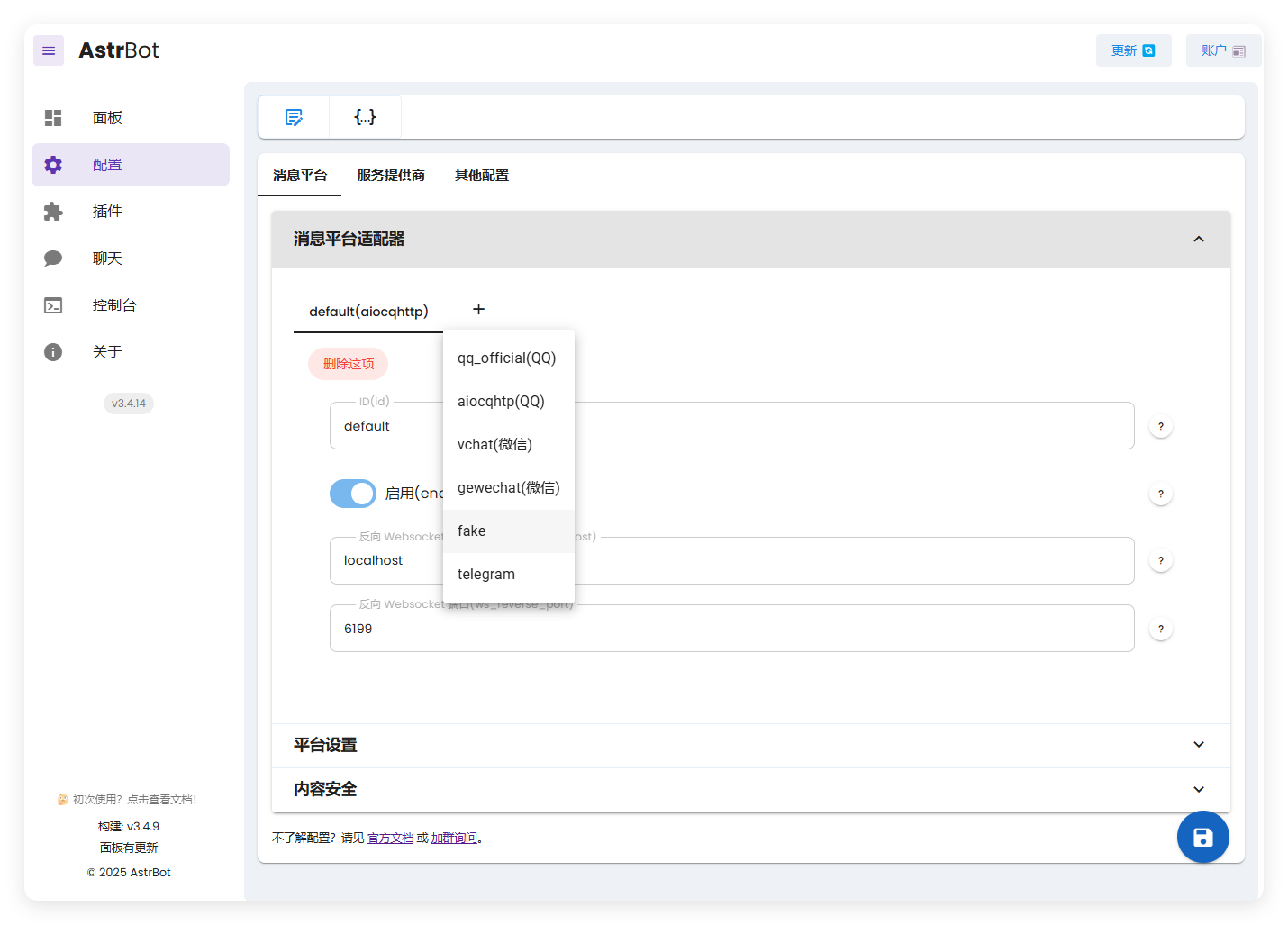
| 搞好后,运行 AstrBot: |
|
|
|  |
|
|
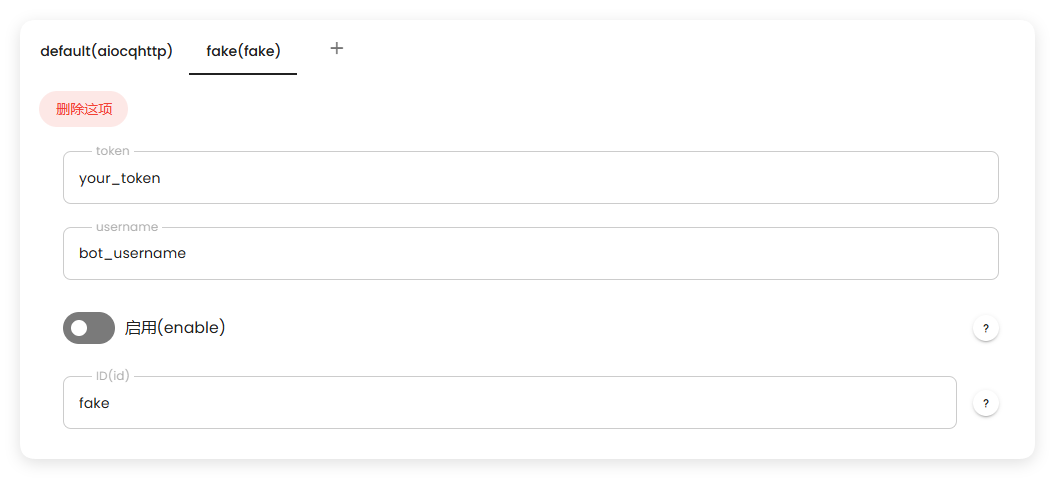
| 这里出现了我们创建的 fake。 |
|
|
|  |
|
|
| 启动后,可以看到正常工作: |
|
|
|  |
|
|
|
|
| 有任何疑问欢迎加群询问~ |

