

File size: 7,383 Bytes
8ede856 | 1 2 3 4 5 6 7 8 9 10 11 12 13 14 15 16 17 18 19 20 21 22 23 24 25 26 27 28 29 30 31 32 33 34 35 36 37 38 39 40 41 42 43 44 45 46 47 48 49 50 51 52 53 54 55 56 57 58 59 60 61 62 63 64 65 66 67 68 69 70 71 72 73 74 75 76 77 78 79 80 81 82 83 84 85 86 87 88 89 90 91 92 93 94 95 96 97 98 99 100 101 102 103 104 105 106 107 108 109 110 111 112 113 114 115 116 117 118 119 120 121 122 123 124 125 126 127 128 129 130 131 132 133 134 135 136 137 138 139 140 141 142 143 144 145 146 147 148 149 150 151 152 153 154 155 156 157 158 159 160 161 162 163 164 165 166 167 168 169 170 171 172 173 174 175 176 177 178 179 180 181 182 183 184 185 | ---
outline: deep
---
# 开发一个平台适配器
AstrBot 支持以插件的形式接入平台适配器,你可以自行接入 AstrBot 没有的平台。如飞书、钉钉甚至是哔哩哔哩私信、Minecraft。
我们以一个平台 `FakePlatform` 为例展开讲解。
首先,在插件目录下新增 `fake_platform_adapter.py` 和 `fake_platform_event.py` 文件。前者主要是平台适配器的实现,后者是平台事件的定义。
## 平台适配器
假设 FakePlatform 的客户端 SDK 是这样:
```py
import asyncio
class FakeClient():
'''模拟一个消息平台,这里 5 秒钟下发一个消息'''
def __init__(self, token: str, username: str):
self.token = token
self.username = username
# ...
async def start_polling(self):
while True:
await asyncio.sleep(5)
await getattr(self, 'on_message_received')({
'bot_id': '123',
'content': '新消息',
'username': 'zhangsan',
'userid': '123',
'message_id': 'asdhoashd',
'group_id': 'group123',
})
async def send_text(self, to: str, message: str):
print('发了消息:', to, message)
async def send_image(self, to: str, image_path: str):
print('发了消息:', to, image_path)
```
我们创建 `fake_platform_adapter.py`:
```py
import asyncio
from astrbot.api.platform import Platform, AstrBotMessage, MessageMember, PlatformMetadata, MessageType
from astrbot.api.event import MessageChain
from astrbot.api.message_components import Plain, Image, Record # 消息链中的组件,可以根据需要导入
from astrbot.core.platform.astr_message_event import MessageSesion
from astrbot.api.platform import register_platform_adapter
from astrbot import logger
from .client import FakeClient
from .fake_platform_event import FakePlatformEvent
# 注册平台适配器。第一个参数为平台名,第二个为描述。第三个为默认配置。
@register_platform_adapter("fake", "fake 适配器", default_config_tmpl={
"token": "your_token",
"username": "bot_username"
})
class FakePlatformAdapter(Platform):
def __init__(self, platform_config: dict, platform_settings: dict, event_queue: asyncio.Queue) -> None:
super().__init__(event_queue)
self.config = platform_config # 上面的默认配置,用户填写后会传到这里
self.settings = platform_settings # platform_settings 平台设置。
async def send_by_session(self, session: MessageSesion, message_chain: MessageChain):
# 必须实现
await super().send_by_session(session, message_chain)
def meta(self) -> PlatformMetadata:
# 必须实现,直接像下面一样返回即可。
return PlatformMetadata(
"fake",
"fake 适配器",
)
async def run(self):
# 必须实现,这里是主要逻辑。
# FakeClient 是我们自己定义的,这里只是示例。这个是其回调函数
async def on_received(data):
logger.info(data)
abm = await self.convert_message(data=data) # 转换成 AstrBotMessage
await self.handle_msg(abm)
# 初始化 FakeClient
self.client = FakeClient(self.config['token'], self.config['username'])
self.client.on_message_received = on_received
await self.client.start_polling() # 持续监听消息,这是个堵塞方法。
async def convert_message(self, data: dict) -> AstrBotMessage:
# 将平台消息转换成 AstrBotMessage
# 这里就体现了适配程度,不同平台的消息结构不一样,这里需要根据实际情况进行转换。
abm = AstrBotMessage()
abm.type = MessageType.GROUP_MESSAGE # 还有 friend_message,对应私聊。具体平台具体分析。重要!
abm.group_id = data['group_id'] # 如果是私聊,这里可以不填
abm.message_str = data['content'] # 纯文本消息。重要!
abm.sender = MessageMember(user_id=data['userid'], nickname=data['username']) # 发送者。重要!
abm.message = [Plain(text=data['content'])] # 消息链。如果有其他类型的消息,直接 append 即可。重要!
abm.raw_message = data # 原始消息。
abm.self_id = data['bot_id']
abm.session_id = data['userid'] # 会话 ID。重要!
abm.message_id = data['message_id'] # 消息 ID。
return abm
async def handle_msg(self, message: AstrBotMessage):
# 处理消息
message_event = FakePlatformEvent(
message_str=message.message_str,
message_obj=message,
platform_meta=self.meta(),
session_id=message.session_id,
client=self.client
)
self.commit_event(message_event) # 提交事件到事件队列。不要忘记!
```
`fake_platform_event.py`:
```py
from astrbot.api.event import AstrMessageEvent, MessageChain
from astrbot.api.platform import AstrBotMessage, PlatformMetadata
from astrbot.api.message_components import Plain, Image
from .client import FakeClient
from astrbot.core.utils.io import download_image_by_url
class FakePlatformEvent(AstrMessageEvent):
def __init__(self, message_str: str, message_obj: AstrBotMessage, platform_meta: PlatformMetadata, session_id: str, client: FakeClient):
super().__init__(message_str, message_obj, platform_meta, session_id)
self.client = client
async def send(self, message: MessageChain):
for i in message.chain: # 遍历消息链
if isinstance(i, Plain): # 如果是文字类型的
await self.client.send_text(to=self.get_sender_id(), message=i.text)
elif isinstance(i, Image): # 如果是图片类型的
img_url = i.file
img_path = ""
# 下面的三个条件可以直接参考一下。
if img_url.startswith("file:///"):
img_path = img_url[8:]
elif i.file and i.file.startswith("http"):
img_path = await download_image_by_url(i.file)
else:
img_path = img_url
# 请善于 Debug!
await self.client.send_image(to=self.get_sender_id(), image_path=img_path)
await super().send(message) # 需要最后加上这一段,执行父类的 send 方法。
```
最后,main.py 只需这样,在初始化的时候导入 fake_platform_adapter 模块。装饰器会自动注册。
```py
from astrbot.api.star import Context, Star
class MyPlugin(Star):
def __init__(self, context: Context):
from .fake_platform_adapter import FakePlatformAdapter # noqa
```
搞好后,运行 AstrBot:
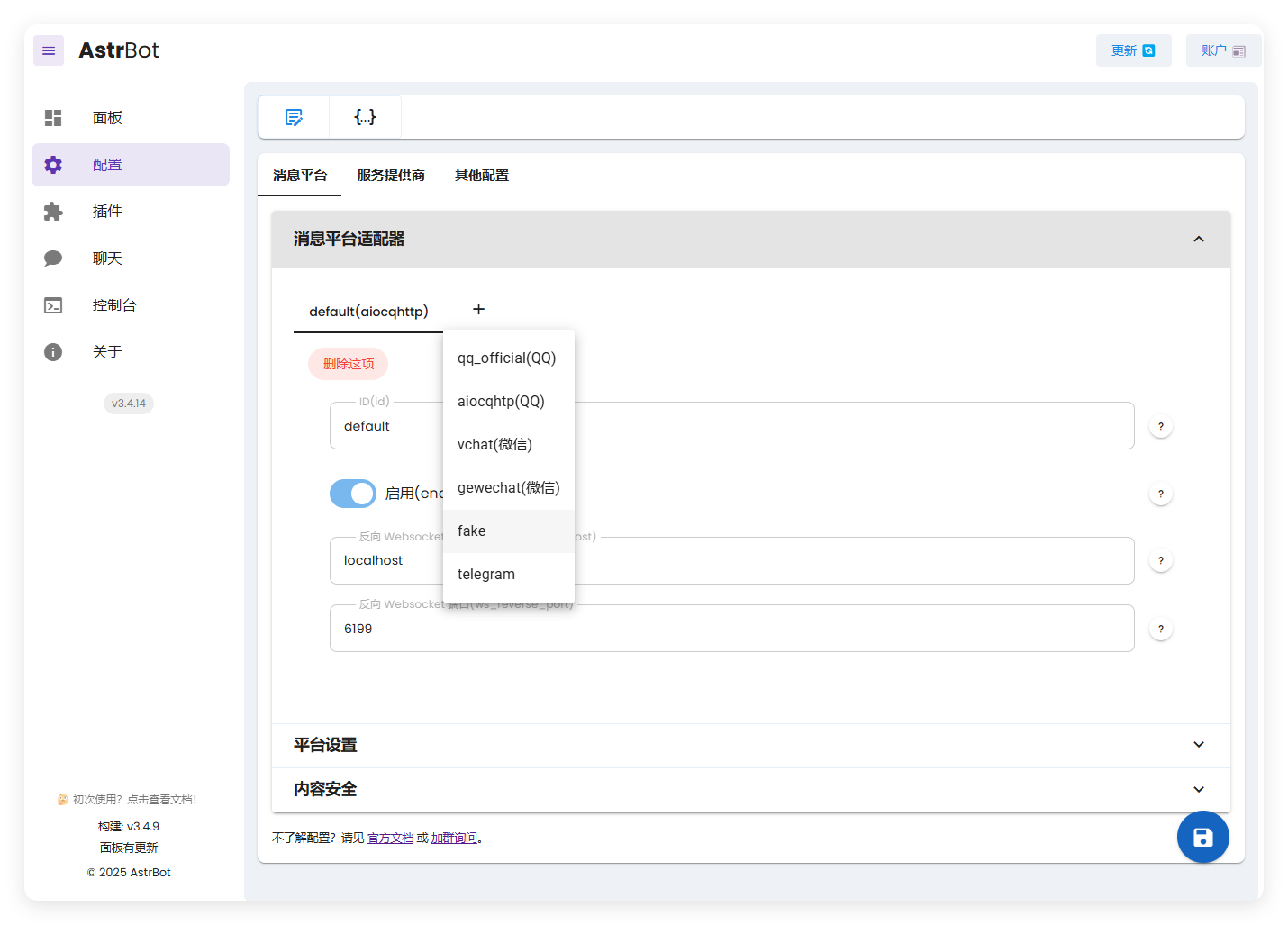
这里出现了我们创建的 fake。
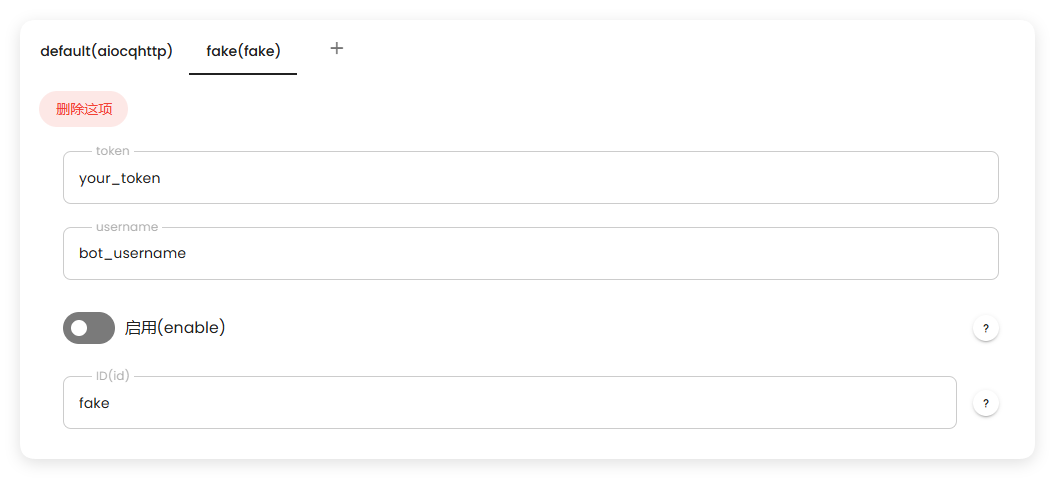
启动后,可以看到正常工作:

有任何疑问欢迎加群询问~ |