| # 上下文压缩 |
|
|
| 在 v4.11.0 之后,AstrBot 引入了自动上下文压缩功能。 |
|
|
|  |
|
|
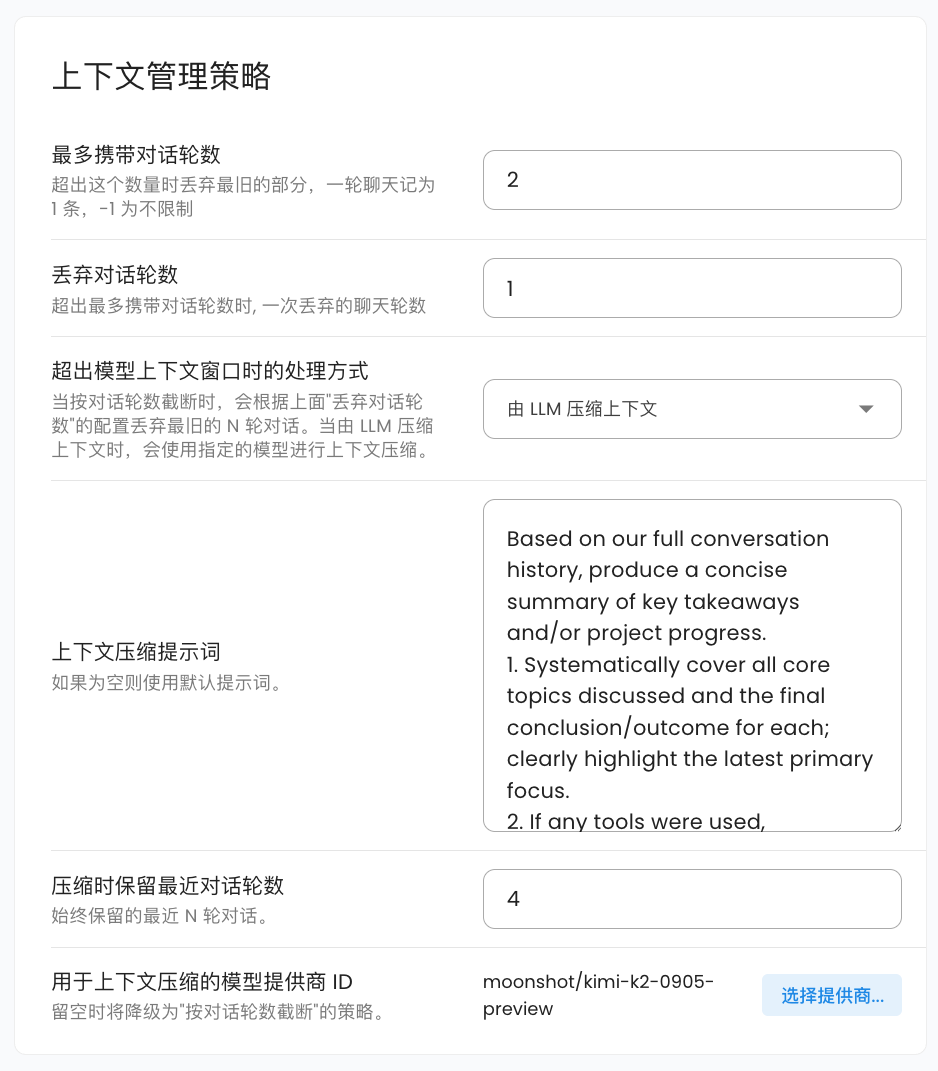
| AstrBot 会在对话上下文达到**使用的对话模型上下文窗口的最大长度的 82% 时**,自动对上下文进行压缩,以确保在不丢失关键信息的情况下,尽可能多地保留对话内容。 |
|
|
| ## 压缩策略 |
|
|
| 目前有两种压缩策略 |
|
|
| 1. 按照对话轮数截断。这种策略会简单地删除最早的对话内容,直到上下文长度符合要求。您可以指定一次性丢弃的对话轮数,默认为 1 轮。这种策略为**默认策略**。 |
| 2. 由 LLM 压缩上下文。这种策略会调用您指定的模型本身来总结和压缩对话内容,从而保留更多的关键信息。您可以指定压缩时使用的对话模型,如果不选择,将会自动回退到 “按照对话轮数截断” 策略。您可以设置压缩时保留最近对话轮数,默认为 4。您还可以自定义压缩时的提示词。默认提示词为: |
|
|
| ``` |
| Based on our full conversation history, produce a concise summary of key takeaways and/or project progress. |
| 1. Systematically cover all core topics discussed and the final conclusion/outcome for each; clearly highlight the latest primary focus. |
| 2. If any tools were used, summarize tool usage (total call count) and extract the most valuable insights from tool outputs. |
| 3. If there was an initial user goal, state it first and describe the current progress/status. |
| 4. Write the summary in the user's language. |
| ``` |
|
|
| 在压缩一轮之后,AstrBot 会二次检查当前上下文长度是否符合要求。如果仍然不符合要求,则会采用对半砍策略,即将当前上下文内容砍掉一半,直到符合要求为止。 |
|
|
| - AstrBot 会在每次对话请求前调用压缩器进行检查。 |
| - 当前版本下 AstrBot 不会在工具调用过程中进行上下文压缩,未来我们会支持这一功能,敬请期待。 |
|
|
| ## ‼️ 重要:模型上下文窗口设置 |
|
|
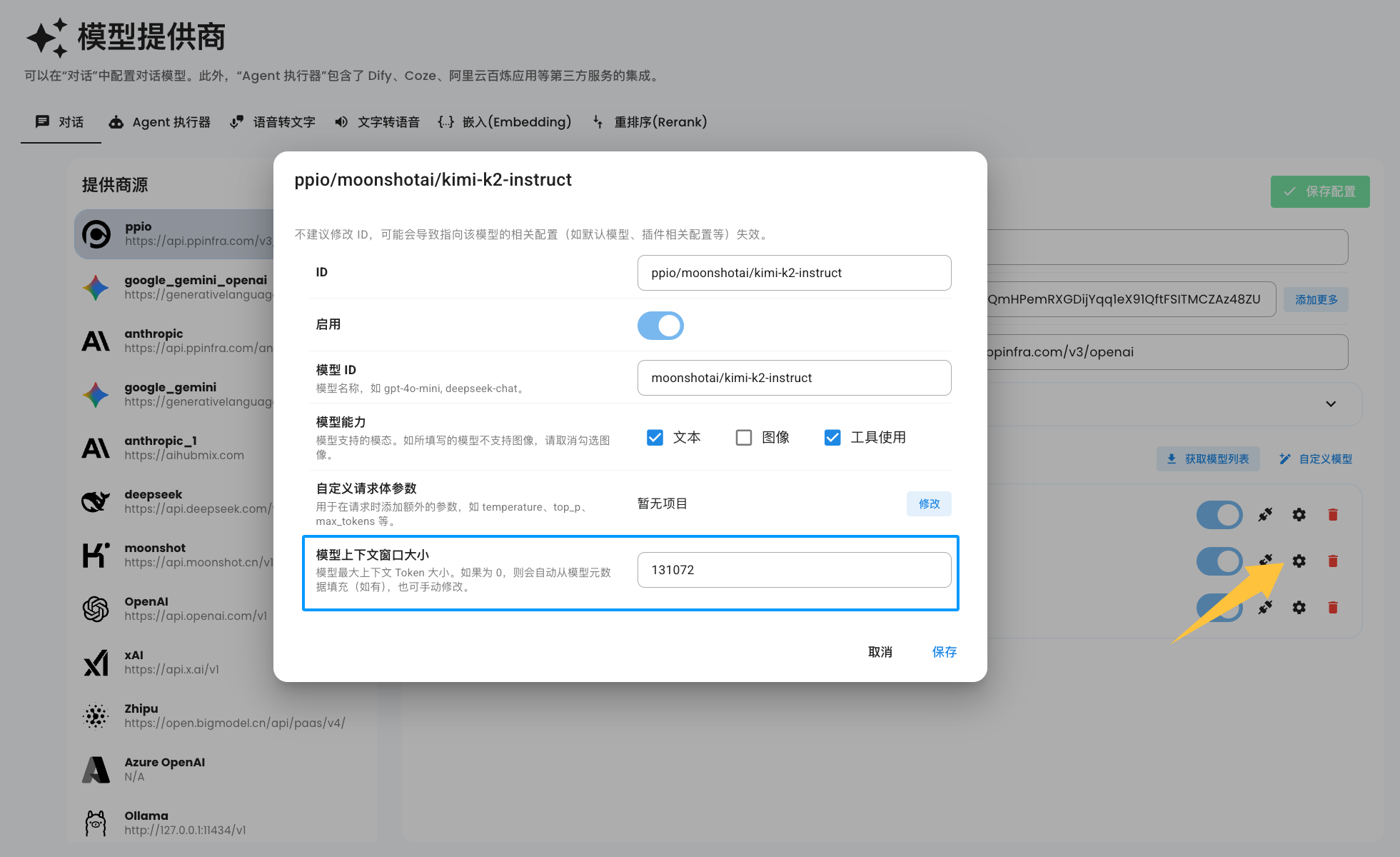
| 默认情况下,当您添加模型时,AstrBot 会自动根据模型的 id,从 [MODELS.DEV](https://models.dev/) 提供的接口中获取模型的上下文窗口大小。但由于模型种类繁多,部分提供商甚至会修改模型的 id,因此 AstrBot 不能自动推断出您所添加的模型的上下文窗口大小。 |
|
|
| 您可以手动在模型配置中设置模型的上下文窗口大小,参考下图: |
|
|
|  |
|
|
| > [!NOTE] |
| > 如果没有看到上图中的配置项,请您删除该模型,然后重新添加模型即可。 |
|
|
| 当模型上下文窗口大小被设置为 0 时,在每次请求时,AstrBot 仍会自动从 MODELS.DEV 获取模型的上下文窗口大小。如果仍为 0,则这次请求不会启用上下文压缩功能。 |
|
|
|
|

