| # 通过源码部署 AstrBot |
|
|
| > [!WARNING] |
| > 你正在直接通过源码来部署本项目,该教程需要您具有一定的技术基础。 |
| > |
| > 以下教程默认您的设备上已经安装 Python,并且版本 `>=3.10` |
|
|
|
|
| ## 下载/克隆仓库 |
|
|
| 如果你的电脑上安装了 `git`,你可以通过以下命令来下载源码: |
|
|
| ```bash |
| git clone https://github.com/AstrBotDevs/AstrBot.git |
| # 上面的代码默认会拉取最新的提交的源码,如果你需要拉取最新稳定发行版本的源码,可以使用以下命令: |
| # git clone --depth=1 --branch $(git ls-remote --tags --sort='-v:refname' https://github.com/AstrBotDevs/AstrBot.git | head -n1 | awk -F/ '{print $3}') https://github.com/AstrBotDevs/AstrBot.git |
| cd AstrBot |
| ``` |
|
|
| 如果你没有安装 `git`,请先下载安装。 |
|
|
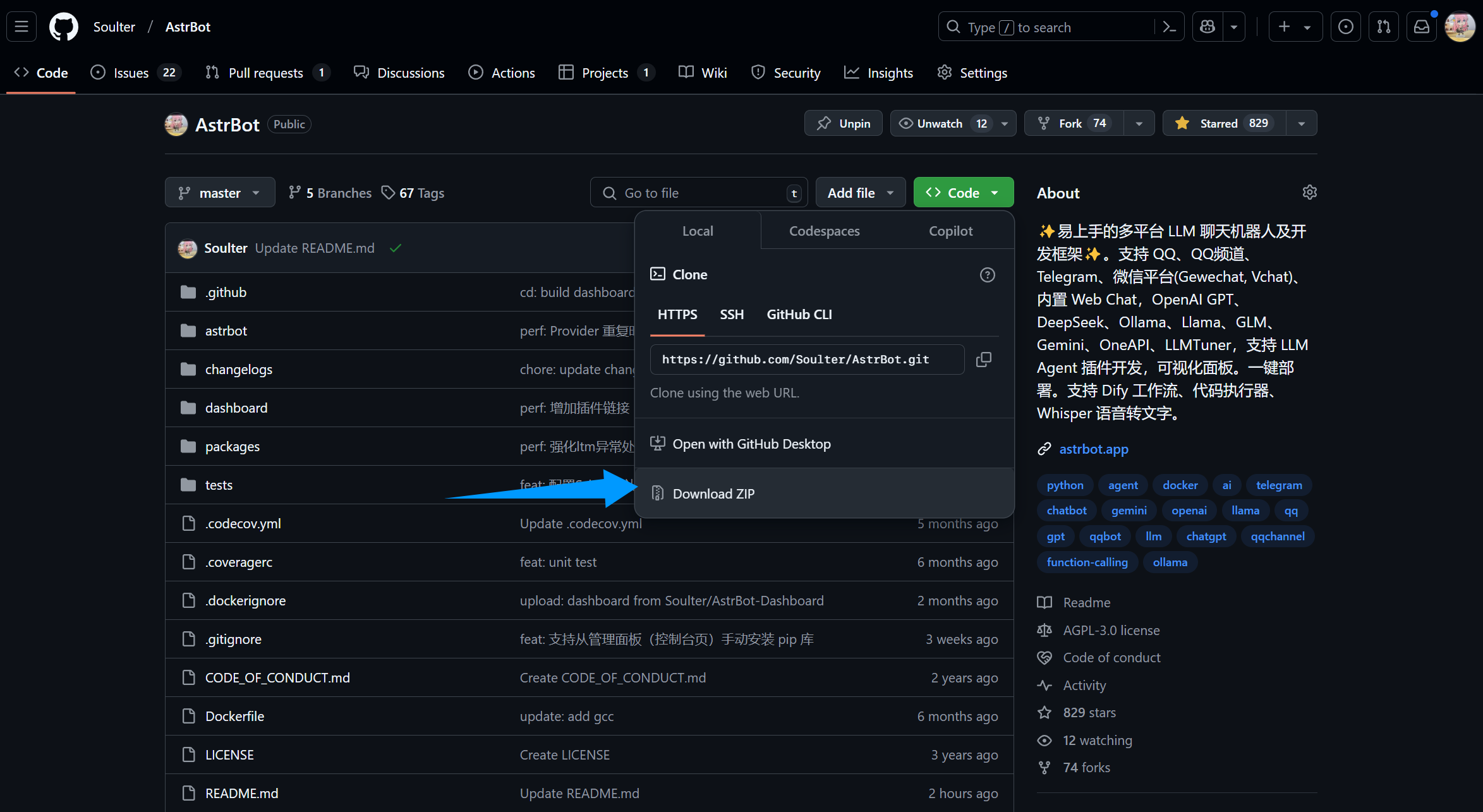
| 或者,直接从 GitHub 上下载源码解压: |
|
|
|  |
|
|
| ## 安装依赖并运行 |
|
|
| ::: details 【🥳推荐】使用 `uv` 管理依赖 |
|
|
| > 如果没安装 `uv`,请参考 [Installing uv](https://docs.astral.sh/uv/getting-started/installation/) 安装。 |
|
|
| 2. 在终端执行(AstrBot 目录下) |
| ```bash |
| uv sync |
| uv run main.py |
| ``` |
|
|
| 如果您安装了一些插件,建议后续启动附上 `--no-sync` 参数,以避免插件依赖库被重复安装。我们正在努力解决这个问题,敬请期待。 |
|
|
| ```bash |
| uv run --no-sync main.py |
| ``` |
| ::: |
|
|
| ::: details Python 内置 venv 安装依赖 |
|
|
| 在 AstrBot 源码目录下,使用终端运行以下命令: |
|
|
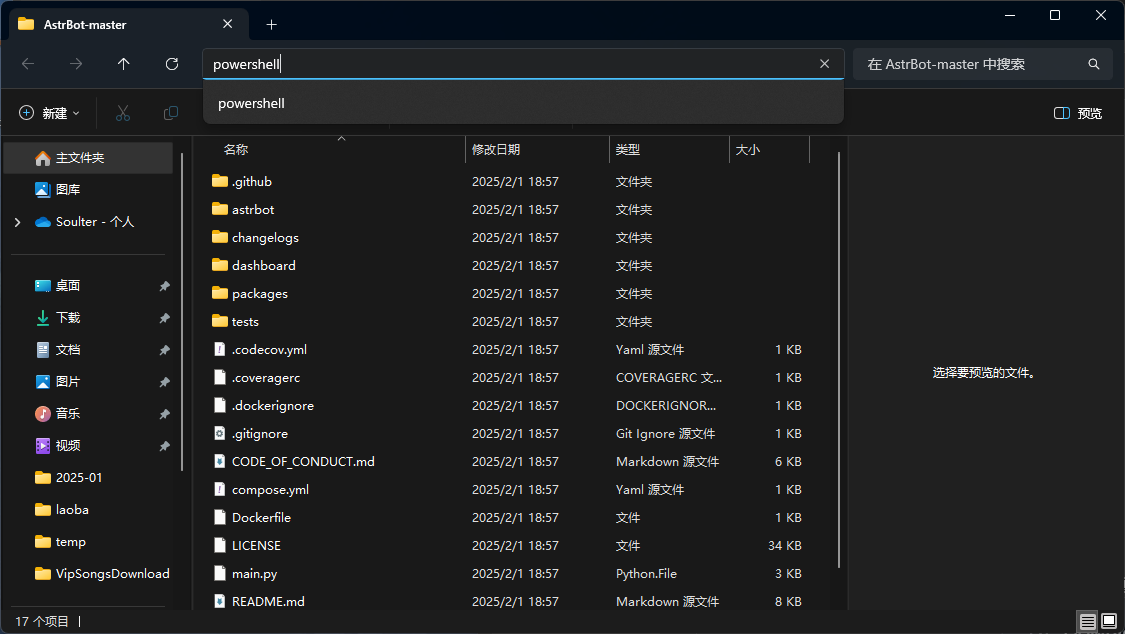
| > 如果是 Windows,直接下载源码解压的,请打开解压的文件夹,在地址栏输入: |
| >  |
|
|
| ```bash |
| python3 -m venv ./venv |
| ``` |
|
|
| > 也可能是 `python` 而不是 `python3` |
| |
| 以上步骤会创建一个虚拟环境并激活(以免打乱您设备本地的 Python 环境)。 |
|
|
| 接下来,通过以下命令安装依赖文件,这可能需要花费一些时间: |
|
|
| Mac/Linux/WSL 执行: |
|
|
| ```bash |
| source venv/bin/activate |
| python -m pip install -r requirements.txt -i https://mirrors.tuna.tsinghua.edu.cn/pypi/web/simple |
| python main.py |
| ``` |
|
|
| Windows 执行: |
|
|
| ```bash |
| venv\Scripts\activate |
| python -m pip install -r requirements.txt -i https://mirrors.tuna.tsinghua.edu.cn/pypi/web/simple |
| python main.py |
| ``` |
| ::: |
|
|
|
|
| ## 🎉 大功告成! |
|
|
| 如果一切顺利,你会看到 AstrBot 打印出的日志。 |
|
|
| 如果没有报错,你会看到一条日志显示类似 `🌈 管理面板已启动,可访问` 并附带了几条链接。打开其中一个链接即可访问 AstrBot 管理面板。链接是 `http://localhost:7860`。 |
|
|
| > [!TIP] |
| > 如果你正在服务器上部署 AstrBot,需要将 `localhost` 替换为你的服务器 IP 地址。 |
| > |
| > 默认用户名和密码是 `astrbot` 和 `astrbot`。 |
|
|
|
|
| 接下来,你需要部署任何一个消息平台,才能够实现在消息平台上使用 AstrBot。 |
|
|

