

| # 在 1Panel 部署 AstrBot | |
| [1Panel](https://1panel.cn/) 是开源的新一代 Linux 服务器运维管理面板。 | |
| AstrBot 已经由 1Panel 团队上架至 [1Panel 应用商店](https://apps.fit2cloud.com/1panel),用户可以直接通过 1Panel 快速部署使用。 | |
| ## 安装 1Panel | |
| 如果您还没有安装 1Panel 面板,请参考 [1Panel 官网](https://1panel.cn/) 一键安装。 | |
| > International users can refer to the [1Panel official site](https://github.com/1Panel-dev/1Panel) for tutorials. | |
| ## 安装 AstrBot | |
| 打开 1Panel 面板,进入 1Panel 应用商店,搜索 `AstrBot`,如下图所示。 | |
| 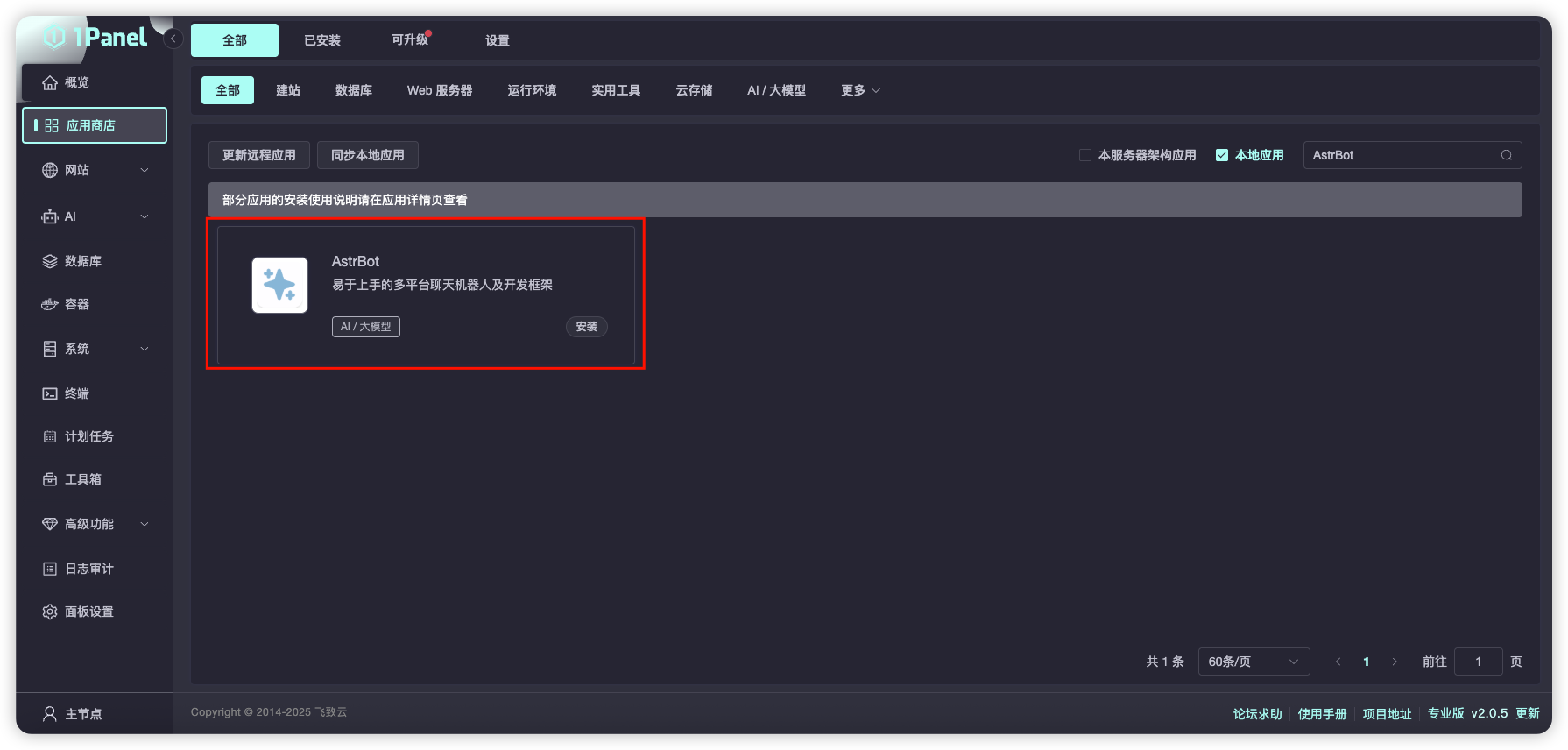 | |
| 点击 `安装`,等待安装成功。 | |
| 安装成功后,在 1Panel 系统-防火墙页面放行对应的 AstrBot 端口(默认是 7860 端口)。 | |
| 如果您正在使用 AWS、阿里云、腾讯云等厂商的云服务器,请确保其安全组也放行了 7860 端口。 | |
| ## 访问 AstrBot | |
| 访问 `http://IP:7860` 即可访问 AstrBot 的管理面板。 | |