| # FAQ |
|
|
| ## Dashboard Related |
|
|
| ### Encountering 404 Error When Opening the Dashboard |
|
|
| Download `dist.zip` from the [release](https://github.com/AstrBotDevs/AstrBot/releases) page, extract it, and move it to `AstrBot/data`. If it still doesn't work, try restarting your computer (based on community feedback). |
|
|
| ### Forgot Dashboard Password |
|
|
| If you forgot your AstrBot dashboard password, you can modify the `"dashboard"` field in the `AstrBot/data/cmd_config.json` configuration file, where `"username"` is your username and `"password"` is your password encrypted with MD5. |
|
|
| To modify your account credentials, follow these steps: |
|
|
| 1. Modify the `"username"` field, keeping the `""` quotation marks. If you don't want to change the username, skip this step |
| 2. Visit the website: [Online MD5 Generator](https://www.metools.info/code/c26.html) |
| 3. Enter your new password in the input text box |
| 4. Select MD5 encryption (32-bit), make sure to choose the 32-bit option |
| 5. Paste the converted string into the configuration file, keeping the `""` quotation marks |
|
|
| ## Bot Core Related |
|
|
| ### How to Let AstrBot Control My Mac / Windows / Linux Computer? |
|
|
| 1. In AstrBot WebUI's `Config -> General Config`, find `Use Computer Capabilities`, and select `local` for the runtime environment. |
| 2. In `Config -> Other Config`, find `Admin ID List`, and add your user ID (you can get it through the `/sid` command). |
|
|
| > [!TIP] |
| > For security reasons, when runtime environment is set to `local`, AstrBot only allows AstrBot administrators to use computer capabilities by default. |
| > You can select `sandbox` for the runtime environment, which allows all users to use computer capabilities (in an isolated sandbox). For more details, see [AstrBot Sandbox Environment](/en/use/astrbot-agent-sandbox.md) |
|
|
| ### Bot Cannot Chat in Group Conversations |
|
|
| 1. In group chats, to prevent message flooding, the bot will not respond to every monitored message. Please try mentioning (@) the bot or using a wake word to chat, such as the default `/`, for example: `/hello`. |
|
|
| ### No Permission to Execute Admin Commands |
|
|
| 1. `/reset, /persona, /dashboard_update, /op, /deop, /wl, /dewl` are the default admin commands. You can use the `/sid` command to get a user's ID, then add it to the admin ID list in Settings -> Other Settings. |
|
|
| ### Chinese Characters Garbled When Locally Rendering Markdown Images (t2i) |
|
|
| You can customize the font. See details -> [#957](https://github.com/AstrBotDevs/AstrBot/issues/957#issuecomment-2749981802) |
|
|
| Recommended font: [Maple Mono](https://github.com/subframe7536/maple-font). |
|
|
| ### Cannot Parse API Returned Completion & LLM Returns `<empty content>` |
|
|
| This is because the provider's API returned empty text. Try the following steps: |
|
|
| 1. Check if the API key is still valid |
| 2. Check if the API call limit or quota has been reached |
| 3. Check network connection |
| 4. Try reset |
| 5. Lower the maximum conversation count setting |
| 6. Switch to another model from the same provider / a different provider |
|
|
| ## Plugin Related |
|
|
| ### Cannot Install Plugin |
|
|
| 1. Plugins are installed via GitHub. Access to GitHub from mainland China can indeed be unstable. You can use a proxy, then go to Other Settings -> HTTP Proxy to configure it. Alternatively, download the plugin archive directly and upload it. |
|
|
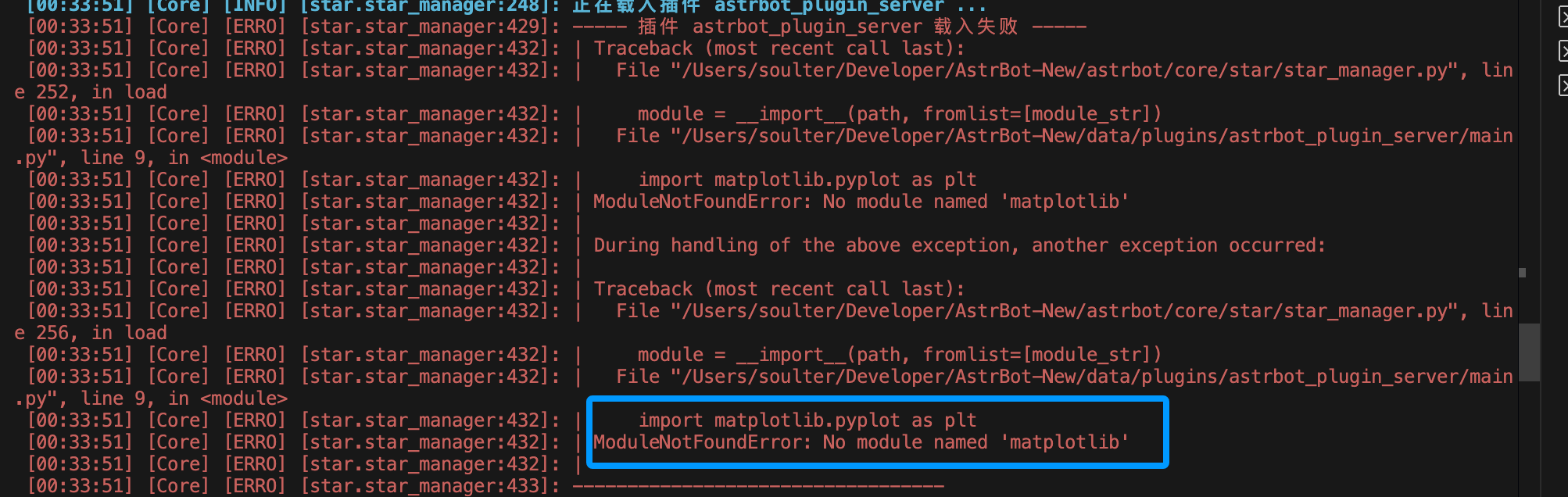
| ### Error `No module named 'xxx'` After Installing Plugin |
|
|
|  |
|
|
| This is because the plugin's dependencies were not installed properly. Normally, AstrBot automatically installs plugin dependencies after installing the plugin, but installation may fail in the following situations: |
|
|
| 1. Network issues preventing dependency downloads |
| 2. Plugin author did not include a `requirements.txt` file |
| 3. Python version incompatibility |
|
|
| Solution: |
|
|
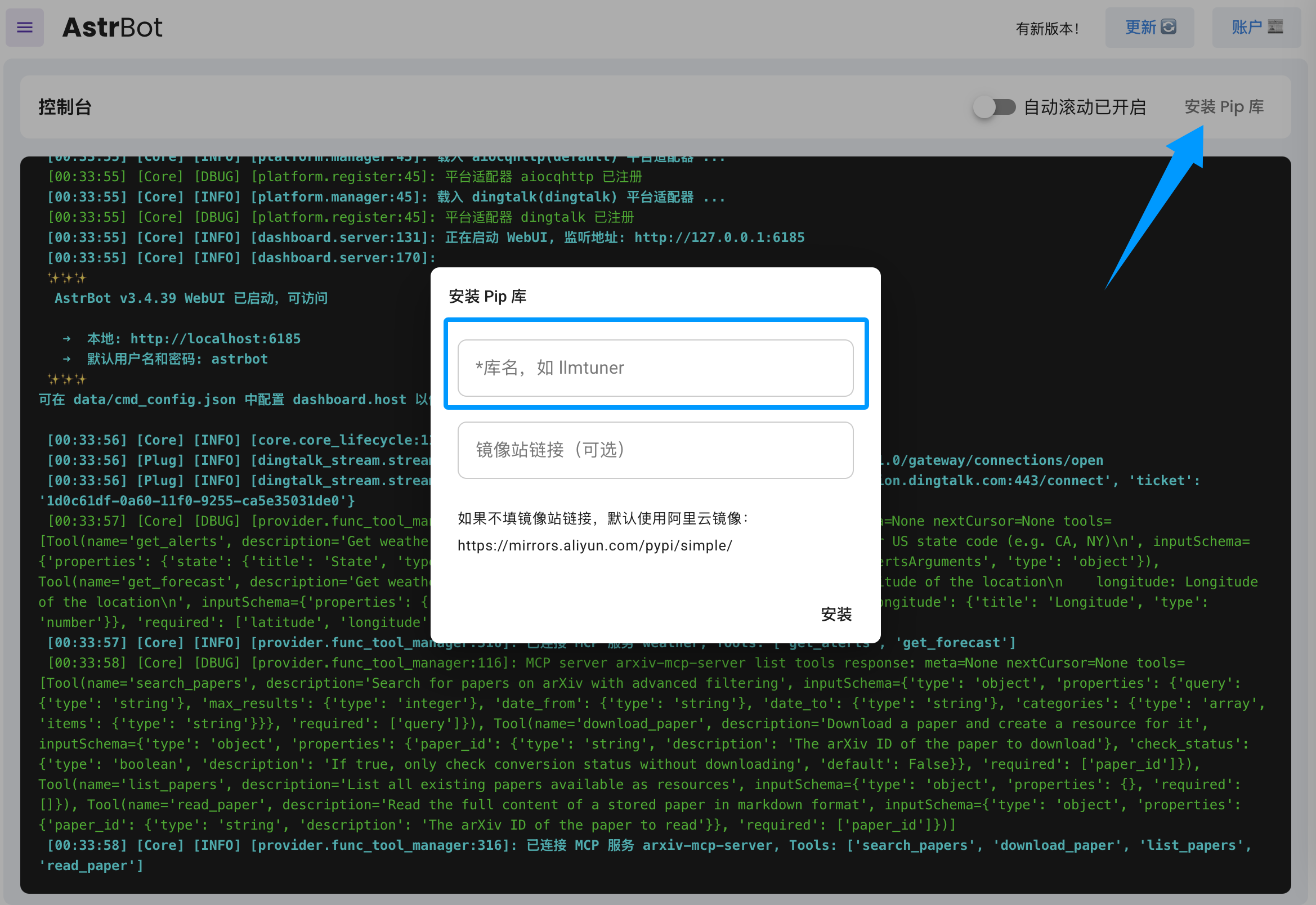
| Based on the error message, refer to the plugin's README to manually install dependencies. You can install dependencies in the AstrBot WebUI under `Console` -> `Install Pip Package`. |
|
|
|  |
|
|
| If you find that the plugin author did not include a `requirements.txt` file, please submit an issue in the plugin repository to remind the author to add it. |
|
|

