

language:
  - en
license: apache-2.0
tags:
  - music
  - text-to-music
  - sheet-music
  - pytorch
datasets:
  - emotionwave-company/text2score
Text2Score: Generating Sheet Music From Textual Prompts




This repository hosts the pre-trained model weights for Text2Score, a model designed to generate sheet music directly from text prompts.
Note on Usage: To use this model, you do not need to download these weights manually. The inference scripts in our primary GitHub repository are configured to automatically download this checkpoint the first time you run them.
For the full codebase, issue tracking, and detailed system architecture, please visit our GitHub Repository.
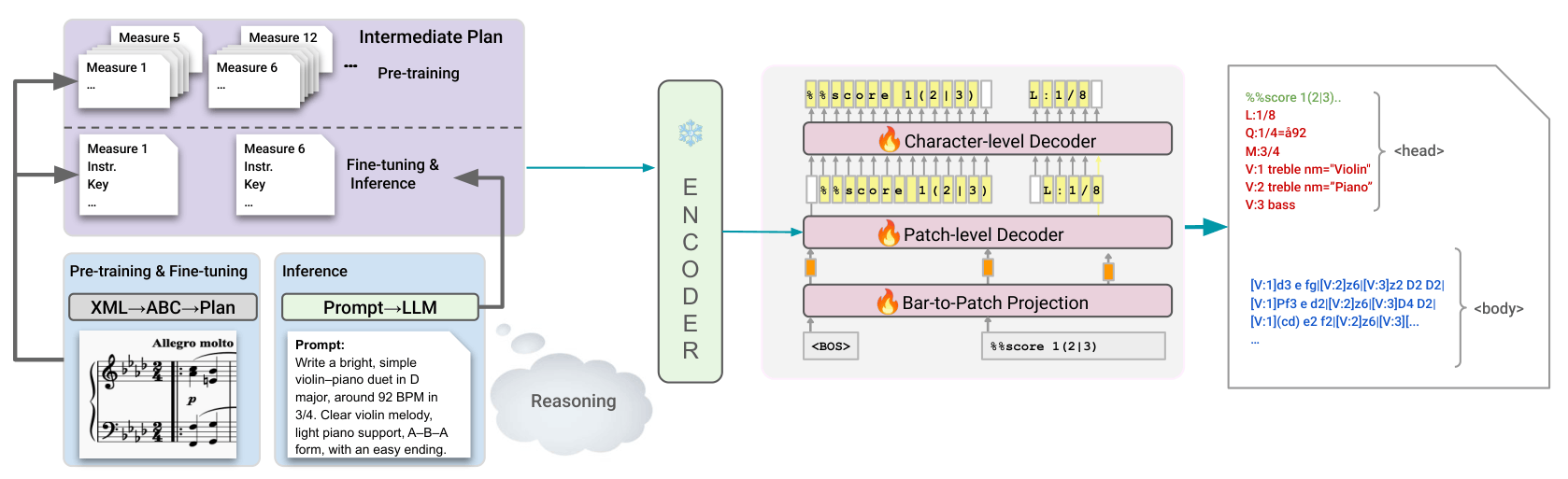
System Overview
For a high-level view of the model architecture and pipeline, please see the system overview below:
Quick Start & Installation
To run inference or train the model, you will need to clone our GitHub repository and set up the environment.
1. Clone the GitHub repository
git clone https://github.com/keshavbhandari/text2score.git
cd text2score
2. Create and activate a new Conda environment
conda create --name text2score python=3.10
conda activate text2score
3. Install PyTorch with CUDA support
conda install pytorch=2.3.0 pytorch-cuda=11.8 numpy -c pytorch -c nvidia
4. Install the project and dependencies
pip install -e .
pip install optimum
Inference & Usage
All commands below should be executed from within the root text2score directory of the cloned GitHub repository.
1. Generating Plans from Prompts
Before running batch inference, you can generate an execution plan based on a JSON of prompts.
python text2music/inference/generate_plan.py \
  --api_key "XXXX" \
  --input_json text2music/artifacts/evaluation/prompts_with_ids.json \
  --output_json text2music/artifacts/evaluation/prompts_with_plan.json
2. Single Inference
To generate a score from a single text prompt:
python text2music/inference/inference.py \
  --user_prompt "A melancholic solo flute melody settling back into D minor, composed as a slow 6/8 barcarolle at 54 BPM." \
  --api_key "XXXX" \
  --remove_prior_outputs False
Important: You will need an active OpenAI API key to run the script this way, as it automatically generates the necessary execution plans on the fly. The script currently defaults to using the GPT-5.1 model for plan generation, but you can easily modify the script to use any other supported model.
Or if you already have a pre-generated plan text file, use:
python text2music/inference/inference.py \
  --plan_path text2music/artifacts/example_plans/partial_plan.txt \
  --remove_prior_outputs False
Tip: If you prefer to generate a plan manually, you can copy the system prompt found in text2score/text2music/inference/prompt.py (add your own prompt in the placeholder text) and paste it into the interface for ChatGPT, Gemini, or any other LLM of your choice along with your desired music prompt. Simply take the LLM's output, replace the contents of text2score/text2music/artifacts/example_plans/partial_plan.txt entirely with that new plan, and run the command above.
3. Batch Inference
Run inference across multiple prompts using accelerate:
accelerate launch --num_processes 1 text2music/inference/run_inference.py \
  --prompt_path_json text2music/artifacts/evaluation/prompts_with_plan.json \
  --output_folder ./outputs/
Data Conversion (ABC to XML & MIDI)
Once you have generated ABC files, you can batch convert them into standard XML and MIDI formats.
# Create XML files
python text2music/data/batch_abci2xml.py --root_folder ./outputs/

# Create MIDI files
python text2music/data/utils/xml2mid.py --data_dir ./outputs/
Citation
If you find this model or repository useful in your research, please consider citing our work:
@article{bhandari2025text2score,
  title     = {Text2Score: Generating Sheet Music from Textual Prompts},
  author    = {Bhandari, Keshav and Chang, Sungkyun and Roy, Abhinaba and Ronchini, Francesca and Benetos, Emmanouil and Herremans, Dorien and Colton, Simon},
  journal   = {arXiv preprint arXiv:2605.13431},
  year      = {2026},
  url       = {https://arxiv.org/abs/2605.13431}
}