

gemma-4-E4B-it-UD-japanese-imatrix developed by dahara1@webbigdata
google/gemma-4-E4B-it を日本語能力を中心にGGUF化したモデル
google/gemma-4-E4B-it GGUF model specializing in Japanese language proficiency.
特徴 / Features
一言で言えば沢山の細かい改善をして出来上がった強力なggufモデルです。
In short, it's a powerful small gguf model with many improvements.
このggufの特徴
- コミュニティが過去に発見した不具合を適用して誤作動割合を減らしています
- UnslothのDynamic Quantization 2.0形式を採用しています
- 日本語が大目のキャリブレーションデータを使用しています
Features of this gguf
- We've applied bugs previously discovered by the community to reduce the rate of malfunctions.
- This model uses Unsloth's Dynamic Quantization 2.0 format.
- Use calibration data with a large amount of Japanese text.
動かし方 / How to Run
GPUがなくても動きますが、Q4版ではシステムメモリは16GB以上、ディスク容量が6GB以上必要です。
It will run without a GPU, but you will need at least 16GB of system memory and 6GB of disk space for Q4.
Linux terminalでの実行
llama.cppを使います。直近でGemma 4対応のアップデートがいくつかありました。まだマージされていないものもあるため、常に最新版を使う事をおすすめします。 (本件の動作確認はversion: 8720 (d12cc3d1c)で行っています)
llama.cpp以外のツールでも動く可能性はありますが、動作確認はしていません
We will be using llama.cpp. There have been several recent updates to support Gemma 4. Some have not yet been merged, so it is recommended to always use the latest version. (This issue was confirmed to work with version: 8720 (d12cc3d1c)).
It might work with tools other than llama.cpp, but we haven't tested it.
llama.cppからお使いのハードウェア用のZIPファイルをダウンロードして設定します。
沢山種類があるので迷うかもしれませんが、chatGPTなりGeminiなりCaludeなりに聞いて適切なものを選んでください
Download the zip file for your hardware from llama.cpp and set it up.
There are many options, so you may be confused, but please ask chatGPT, Gemini, or Calude to help you choose the right one.
ダウンロードしたzipを解凍後し、ターミナル、PowerShell、端末から以下のコマンドを打ち込んで起動します
After unzipping the downloaded zip file, run it via Terminal, PowerShell, or the terminal by typing the following command.
Linuxでのターミナルでの実行例です
Here is an example of running the command on Linux terminal:
まずhf commandをインストールしてください
First, please install the hf command.
# モデルのダウンロード / download model
hf download dahara1/gemma-4-E4B-it-UD-japanese-imatrix gemma-4-E4B-it-UD-Q4_K_XL.gguf --local-dir gemma-4-E4B-it-UD-japanese-imatrix
# 視覚対応用のファイルのダウンロード / download model's vision part
hf download dahara1/gemma-4-E4B-it-UD-japanese-imatrix mmproj-bf16.gguf --local-dir gemma-4-E4B-it-UD-japanese-imatrix
# 念の為jinjaテンプレートのダウンロード / download jinja template
hf download dahara1/gemma-4-E4B-it-UD-japanese-imatrix chat_template.jinja --local-dir gemma-4-E4B-it-UD-japanese-imatrix

./llama-cli \
  -m gemma-4-E4B-it-UD-japanese-imatrix/gemma-4-E4B-it-UD-Q4_K_XL.gguf \
  --temp 1.0 \
  --top-p 0.95 \
  --top-k 64 \
  --min-p 0.0 \
  --ctx-size 12000 \
  --jinja \
  --reasoning on \
  --chat-template-file gemma-4-E4B-it-UD-japanese-imatrix/chat_template.jinja \
  -ub 2048 \
  -b 2048
ctx-sizeが扱える文章の長さです。長くすると複数ターンの長い会話も扱えるようになりますが、必要メモリ量も増えます。ctx-size specifies the length of text that can be handled. Increasing this value allows for longer conversations with multiple turns, but it also increases the amount of memory required.
GPUをお持ちの方へ(for GPU User)
16GBのGPUメモリがあると比較的快適に動かす事ができます。上記のコマンドに-ngl 99を追加してください
If you have 16GB of GPU memory, it will run relatively smoothly. Add -ngl 99 to the above command.
Windows AMD CPUの例
AMD Ryzen 9 7940HS w/ Radeon 780M Graphics システムメモリ32GBのミニPCでのコマンド例
※現在のllama.cppは「Windows x64 (Vulkan)」で画像識別をしようとすると落ちてしまう(メモリ不足?)事があるためcpu版で動作確認しました
AMD Ryzen 9 7940HS w/ Radeon 780M Graphics Mini PC with 32GB of system memory, Vulkan setuped, and 8GB allocated to the GPU with CMD. *The current llama.cpp sometimes crashes when attempting image recognition on "Windows x64 (Vulkan)" (possibly due to insufficient memory?), so we have tested it using cpu version.
.\llama-server ^
  -m ..\gemma-4-E4B-it-UD-Q4_K_XL.gguf ^
  --host 0.0.0.0 ^
  --port 8080 ^
  --temp 1.0 ^
  --top-p 0.95 ^
  --top-k 64 ^
  --min-p 0.0 ^
  --ctx-size 8000 ^
  --jinja ^
  --chat-template-file ..\chat_template.jinja ^
  --reasoning on ^
  -ub 2048 ^
  -b 2048
サンプルスクリプト / sample script
hermes-agent demo
llama-sereverを接続先ローカルバックエンドに指定する事で以下のように動かす事ができます。
By specifying llama-serever as the target local backend, you can run it as follows: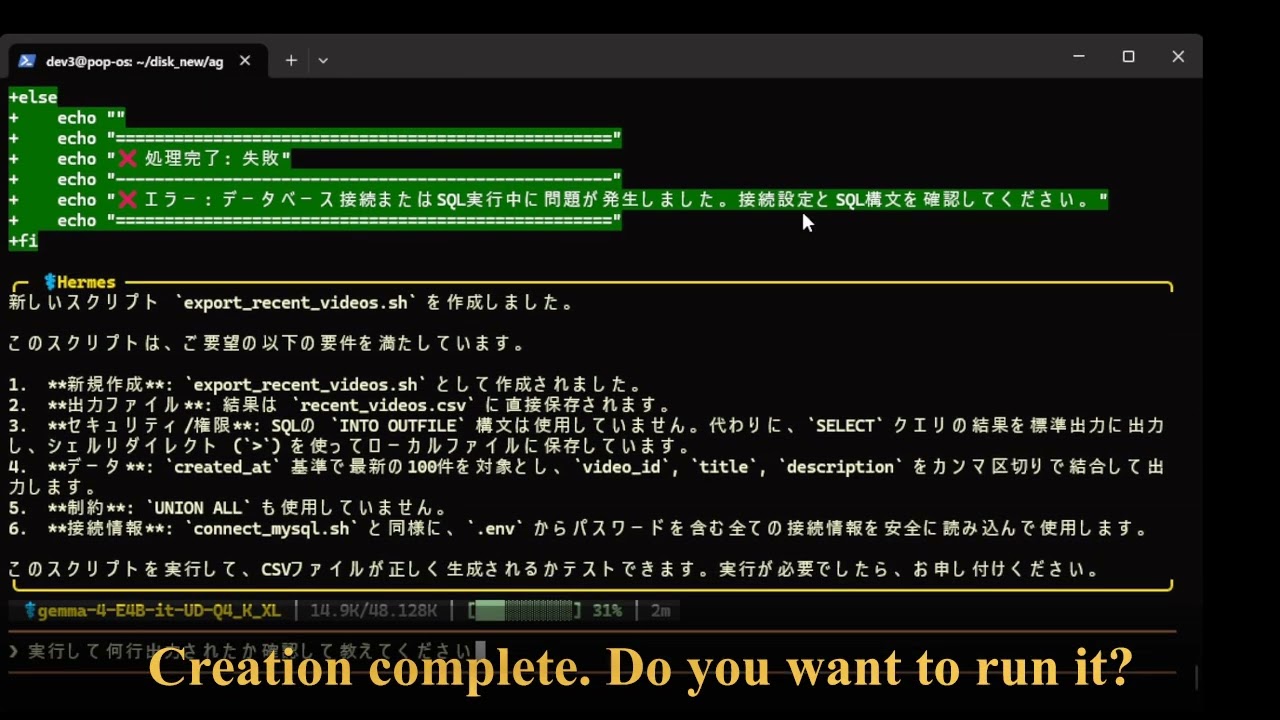
ベンチマーク結果/benchmark result
shisa-ai/M-IFEval を使って計測した日本語における指示追従性能は以下です。
Ability to follow Japanese instructions measured using shisa-ai/M-IFEval is as follows.
Unslothは量子化モデルで世界的に有名であるため、今回、彼らのモデルに挑戦しました。
英語をメインに使用する場合はUnslothのモデルの方が性能が高いと思われるので留意してください。
Since Unsloth are world-renowned experts in quantization models, I decided to try their models this time.
Please note that their models are likely to perform better if you primarily use English.
| Model Name | Strict Prompt | Strict Inst | Loose Prompt | Loose Inst |
|---|---|---|---|---|
| Unsloth-Q4_K_XL(4/7, maybe old) | 0.6220 | 0.6814 | 0.6627 | 0.7123 |
| gemma-4-E2B-it-UD-japanese-imatrix-Q4_K_XL | 0.6511 | 0.7256 | 0.7151 | 0.7743 |
update info
- 2026/04/09 update prompt template
- 2026/04/11 replace updated google version chat_template.jinja
謝辞 / Acknowledgments
作成者 / Developer
開発:dahara1@Webbigdata / Developed by dahara1@Webbigdata
- Downloads last month
- 19,288
2-bit
3-bit
4-bit
5-bit
6-bit
8-bit