

MewZoom V1
Collection
A family of image super-resolution models with purrfect pixels. • 4 items • Updated
A family of open-source super-resolution models with cat-like vision. Pre-trained on a diverse set of high-quality images and fine-tuned with an adversarial network, MewZoom transforms your fuzzy images into crystal-clear high-resolution masterpieces with exceptional realism. In addition to upscaling images by 2X, 3X, 4X, or 8X the original size, MewZoom's degradation-aware training enables it to surgically identify and remove blur, noise, and compression artifacts without removing details.
Fast and scalable: MewZoom incorporates parameter-efficiency into the architecture requiring less parameters than models with similar performance.
Ultra clarity: MewZoom is trained to predict and remove blur, noise, and compression artifacts in addition to upscaling.
Full RGB: MewZoom operates within the full RGB color domain enhancing both luminance and chrominance for the best possible image quality.
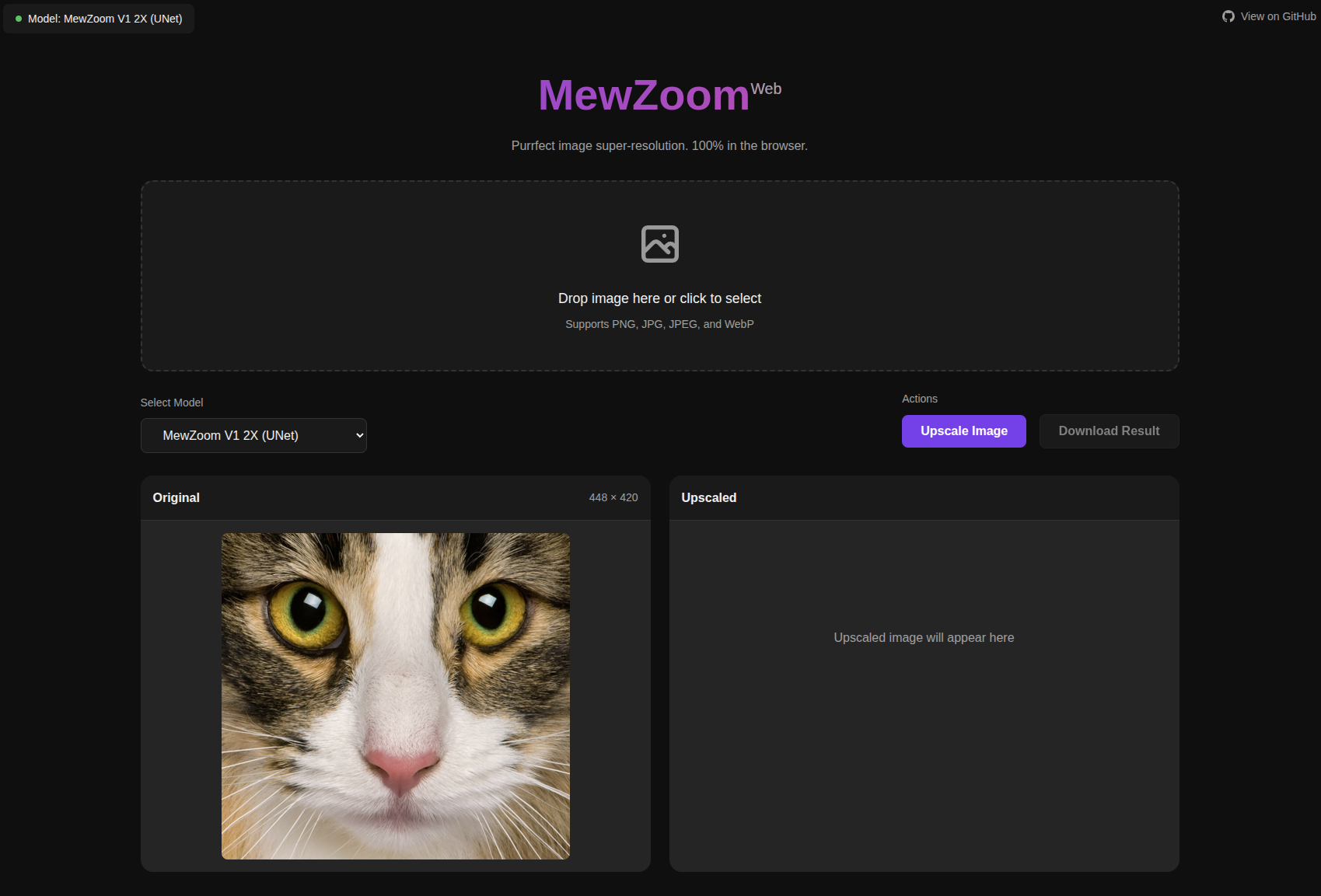
Check out the MewZoom Web UI for upscaling images in the browser. Inference happens on your device and your data never leaves the browser. Note that due to the limitations of Web Assembly only CPU with max 4GB of memory is supported.
The training and inference code is available at https://github.com/andrewdalpino/MewZoom.
The latest pretrained models are available on HuggingFace Hub. They use the newer mewzoom library for inference.
| Name | Upscale | Architecture | Channels | Layers | Parameters | Library Version |
|---|---|---|---|---|---|---|
| andrewdalpino/MewZoom-V1-2X | 2X | TrunkNet | 48 | 64 | 5.3M | 1.x |
| andrewdalpino/MewZoom-V1-2X-Unet | 2X | UNet | 48/96/192/384 | 4/4/4/4 | 32M | 1.x |
| andrewdalpino/MewZoom-V1-4X | 4X | TrunkNet | 96 | 64 | 21M | 1.x |
| andrewdalpino/MewZoom-V1-4X-Unet | 4X | UNet | 96/192/384/768 | 4/4/4/4 | 128M | 1.x |
The following legacy pretrained models are also available on HuggingFace Hub. Note that legacy models use the ultrazoom library for inference.
| Name | Upscale | Channels | Layers | Parameters | Control Modules | Library Version |
|---|---|---|---|---|---|---|
| andrewdalpino/MewZoom-V0-2X-Ctrl | 2X | 48 | 20 | 1.8M | Yes | 0.2.x |
| andrewdalpino/MewZoom-V0-3X-Ctrl | 3X | 54 | 30 | 3.5M | Yes | 0.2.x |
| andrewdalpino/MewZoom-V0-4X-Ctrl | 4X | 96 | 40 | 14M | Yes | 0.2.x |
| andrewdalpino/MewZoom-V0-2X | 2X | 48 | 20 | 1.8M | No | 0.1.x |
| andrewdalpino/MewZoom-V0-3X | 3X | 54 | 30 | 3.5M | No | 0.1.x |
| andrewdalpino/MewZoom-V0-4X | 4X | 96 | 40 | 14M | No | 0.1.x |
To load pretrained weights and start upscaling your images, getting started is as simple as in the examples below.
In this example we'll use HuggingFace Hub to download the pretrained model weights and then run inference using the Python mewzoom library which utilizes PyTorch under the hood. First, you'll need the mewzoom package installed into your project. We'll also need the torchvision library to do some basic image preprocessing. We recommend using a virtual environment to make package management easier.
pip install mewzoom~=1.0.0 torchvision
Then, load the weights from HuggingFace Hub using the from_pretrained() method, load and convert the input image to a tensor using Torch Vision, upscale the image using the model, and then display the upscaled image.
import torch

from torchvision.io import decode_image, ImageReadMode
from torchvision.transforms.v2 import ToDtype, ToPILImage

from mewzoom.model import MewZoom


model_name = "andrewdalpino/MewZoom-V1-2X-Unet"
image_path = "./bird.png"

model = MewZoom.from_pretrained(model_name)

image_to_tensor = ToDtype(torch.float32, scale=True)
tensor_to_pil = ToPILImage()

image = decode_image(image_path, mode=ImageReadMode.RGB)

x = image_to_tensor(image).unsqueeze(0)

y_pred = model.upscale(x)

pil_image = tensor_to_pil(y_pred.squeeze(0))

pil_image.show()
If you prefer to run the models via an ONNX runtime then you can manually download the ONNX model from the model's repository on HuggingFace Hub and then load the graph into your preferred ONNX-compatible inference engine. In Python, you'll first need to install the onnxruntime, numpy, and pillow dependencies into your project using your favorite package manager.
pip install onnxruntime numpy pillow
Then, load the weights, process the input image so that it's compatible with the ONNX graph, upscale the image, and then display it.
import numpy as np
import onnxruntime as ort

from PIL import Image

model_path = "./model.onnx"
image_path = "./bird.png"

session = ort.InferenceSession(model_path, providers=["CPUExecutionProvider"])

image = Image.open(image_path).convert("RGB")

image_array = np.array(image, dtype=np.float32) / 255.0  # Normalize to [0, 1]

# Convert from (H, W, C) to (1, C, H, W)
input_tensor = np.transpose(image_array, (2, 0, 1))
input_tensor = np.expand_dims(input_tensor, axis=0)

outputs = session.run(None, {"x": input_tensor})

output_tensor = outputs[0][0]  # Remove batch dimension

output_array = np.transpose(output_tensor, (1, 2, 0))  # (C, H, W) -> (H, W, C)
output_array = np.clip(output_array, 0.0, 1.0)

output_image = (output_array * 255).astype(np.uint8)

result = Image.fromarray(output_image, "RGB")

result.show()
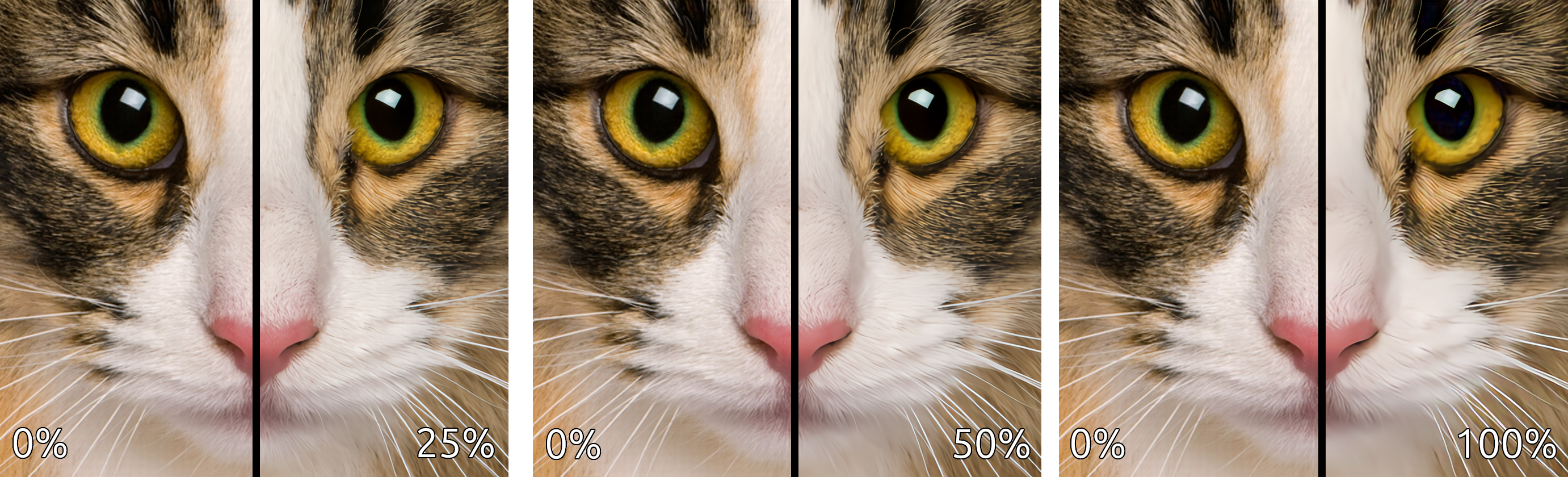
View at full resolution for best results. More comparisons can be found here.
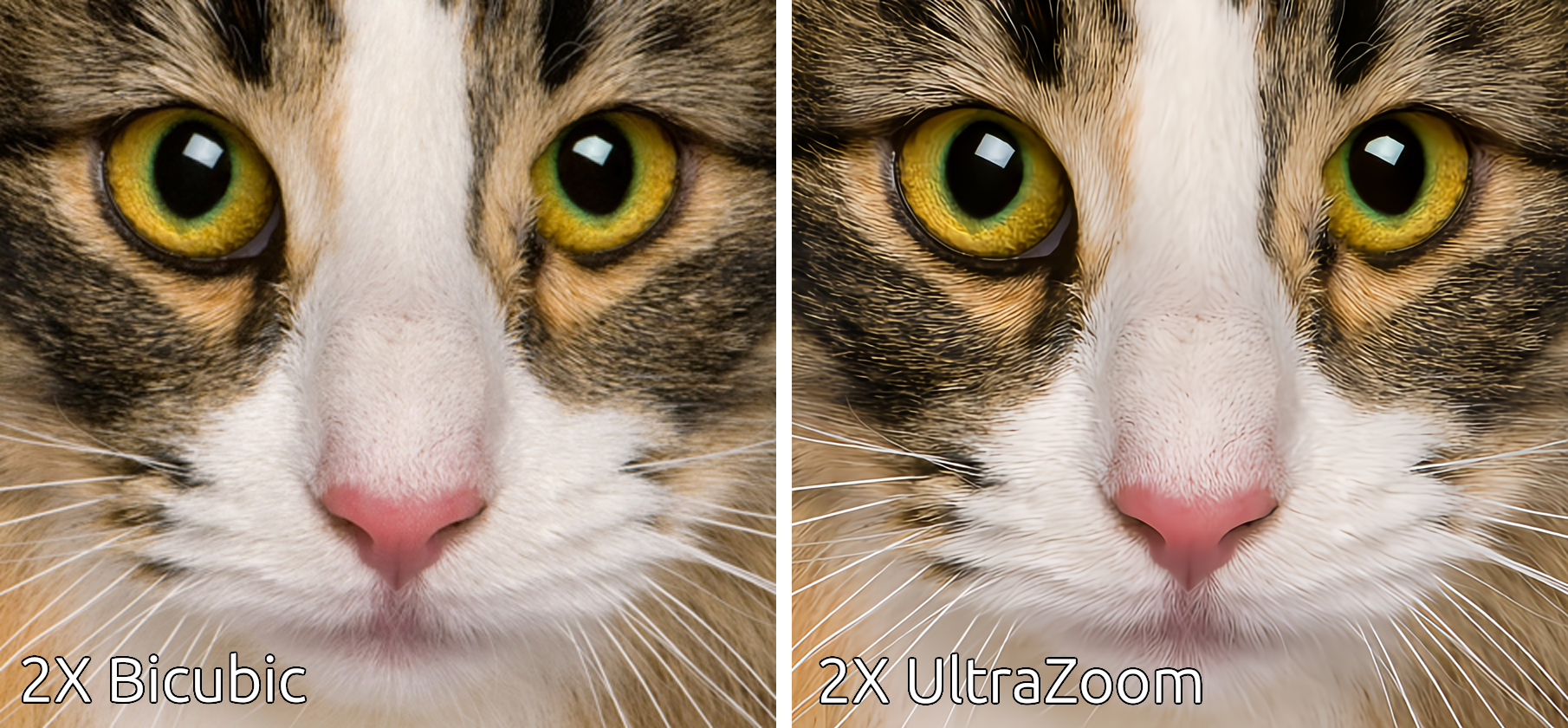

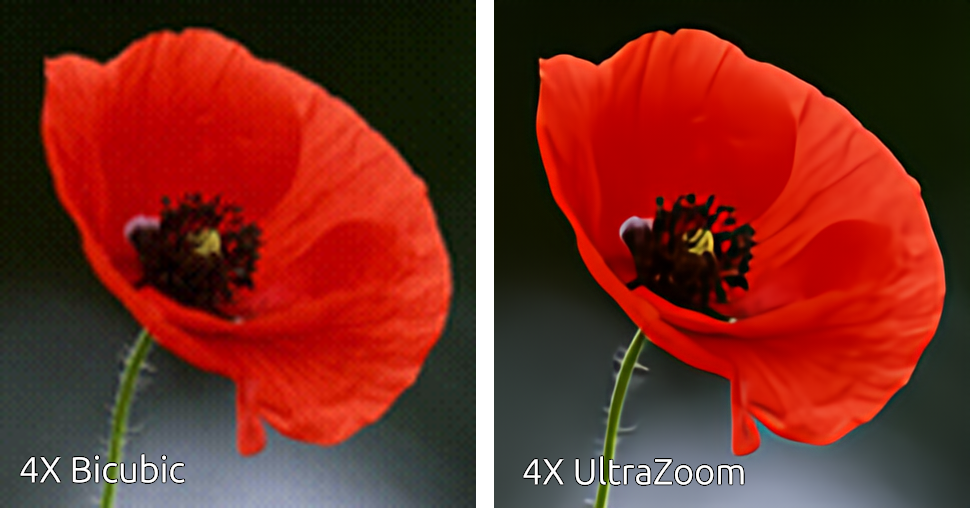
This comparison demonstrates the strength of the enhancements (deblurring, denoising, and deartifacting) applied to the upscaled image.
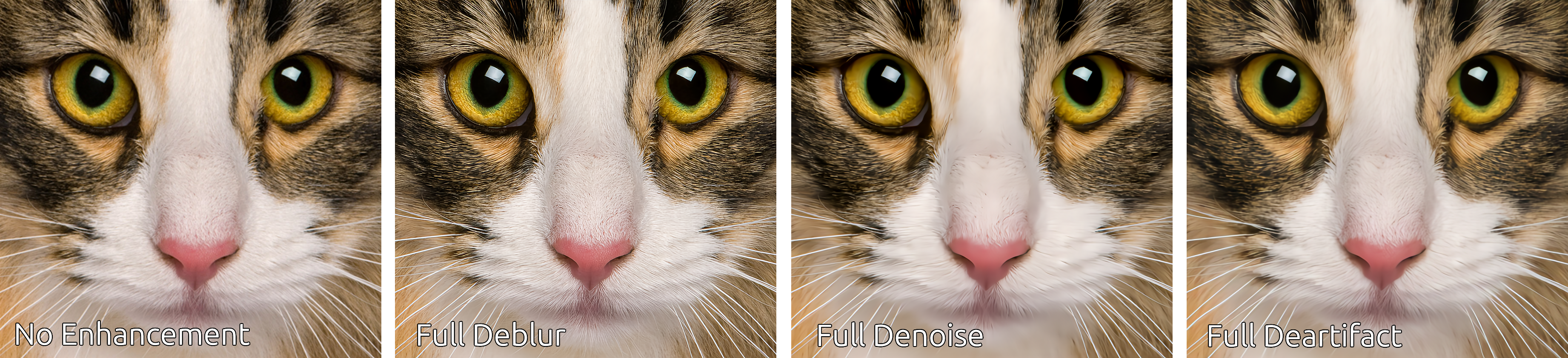
This comparison demonstrates the individual enhancements applied in isolation.
- A. Jolicoeur-Martineau. The Relativistic Discriminator: A Key Element Missing From Standard GAN, 2018.
- J. Yu, et al. Wide Activation for Efficient and Accurate Image Super-Resolution, 2018.
- J. Johnson, et al. Perceptual Losses for Real-time Style Transfer and Super-Resolution, 2016.
- W. Shi, et al. Real-Time Single Image and Video Super-Resolution Using an Efficient Sub-Pixel Convolutional Neural Network, 2016.
- T. Salimans, et al. Weight Normalization: A Simple Reparameterization to Accelerate Training of Deep Neural Networks, OpenAI, 2016.
- T. Miyato, et al. Spectral Normalization for Generative Adversarial Networks, ICLR, 2018.
- A. Kendall, et. al. Multi-task Learning Using Uncertainty to Weigh Losses for Scene Geomtery and Semantics, 2018.
- L. Mescheder, et al. Which Training Methods for GANs do actually Converge?, PMLR 80, 2018.
- M. Heusel, et al. GANs Trained by a Two Time-Scale Update Rule Converge to a Local Nash Equilibrium, NIPS 2017.
- Z. Huang, et al. ScaleLong: Towards More Stable Training of Diffusion Model via Scaling Network Long Skip Connection, NeurIPS 2023.
- H. Wang, et al. Narrowing the semantic gaps in U-Net with learnable skip connections: The case of medical image segmentation, 2023.
- Z. Wang, et al. RA‑Net: reverse attention for generalizing residual learning, Nature Scientific Reports, 2024.
- X. Jiang, et al. Residual Spatial and Channel Attention Networks for Single Image Dehazing, Sensors, 2024.
- A. Gomaa, et al. Residual Channel-attention (RCA) network for remote sensing image scene classification, Multimedia Tools and Applications, 2025.