
Spaces:
Build error

Build error
File size: 19,050 Bytes
c8e832f | 1 2 3 4 5 6 7 8 9 10 11 12 13 14 15 16 17 18 19 20 21 22 23 24 25 26 27 28 29 30 31 32 33 34 35 36 37 38 39 40 41 42 43 44 45 46 47 48 49 50 51 52 53 54 55 56 57 58 59 60 61 62 63 64 65 66 67 68 69 70 71 72 73 74 75 76 77 78 79 80 81 82 83 84 85 86 87 88 89 90 91 92 93 94 95 96 97 98 99 100 101 102 103 104 105 106 107 108 109 110 111 112 113 114 115 116 117 118 119 120 121 122 123 124 125 126 127 128 129 130 131 132 133 134 135 136 137 138 139 140 141 142 143 144 145 146 147 148 149 150 151 152 153 154 155 156 157 158 159 160 161 162 163 164 165 166 167 168 169 170 171 172 173 174 175 176 177 178 179 180 181 182 183 184 185 186 187 188 189 190 191 192 193 194 195 196 197 198 199 200 201 202 203 204 205 206 207 208 209 210 211 212 213 214 215 216 217 218 219 220 221 222 223 224 225 226 227 228 229 230 231 232 233 234 235 236 237 238 239 240 241 242 243 244 245 246 247 248 249 250 251 252 253 254 255 256 257 258 259 260 261 262 263 264 265 266 267 268 269 270 271 272 273 274 275 276 277 278 279 280 281 282 283 284 285 286 287 288 289 290 291 292 293 294 295 296 297 298 299 300 301 302 303 304 305 306 307 308 309 310 311 312 313 314 315 316 317 318 319 320 321 322 323 324 325 326 327 328 329 330 331 332 333 334 335 336 337 338 339 340 341 342 343 344 345 346 347 348 349 350 351 352 353 354 355 356 357 358 359 360 361 362 363 364 365 366 367 368 369 370 371 372 373 374 375 376 377 378 379 380 381 382 383 384 385 386 387 388 389 390 391 392 393 394 395 396 397 398 399 400 401 402 403 404 405 406 407 408 409 410 411 412 413 414 415 416 417 418 419 420 421 422 423 424 425 426 427 428 429 430 431 432 433 434 435 436 437 438 439 440 441 442 443 444 445 446 447 448 449 450 451 452 453 454 455 456 457 | # 3. How OpenEnv environments scale
This section covers benchmarking and scaling OpenEnv environments.
**Contents:**
- [Provider Scaling](#provider-scaling)
- [WebSocket-based Scaling](#websocket-based-scaling)
- [Microservice Scaling](#microservice-scaling)
- [Scaling Experiments](#scaling-experiments)
---
## Provider Scaling
The easiest way to scale an OpenEnv environment is to use a `provider` these are abstractions based on runtimes like Uvicorn, Docker Swarm, or Kubernetes.
```python
from openenv.providers import UVProvider, DockerSwarmProvider, LocalDockerProvider
docker_provider = LocalDockerProvider() # default
uvicorn_provider = UVProvider() # python only
swarm_provider = DockerSwarmProvider()
with EchoEnv.from_hub(
repo_id="openenv/echo-env",
provider=swarm_provider,
replicas=4,
) as env:
result = env.reset()
result = env.step(EchoAction(message="Hello"))
```
## WebSocket-based Scaling
OpenEnv uses WebSocket connections (`/ws`) instead of stateless HTTP for environment interactions. This design enables efficient scaling within a single container.
### What are WebSockets?
WebSocket is a communication protocol that provides a persistent, bidirectional connection between client and server. Unlike HTTP—where each request opens a new connection, sends data, receives a response, and closes—a WebSocket connection stays open for the duration of a session.

For RL environments, this matters because a typical episode involves dozens to thousands of sequential `step()` calls. With HTTP, each step incurs TCP handshake overhead (~10-50ms). With WebSocket, messages are sent as lightweight frames (~0.1ms overhead) over the existing connection.
Also, with HTTP, long running sessions require logic to manage session state, which is not necessary with WebSocket.
### Multiple sessions per container
With HTTP, maintaining session state requires cookies or session IDs with every request. Each isolated environment instance typically needs its own container:
```
HTTP approach: N parallel episodes → N containers
```
> [!NOTE]
> This is completely fine (and ideal) for larger deployments where containers can be scaled. But if your resources are constrained, this add loads of overhead.
With WebSocket, **one container handles many isolated sessions**. Each WebSocket connection gets its own environment instance server-side:
```python
# Single container serving multiple concurrent sessions
# docker run -d -p 8000:8000 my-env:latest
# Each client gets an isolated environment instance
with MyEnv(base_url="http://localhost:8000") as env1: # Session 1
result = env1.reset()
with MyEnv(base_url="http://localhost:8000") as env2: # Session 2
result = env2.reset()
with MyEnv(base_url="http://localhost:8000") as env3: # Session 3
result = env3.reset()
```
> [!NOTE]
> This has its own advantages and disadvantages. For example: Separation of concerns and fault tolerance in environments like coding or terminal.
### Server-side session state
The server maintains environment state per WebSocket connection which means that the environment builder does not need to worry about session state.
- No session IDs because Connection itself is the session
- Automatic cleanup because Environment instance destroyed when connection closes
- Isolation guaranteed because Each connection has dedicated state
```python
# Server creates new environment instance per WebSocket connection
@app.websocket("/ws")
async def websocket_endpoint(websocket: WebSocket):
env = MyEnvironment() # Fresh instance per connection
await websocket.accept()
while True:
data = await websocket.receive_json()
if data["type"] == "reset":
result = env.reset()
elif data["type"] == "step":
result = env.step(data["action"])
await websocket.send_json(result)
```
### Resource efficiency
| Approach | Containers | Memory | Startup | Max parallel |
|----------|------------|--------|---------|--------------|
| HTTP (1 env = 1 container) | N | N × ~100MB | N × ~5s | Limited by containers |
| WebSocket (N sessions = 1 container) | 1 | ~200MB | ~5s | Limited by `MAX_CONCURRENT_ENVS` |
Configure session limits via environment variable:
```bash
docker run -d -p 8000:8000 -e MAX_CONCURRENT_ENVS=100 registry.hf.space/openenv-echo-env:latest
```
## Scaling a Single Container
Before adding more containers, maximize the capacity of a single deployment. The key parameters are **workers** (CPU parallelism) and **MAX_CONCURRENT_ENVS** (session limit).
### Uvicorn workers
Each Uvicorn worker is a separate process that can handle requests independently. More workers = more CPU cores utilized.
```bash
# Clone and run locally
git clone https://huggingface.co/spaces/burtenshaw/openenv-benchmark
cd openenv-benchmark
pip install -e .
# Run with 8 workers
WORKERS=8 uvicorn benchmark.server.app:app --host 0.0.0.0 --port 8000 --workers 8
```
The above example will use 8 workers and each worker will be able to handle 100 concurrent sessions. **For simple environments, like text games, it's possible to get to 2000 concurrent sessions with 8 workers.**
> **Note:** More workers consume more memory. Each worker loads a full copy of the environment code.
### Docker with environment variables
Pass scaling parameters when starting the container:
```bash
# Pull from HF Spaces registry
docker pull registry.hf.space/burtenshaw-openenv-benchmark:latest
# Run with custom configuration
docker run -d -p 8000:8000 \
-e WORKERS=8 \
-e MAX_CONCURRENT_ENVS=400 \
--name openenv-benchmark \
registry.hf.space/burtenshaw-openenv-benchmark:latest
```
| Variable | Default | Description |
|----------|---------|-------------|
| `WORKERS` | 4 | Uvicorn worker processes |
| `MAX_CONCURRENT_ENVS` | 100 | Max WebSocket sessions per worker |
| `PORT` | 8000 | Server port |
| `HOST` | 0.0.0.0 | Bind address |
### HF Spaces configuration
Now, let's deploy the environment to HF Spaces so that we can interact with the server from the client. Configure scaling via Space Settings > Variables:
1. Go to your Space settings page
2. Add environment variables:
- `WORKERS=4` (max 4 on free tier, 8 on CPU Upgrade)
- `MAX_CONCURRENT_ENVS=100`
3. Restart the Space
| Tier | vCPU | Recommended workers | Expected max batch (textarena) |
|------|------|--------------------|--------------------|
| CPU Basic (Free) | 2 | 2 | ~128 |
| CPU Upgrade | 8 | 4-8 | ~512 |
> **Limitation:** HF Spaces free users tier caps at ~128 concurrent sessions regardless of configuration. See [Scaling Experiments](#scaling-experiments) for measured limits.
### Scaling limits
The experiments below found that even on larger instances, a single container eventually fails to scale and we need multiple containers to handle the load. For example, on a CPU Upgrade instance with 8 workers, the max batch was 1024 concurrent sessions:
- Success rate drops to 92%
- P99 latency exceeds 2× the expected step time
- Connection errors increase under load
When this happens, we need to scale to multiple containers and use a load balancer.
For high-throughput workloads, scale horizontally by running multiple environment containers behind a load balancer.
| Scenario | Recommended approach |
|----------|---------------------|
| Development / testing | Single container with WebSocket sessions |
| Moderate load (< 100 concurrent) | Single container, increase `MAX_CONCURRENT_ENVS` |
| High load (100+ concurrent) | Multiple containers + load balancer |
| GPU environments | One container per GPU |
We explored this in detail in the [Scaling Experiments](https://github.com/burtenshaw/openenv-scaling) repository.
<details>
<summary>Envoy configuration</summary>
```yaml
static_resources:
listeners:
- name: listener_0
address:
socket_address:
address: 0.0.0.0
port_value: 8080
filter_chains:
- filters:
- name: envoy.filters.network.http_connection_manager
typed_config:
"@type": type.googleapis.com/envoy.extensions.filters.network.http_connection_manager.v3.HttpConnectionManager
stat_prefix: ingress_http
upgrade_configs:
- upgrade_type: websocket
route_config:
name: local_route
virtual_hosts:
- name: openenv_service
domains: ["*"]
routes:
- match:
prefix: "/"
route:
cluster: openenv_cluster
http_filters:
- name: envoy.filters.http.router
typed_config:
"@type": type.googleapis.com/envoy.extensions.filters.http.router.v3.Router
clusters:
- name: openenv_cluster
connect_timeout: 30s
type: STRICT_DNS
lb_policy: ROUND_ROBIN
load_assignment:
cluster_name: openenv_cluster
endpoints:
- lb_endpoints:
- endpoint:
address:
socket_address:
address: host.docker.internal
port_value: 8001
- endpoint:
address:
socket_address:
address: host.docker.internal
port_value: 8002
- endpoint:
address:
socket_address:
address: host.docker.internal
port_value: 8003
- endpoint:
address:
socket_address:
address: host.docker.internal
port_value: 8004
```
Start Envoy:
```bash
docker run -d \
-p 8080:8080 \
-v $(pwd)/envoy.yaml:/etc/envoy/envoy.yaml \
--add-host=host.docker.internal:host-gateway \
envoyproxy/envoy:v1.28.0
```
Connect through the load balancer:
```python
# Clients connect to Envoy, which distributes to backend containers
with MyEnv(base_url="http://localhost:8080") as env:
result = env.reset()
```
</details>
### Scaling expectations

| Setup | Containers | Sessions/container | Total capacity | Throughput |
|-------|------------|-------------------|----------------|------------|
| Single | 1 | 100 | 100 | ~100 req/s |
| 4× containers | 4 | 100 | 400 | ~350 req/s |
| 8× containers | 8 | 100 | 800 | ~600 req/s |
> **Note:** Actual throughput depends on environment complexity and hardware. Benchmark your specific workload.
## Experiments Results
This section documents experiments measuring OpenEnv scaling characteristics across five infrastructure configurations. Full experiment data and code available at [burtenshaw/openenv-scaling](https://github.com/burtenshaw/openenv-scaling).
### Experiment setup
**Benchmark environment:** A minimal OpenEnv environment with configurable wait time (simulates computation). Each `step()` call sleeps for the specified duration, isolating infrastructure overhead from environment logic.
**Infrastructure tested:**
| Infrastructure | Cores | Configuration |
|----------------|-------|---------------|
| local-uvicorn | 8 | Direct Uvicorn, 8 workers |
| local-docker | 8 | Docker container from HF Spaces image |
| hf-spaces | 2 | HF Spaces free tier (cpu-basic) |
| slurm-single | 48 | Single AWS HPC node |
| slurm-multi | 96 | Two AWS HPC nodes + Envoy load balancer |
**Protocol:** WebSocket (`/ws`) and HTTP (`/reset`, `/step`) compared where available.
**Metrics:**
- **Max batch:** Largest concurrent request count with ≥95% success rate
- **Batch/core:** Max batch divided by available cores (efficiency metric)
- **P99 latency:** 99th percentile total request time
- **RPS:** Requests per second at max batch
### Results summary
| Infrastructure | Max Batch (WS) | Cores | Batch/Core | P99 Latency | RPS |
|----------------|----------------|-------|------------|-------------|-----|
| slurm-multi | 16,384 | 96 | 170.7 | 29.8s | 518 |
| local-uvicorn | 2,048 | 8 | 256.0 | 1.97s | 932 |
| local-docker | 2,048 | 8 | 256.0 | 2.90s | 682 |
| slurm-single | 512 | 48 | 10.7 | 1.45s | 358 |
| hf-spaces | 128 | 2 | 64.0 | 2.68s | 48 |
All results measured with `wait=10.0s` step duration.
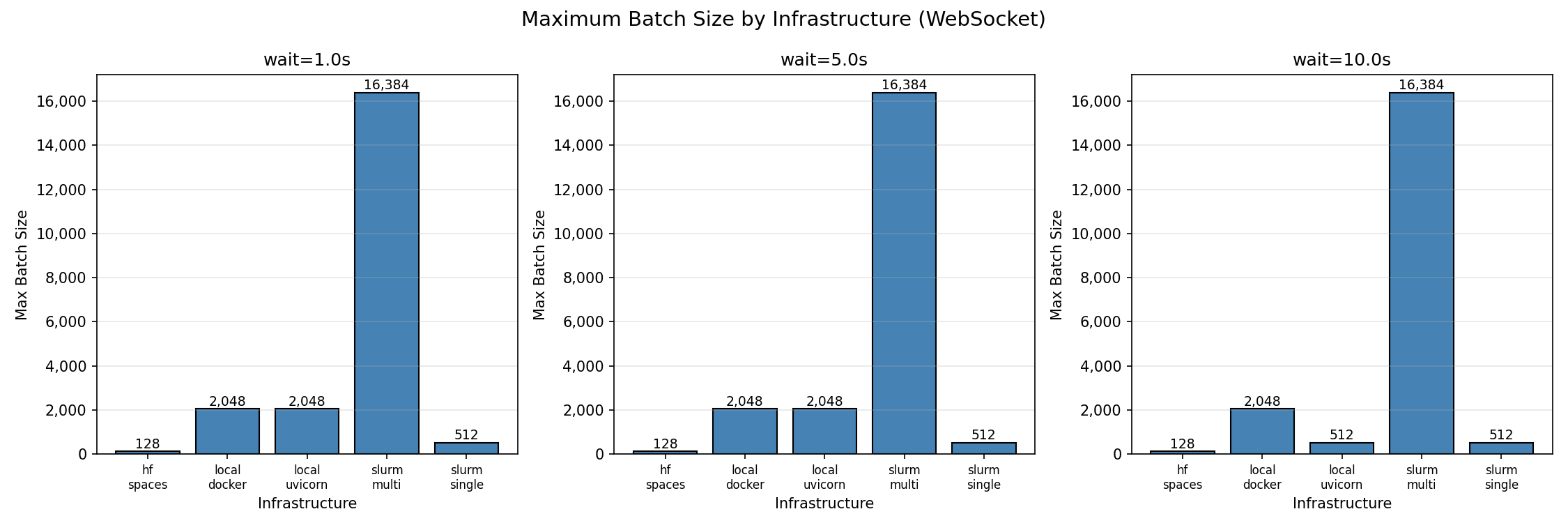
*Maximum batch size by infrastructure (95% success threshold)*
### Finding 1: Local deployments have highest per-core efficiency
Single instance of Python and Docker both achieve **256 concurrent sessions per core**—the highest efficiency observed. With 8 workers, both reach 2,048 concurrent sessions before degradation begins.
This makes sense because the environment is running in a single process and the overhead of the environment is relatively low. But it's ideal for hackers and developers who want to test their environment quickly or train on a single machine.
| Batch Size | Success Rate | P99 Latency | Notes |
|------------|--------------|-------------|-------|
| 32 | 100% | 1.05s | Perfect scaling |
| 128 | 100% | 1.07s | Perfect scaling |
| 512 | 100% | 1.33s | Perfect scaling |
| 2,048 | 96.5% | 1.97s | Max reliable batch |
| 4,096 | 63.8% | 3.20s | Connection failures begin |
| 8,192 | 36.9% | 5.75s | Above capacity |
Beyond 2,048 concurrent connections, success rate drops sharply. The failure mode is connection rejection, not timeout—the server saturates its connection pool.
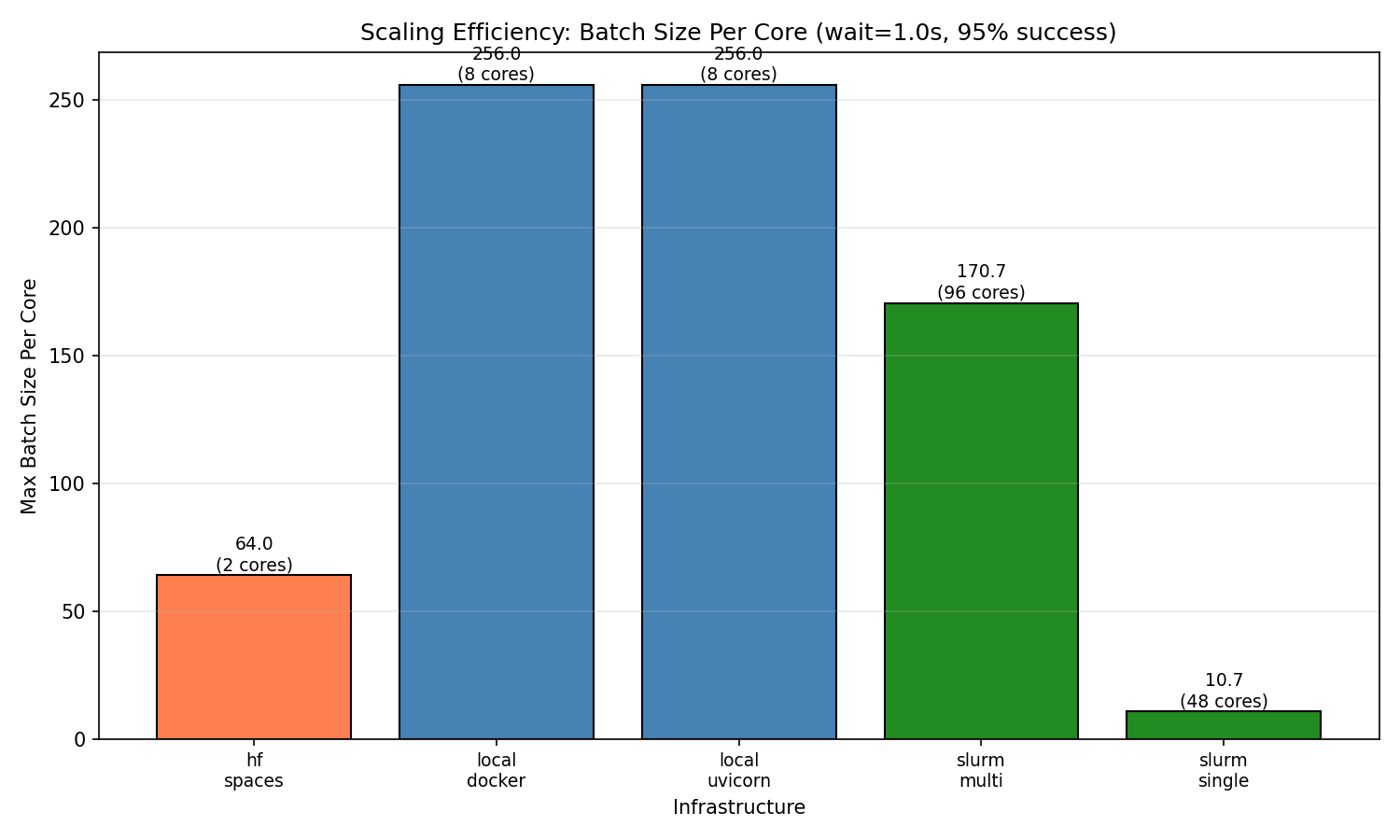
*Per-core efficiency comparison across infrastructures*
### Finding 2: HF Spaces works reliably up to 128 concurrent sessions
HF Spaces free tier (cpu-basic) provides 2 workers and achieves 128 concurrent WebSocket sessions with 100% success. This translates to **64 sessions per core**.
**HF Spaces scaling behavior (WebSocket):**
| Batch Size | Success Rate | P99 Latency | Notes |
|------------|--------------|-------------|-------|
| 1 | 100% | 1.64s | Baseline |
| 32 | 100% | 1.80s | Perfect scaling |
| 64 | 100% | 2.14s | Perfect scaling |
| 128 | 100% | 2.68s | Max reliable batch |
| 256 | ~33% | 4.41s | Inconsistent (some runs 0%, some 100%) |
| 512 | 0% | — | Complete failure |
At 256 concurrent connections, results become unstable. At 512+, connections fail entirely due to HF Spaces connection limits.
**HTTP mode does not work on HF Spaces.** The `/reset` and `/step` HTTP endpoints are not accessible on the deployed Space—all HTTP requests fail. Use WebSocket mode exclusively.
### Finding 3: Multi-node scaling works
Multi-node SLURM (96 cores across 2 nodes) achieves **16,384 concurrent sessions** with 100% success rate—the highest absolute throughput tested.
**SLURM multi-node scaling behavior:**
| Batch Size | Success Rate | P99 Latency | Notes |
|------------|--------------|-------------|-------|
| 32 | 100% | 1.05s | Perfect scaling |
| 512 | 100% | 1.59s | Perfect scaling |
| 2,048 | 100% | 3.48s | Perfect scaling |
| 4,096 | 100% | 6.97s | Perfect scaling |
| 8,192 | 100% | 13.7s | Perfect scaling |
| 16,384 | 100% | 29.8s | Max tested batch |
The batch/core ratio (170.7) is lower than local deployments (256) but provides the highest absolute capacity for large-scale workloads.
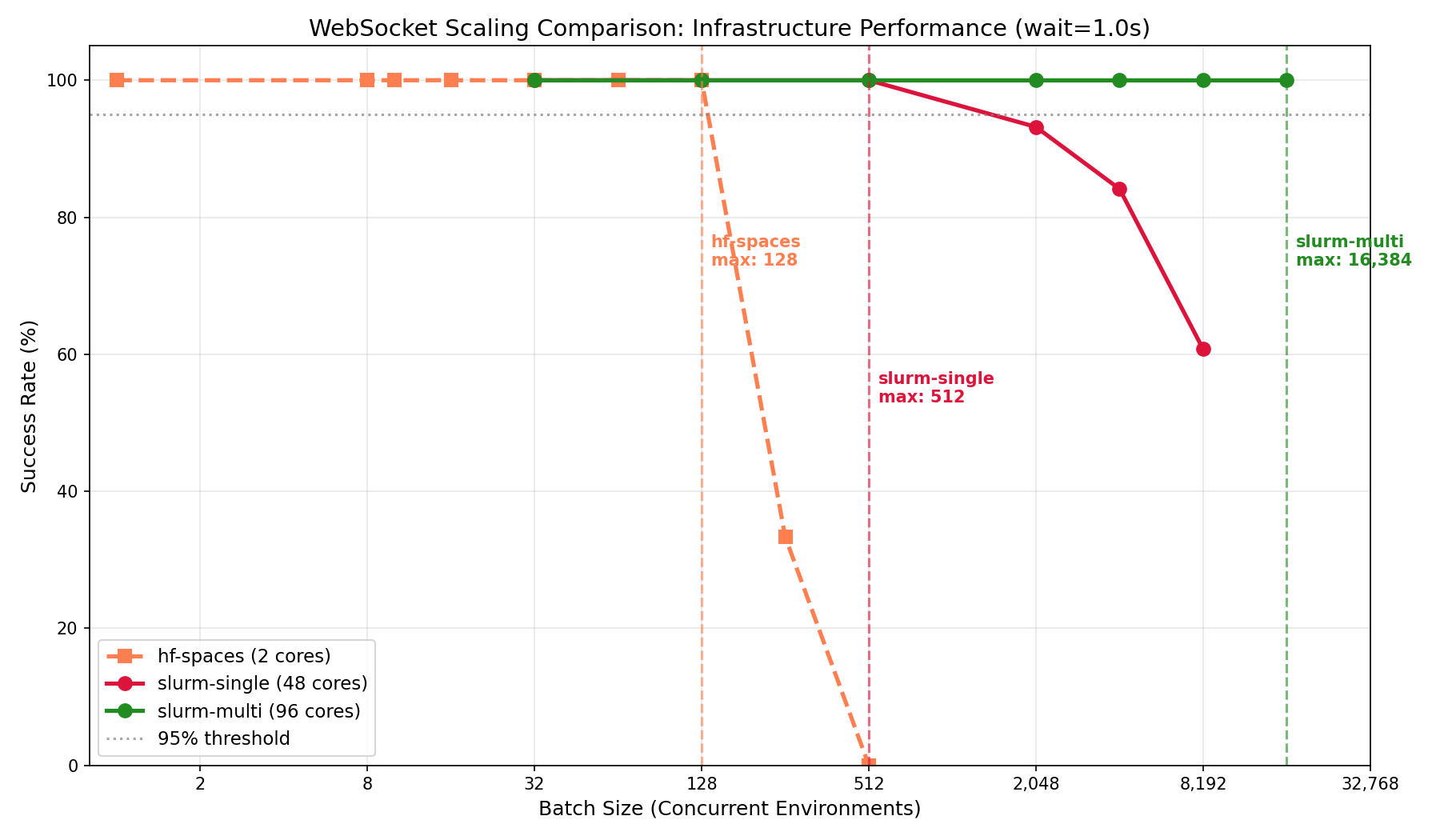
*Multi-node vs single-node scaling behavior*
### Latency breakdown
At max load (`wait=1.0s`), latency breaks down as:
| Infrastructure | Connect P50 | Reset P50 | Step P50 | Total P99 |
|----------------|-------------|-----------|----------|-----------|
| slurm-single | 0.26s | 0.04s | 1.00s | 1.33s |
| local-uvicorn | 0.58s | 0.08s | 1.05s | 1.95s |
| hf-spaces | 0.79s | 0.10s | 1.10s | 2.48s |
| local-docker | 1.38s | 0.19s | 1.05s | 2.90s |
| slurm-multi | 17.5s | 2.25s | 2.42s | 26.3s |
**Observations:**
- **Step latency** is consistent across infrastructures (~1.0s for 1.0s wait), confirming the benchmark measures infrastructure overhead accurately
- **Connect latency** varies significantly—local Docker shows higher connect time at load (1.38s), likely due to container networking
- **Multi-node has high connect latency** (17.5s) at 16,384 batch due to queuing at the load balancer; this is the cost of handling 16× more connections than single-node
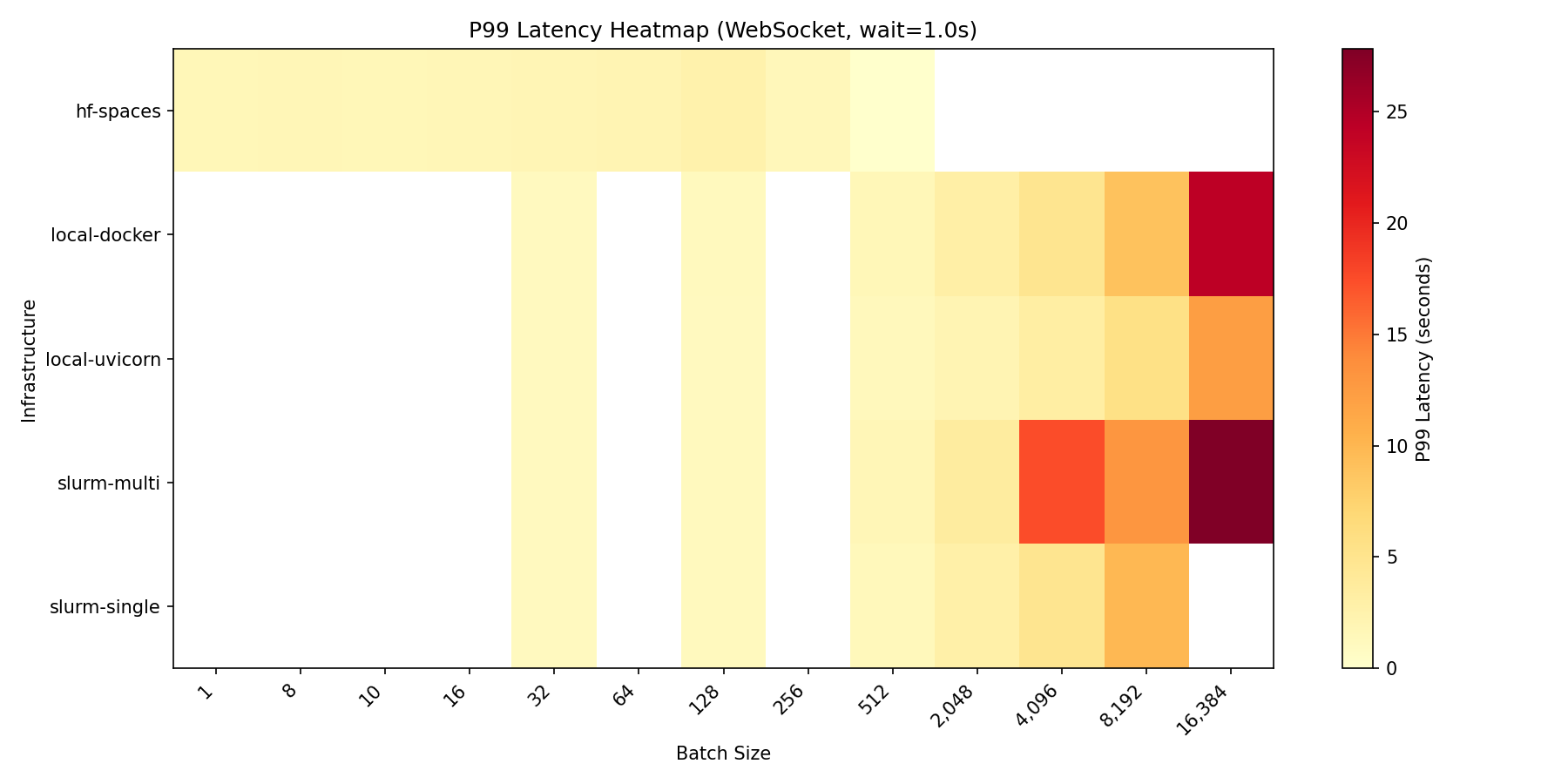
*P99 latency across configurations and batch sizes*
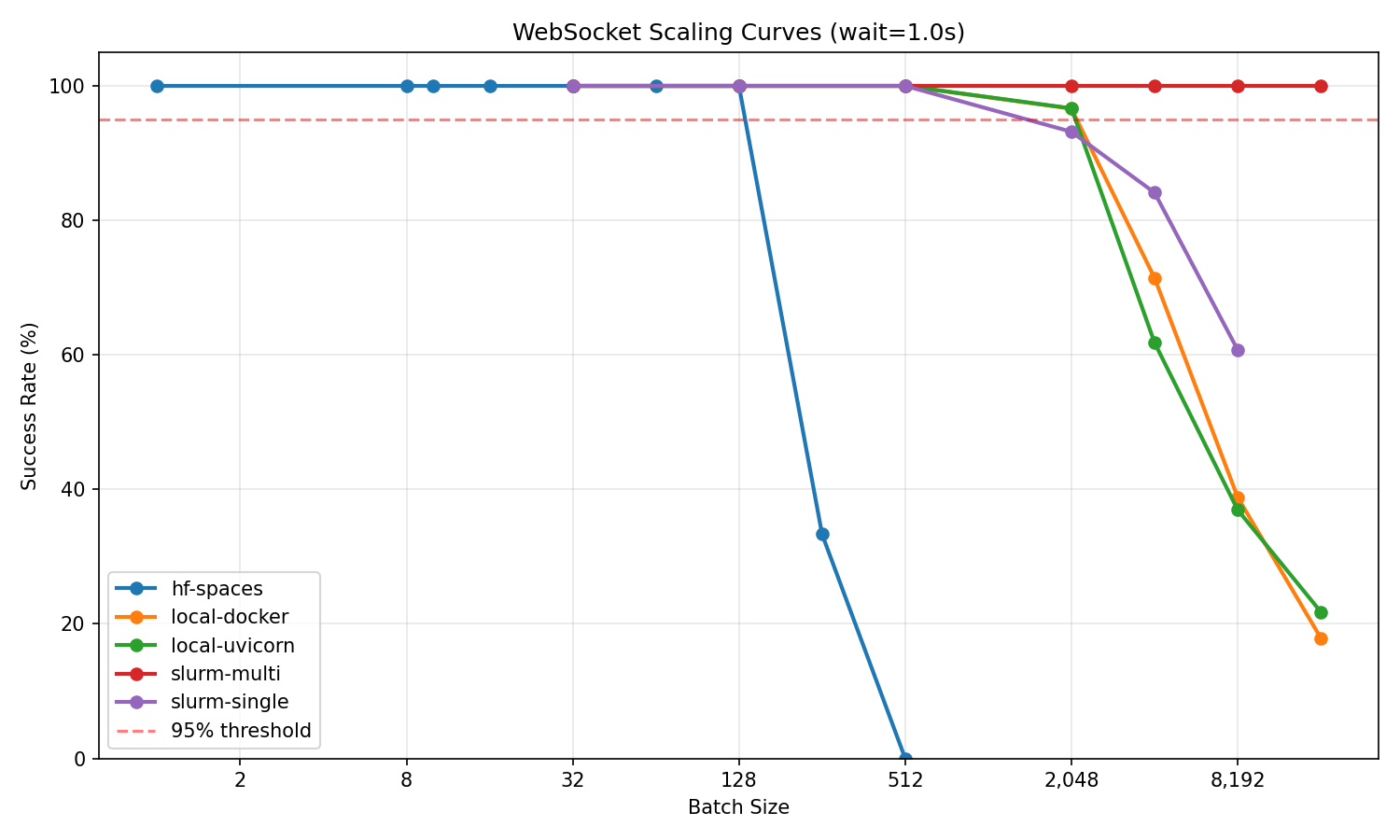
*Success rate vs batch size for all infrastructures*
### Test methodology
```bash
# Clone benchmark environment
git clone https://huggingface.co/spaces/burtenshaw/openenv-scaling
cd openenv-scaling
# Run scaling test
python tests/test_scaling.py \
--url http://localhost:8000 \
--requests-grid 32,128,512,2048,4096,8192,16384 \
--wait-grid 1.0,5.0,10.0 \
--reps 3 \
--mode ws \
--output-dir experiments/results/
```
Each configuration was tested with 3 repetitions. Max batch is defined as the largest batch size achieving ≥95% success rate across all repetitions.
---
## Summary
| Infrastructure | Best for | Max concurrent | Batch/core |
|----------------|----------|----------------|------------|
| local-uvicorn | Development, <2K sessions | 2,048 | 256 |
| local-docker | Same as uvicorn, containerized | 2,048 | 256 |
| hf-spaces | Demos, moderate load | 128 | 64 |
| slurm-single | HPC, single-node jobs | 512 | 10.7 |
| slurm-multi | Large-scale training | 16,384 | 170.7 |
**Recommendations:**
1. **For development and moderate workloads (<2,000 concurrent):** Use single node Uvicorn or Docker depending software environment. These provide the best per-core efficiency (256 sessions/core).
2. **For demos, testing, and published environments:** HF Spaces free tier works reliably up to 128 concurrent sessions.
3. **For large-scale training (>2,000 concurrent):** Deploy multi-node with proper load balancing. Expect ~170 sessions per core, but much higher absolute throughput. |