---
title: AstrBot
emoji: 🤖
colorFrom: blue
colorTo: purple
sdk: docker
sdk_version: "4.0.0"
python_version: "3.12"
app_file: app.py
pinned: false
---

AstrBot is an open-source all-in-one Agent chatbot platform that integrates with mainstream instant messaging apps. It provides reliable and scalable conversational AI infrastructure for individuals, developers, and teams. Whether you're building a personal AI companion, intelligent customer service, automation assistant, or enterprise knowledge base, AstrBot enables you to quickly build production-ready AI applications within your IM platform workflows.

## Key Features
1. 💯 Free & Open Source.
2. ✨ AI LLM Conversations, Multimodal, Agent, MCP, Skills, Knowledge Base, Persona Settings, Auto Context Compression.
3. 🤖 Supports integration with Dify, Alibaba Cloud Bailian, Coze, and other agent platforms.
4. 🌐 Multi-Platform: QQ, WeChat Work, Feishu, DingTalk, WeChat Official Accounts, Telegram, Slack, and [more](#supported-messaging-platforms).
5. 📦 Plugin Extensions with 1000+ plugins available for one-click installation.
6. 🛡️ [Agent Sandbox](https://docs.astrbot.app/use/astrbot-agent-sandbox.html) for isolated, safe execution of code, shell calls, and session-level resource reuse.
7. 💻 WebUI Support.
8. 🌈 Web ChatUI Support with built-in agent sandbox and web search.
9. 🌐 Internationalization (i18n) Support.
| 💙 Role-playing & Emotional Companionship |
✨ Proactive Agent |
🚀 General Agentic Capabilities |
🧩 1000+ Community Plugins |

|

|

|

|
## Quick Start
### One-Click Deployment
For users who want to quickly experience AstrBot, are familiar with command-line usage, and can install a `uv` environment on their own, we recommend the `uv` one-click deployment method ⚡️:
```bash
uv tool install astrbot
astrbot init # Only execute this command for the first time to initialize the environment
astrbot run
```
> Requires [uv](https://docs.astral.sh/uv/) to be installed.
> [!NOTE]
> For macOS user: due to macOS security checks, the first run of the `astrbot` command may take longer (about 10-20s).
Update `astrbot`:
```bash
uv tool upgrade astrbot
```
### Docker Deployment
For users familiar with containers and looking for a more stable, production-ready deployment method, we recommend deploying AstrBot with Docker / Docker Compose.
Please refer to the official documentation: [Deploy AstrBot with Docker](https://astrbot.app/deploy/astrbot/docker.html#%E4%BD%BF%E7%94%A8-docker-%E9%83%A8%E7%BD%B2-astrbot).
### Deploy on RainYun
For users who want one-click deployment and do not want to manage servers themselves, we recommend RainYun's one-click cloud deployment service ☁️:
[](https://app.rainyun.com/apps/rca/store/5994?ref=NjU1ODg0)
### Desktop Application Deployment
For users who want to use AstrBot on desktop and mainly use ChatUI, we recommend AstrBot App.
Visit [AstrBot-desktop](https://github.com/AstrBotDevs/AstrBot-desktop) to download and install; this method is designed for desktop usage and is not recommended for server scenarios.
### Launcher Deployment
For desktop users who also want fast deployment and isolated multi-instance usage, we recommend AstrBot Launcher.
Visit [AstrBot Launcher](https://github.com/Raven95676/astrbot-launcher) to download and install.
### Deploy on Replit
Replit deployment is maintained by the community and is suitable for online demos and lightweight trials.
[](https://repl.it/github/AstrBotDevs/AstrBot)
### AUR
AUR deployment targets Arch Linux users who prefer installing AstrBot through the system package workflow.
Run the command below to install `astrbot-git`, then start AstrBot in your local environment.
```bash
yay -S astrbot-git
```
**More deployment methods**
If you need panel-based management or deeper customization, see [BT-Panel Deployment](https://astrbot.app/deploy/astrbot/btpanel.html) for BT Panel app-store setup, [1Panel Deployment](https://astrbot.app/deploy/astrbot/1panel.html) for 1Panel app-market deployment, [CasaOS Deployment](https://astrbot.app/deploy/astrbot/casaos.html) for NAS/home-server visual deployment, and [Manual Deployment](https://astrbot.app/deploy/astrbot/cli.html) for fully custom source-based installation with `uv`.
## Supported Messaging Platforms
Connect AstrBot to your favorite chat platform.
| Platform | Maintainer |
|---------|---------------|
| QQ | Official |
| OneBot v11 protocol implementation | Official |
| Telegram | Official |
| Wecom & Wecom AI Bot | Official |
| WeChat Official Accounts | Official |
| Feishu (Lark) | Official |
| DingTalk | Official |
| Slack | Official |
| Discord | Official |
| LINE | Official |
| Satori | Official |
| Misskey | Official |
| WhatsApp (Coming Soon) | Official |
| [Matrix](https://github.com/stevessr/astrbot_plugin_matrix_adapter) | Community |
| [KOOK](https://github.com/wuyan1003/astrbot_plugin_kook_adapter) | Community |
| [VoceChat](https://github.com/HikariFroya/astrbot_plugin_vocechat) | Community |
## Supported Model Services
| Service | Type |
|---------|---------------|
| OpenAI and Compatible Services | LLM Services |
| Anthropic | LLM Services |
| Google Gemini | LLM Services |
| Moonshot AI | LLM Services |
| Zhipu AI | LLM Services |
| DeepSeek | LLM Services |
| Ollama (Self-hosted) | LLM Services |
| LM Studio (Self-hosted) | LLM Services |
| [AIHubMix](https://aihubmix.com/?aff=4bfH) | LLM Services (API Gateway, supports all models) |
| [CompShare](https://www.compshare.cn/?ytag=GPU_YY-gh_astrbot&referral_code=FV7DcGowN4hB5UuXKgpE74) | LLM Services |
| [302.AI](https://share.302.ai/rr1M3l) | LLM Services |
| [TokenPony](https://www.tokenpony.cn/3YPyf) | LLM Services |
| [SiliconFlow](https://docs.siliconflow.cn/cn/usercases/use-siliconcloud-in-astrbot) | LLM Services |
| [PPIO Cloud](https://ppio.com/user/register?invited_by=AIOONE) | LLM Services |
| ModelScope | LLM Services |
| OneAPI | LLM Services |
| Dify | LLMOps Platforms |
| Alibaba Cloud Bailian Applications | LLMOps Platforms |
| Coze | LLMOps Platforms |
| OpenAI Whisper | Speech-to-Text Services |
| SenseVoice | Speech-to-Text Services |
| OpenAI TTS | Text-to-Speech Services |
| Gemini TTS | Text-to-Speech Services |
| GPT-Sovits-Inference | Text-to-Speech Services |
| GPT-Sovits | Text-to-Speech Services |
| FishAudio | Text-to-Speech Services |
| Edge TTS | Text-to-Speech Services |
| Alibaba Cloud Bailian TTS | Text-to-Speech Services |
| Azure TTS | Text-to-Speech Services |
| Minimax TTS | Text-to-Speech Services |
| Volcano Engine TTS | Text-to-Speech Services |
## ❤️ Sponsors

## ❤️ Contributing
Issues and Pull Requests are always welcome! Feel free to submit your changes to this project :)
### How to Contribute
You can contribute by reviewing issues or helping with pull request reviews. Any issues or PRs are welcome to encourage community participation. Of course, these are just suggestions—you can contribute in any way you like. For adding new features, please discuss through an Issue first.
### Development Environment
AstrBot uses `ruff` for code formatting and linting.
```bash
git clone https://github.com/AstrBotDevs/AstrBot
pip install pre-commit
pre-commit install
```
## 🌍 Community
### QQ Groups
- Group 9: 1076659624 (New)
- Group 10: 1078079676 (New)
- Group 1: 322154837
- Group 3: 630166526
- Group 5: 822130018
- Group 6: 753075035
- Group 7: 743746109
- Group 8: 1030353265
- Developer Group(Chit-chat): 975206796
- Developer Group(Formal): 1039761811
### Discord Server
 ## ❤️ Special Thanks
Special thanks to all Contributors and plugin developers for their contributions to AstrBot ❤️
## ❤️ Special Thanks
Special thanks to all Contributors and plugin developers for their contributions to AstrBot ❤️
 Additionally, the birth of this project would not have been possible without the help of the following open-source projects:
- [NapNeko/NapCatQQ](https://github.com/NapNeko/NapCatQQ) - The amazing cat framework
## ⭐ Star History
> [!TIP]
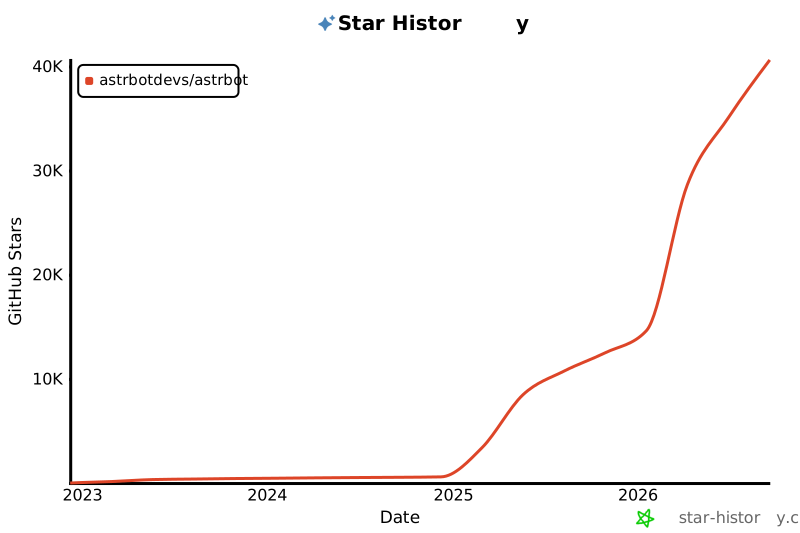
> If this project has helped you in your life or work, or if you're interested in its future development, please give the project a Star. It's the driving force behind maintaining this open-source project <3
Additionally, the birth of this project would not have been possible without the help of the following open-source projects:
- [NapNeko/NapCatQQ](https://github.com/NapNeko/NapCatQQ) - The amazing cat framework
## ⭐ Star History
> [!TIP]
> If this project has helped you in your life or work, or if you're interested in its future development, please give the project a Star. It's the driving force behind maintaining this open-source project <3
[](https://star-history.com/#astrbotdevs/astrbot&Date)
_Companionship and capability should never be at odds. What we aim to create is a robot that can understand emotions, provide genuine companionship, and reliably accomplish tasks._
_私は、高性能ですから!_