

File size: 1,860 Bytes
8ede856 | 1 2 3 4 5 6 7 8 9 10 11 12 13 14 15 16 17 18 19 20 21 22 23 24 25 26 27 28 29 30 31 32 33 34 35 36 37 38 39 40 41 42 43 44 45 46 47 48 49 |
# 开发环境准备
## 获取插件模板
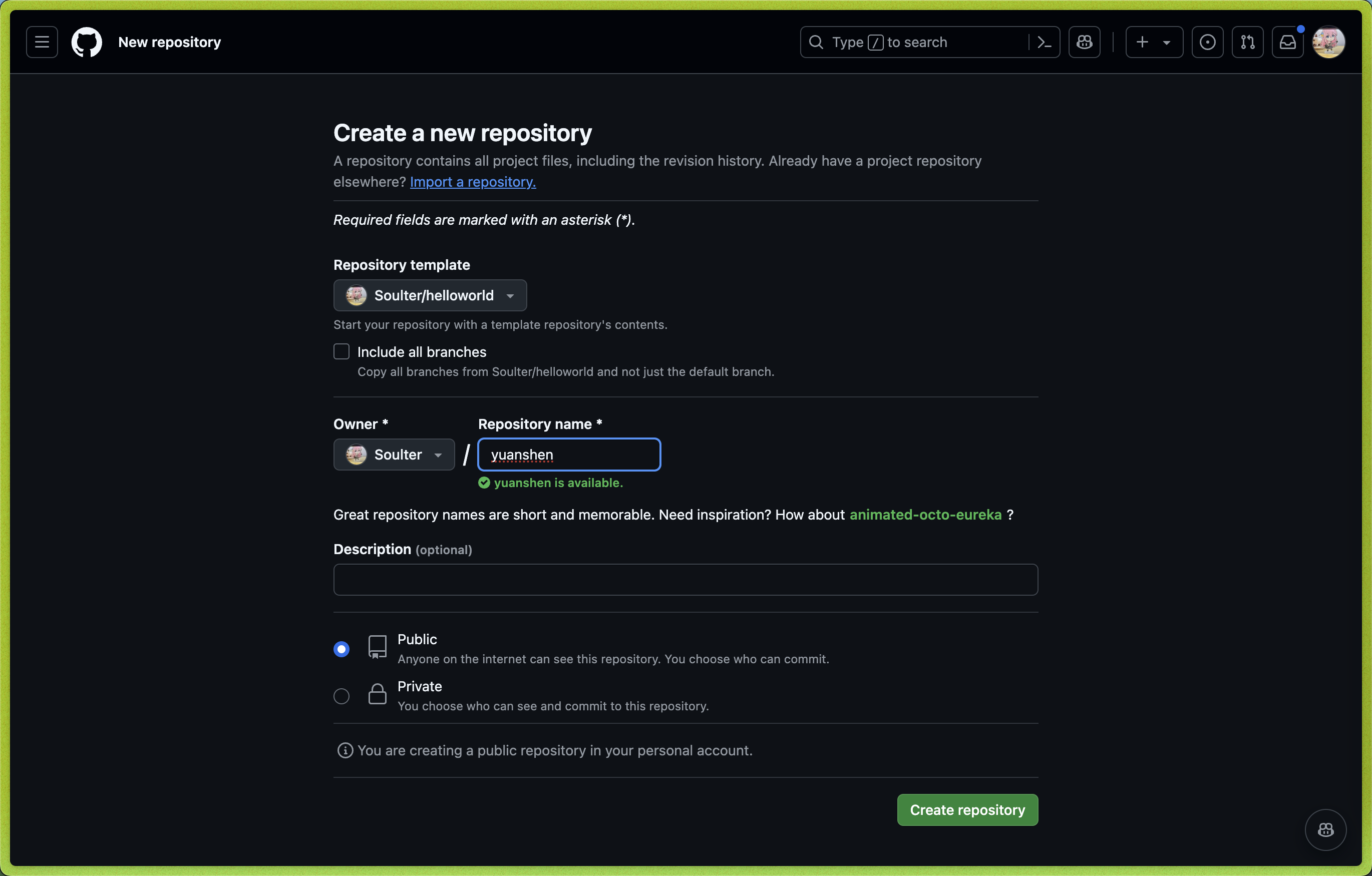
1. 打开 AstrBot 插件模板: [helloworld](https://github.com/Soulter/helloworld)
2. 点击右上角的 `Use this template`
3. 然后点击 `Create new repository`。
4. 在 `Repository name` 处填写您的插件名。插件名格式:
- 推荐以 `astrbot_plugin_` 开头;
- 不能包含空格;
- 保持全部字母小写;
- 尽量简短。
5. 点击右下角的 `Create repository`。
## Clone 插件和 AstrBot 项目
Clone AstrBot 项目本体和刚刚创建的插件仓库到本地。
```bash
git clone https://github.com/AstrBotDevs/AstrBot
mkdir -p AstrBot/data/plugins
cd AstrBot/data/plugins
git clone 插件仓库地址
```
然后,使用 `VSCode` 打开 `AstrBot` 项目。找到 `data/plugins/<你的插件名字>` 目录。
更新 `metadata.yaml` 文件,填写插件的元数据信息。
> [!NOTE]
> AstrBot 插件市场的信息展示依赖于 `metadata.yaml` 文件。
## 调试插件
AstrBot 采用在运行时注入插件的机制。因此,在调试插件时,需要启动 AstrBot 本体。
您可以使用 AstrBot 的热重载功能简化开发流程。
插件的代码修改后,可以在 AstrBot WebUI 的插件管理处找到自己的插件,点击右上角 `...` 按钮,选择 `重载插件`。
## 插件依赖管理
目前 AstrBot 对插件的依赖管理使用 `pip` 自带的 `requirements.txt` 文件。如果你的插件需要依赖第三方库,请务必在插件目录下创建 `requirements.txt` 文件并写入所使用的依赖库,以防止用户在安装你的插件时出现依赖未找到(Module Not Found)的问题。
> `requirements.txt` 的完整格式可以参考 [pip 官方文档](https://pip.pypa.io/en/stable/reference/requirements-file-format/)。
|