

File size: 15,958 Bytes
8ede856 | 1 2 3 4 5 6 7 8 9 10 11 12 13 14 15 16 17 18 19 20 21 22 23 24 25 26 27 28 29 30 31 32 33 34 35 36 37 38 39 40 41 42 43 44 45 46 47 48 49 50 51 52 53 54 55 56 57 58 59 60 61 62 63 64 65 66 67 68 69 70 71 72 73 74 75 76 77 78 79 80 81 82 83 84 85 86 87 88 89 90 91 92 93 94 95 96 97 98 99 100 101 102 103 104 105 106 107 108 109 110 111 112 113 114 115 116 117 118 119 120 121 122 123 124 125 126 127 128 129 130 131 132 133 134 135 136 137 138 139 140 141 142 143 144 145 146 147 148 149 150 151 152 153 154 155 156 157 158 159 160 161 162 163 164 165 166 167 168 169 170 171 172 173 174 175 176 177 178 179 180 181 182 183 184 185 186 187 188 189 190 191 192 193 194 195 196 197 198 199 200 201 202 203 204 205 206 207 208 209 210 211 212 213 214 215 216 217 218 219 220 221 222 223 224 225 226 227 228 229 230 231 232 233 234 235 236 237 238 239 240 241 242 243 244 245 246 247 248 249 250 251 252 253 254 255 256 257 258 259 260 261 262 263 264 265 266 267 268 269 270 271 272 273 274 275 276 277 278 279 280 281 282 283 284 285 286 287 288 289 290 291 292 293 294 295 296 297 298 299 300 301 302 303 304 305 306 307 308 309 310 311 312 313 314 315 316 317 318 319 320 321 322 323 324 325 326 327 328 329 330 331 332 333 334 335 336 337 338 339 340 341 342 343 344 345 346 347 348 349 350 351 352 353 354 355 356 357 358 359 360 361 362 363 364 365 366 367 368 369 370 371 372 373 374 375 376 377 378 379 380 381 382 383 384 385 386 387 388 389 390 391 392 393 394 395 396 397 398 399 400 401 402 403 404 405 406 407 408 409 410 411 412 413 414 415 416 417 418 419 420 421 422 423 424 425 426 427 428 429 430 431 432 433 434 435 436 437 438 439 440 441 442 443 444 445 446 447 448 449 450 451 452 453 454 455 456 457 458 459 460 461 462 463 464 465 466 467 468 469 470 471 472 473 474 475 476 477 478 479 480 481 482 483 484 485 486 487 488 489 490 |
# AI
AstrBot provides built-in support for multiple Large Language Model (LLM) providers and offers a unified interface, making it convenient for plugin developers to access various LLM services.
You can use the LLM / Agent interfaces provided by AstrBot to implement your own intelligent agents.
Starting from version `v4.5.7`, we've made significant improvements to the way LLM providers are invoked. We recommend using the new approach, which is more concise and supports additional features. The legacy invocation method remains documented in the previous Chinese-only guide.
## Getting the Chat Model ID for the Current Session
> [!TIP]
> Added in v4.5.7
```py
umo = event.unified_msg_origin
provider_id = await self.context.get_current_chat_provider_id(umo=umo)
```
## Invoking Large Language Models
> [!TIP]
> Added in v4.5.7
```py
llm_resp = await self.context.llm_generate(
chat_provider_id=provider_id, # Chat model ID
prompt="Hello, world!",
)
# print(llm_resp.completion_text) # Get the returned text
```
## Defining Tools
Tools enable large language models to invoke external capabilities.
```py
from pydantic import Field
from pydantic.dataclasses import dataclass
from astrbot.core.agent.run_context import ContextWrapper
from astrbot.core.agent.tool import FunctionTool, ToolExecResult
from astrbot.core.astr_agent_context import AstrAgentContext
@dataclass
class BilibiliTool(FunctionTool[AstrAgentContext]):
name: str = "bilibili_videos" # Tool name
description: str = "A tool to fetch Bilibili videos." # Tool description
parameters: dict = Field(
default_factory=lambda: {
"type": "object",
"properties": {
"keywords": {
"type": "string",
"description": "Keywords to search for Bilibili videos.",
},
},
"required": ["keywords"],
}
)
async def call(
self, context: ContextWrapper[AstrAgentContext], **kwargs
) -> ToolExecResult:
return "1. Video Title: How to Use AstrBot\nVideo Link: xxxxxx"
```
## Invoking Agents
> [!TIP]
> Added in v4.5.7
An Agent can be defined as a combination of system_prompt + tools + llm, enabling more sophisticated intelligent behavior.
After defining the Tool above, you can invoke an Agent as follows:
```py
llm_resp = await self.context.tool_loop_agent(
event=event,
chat_provider_id=prov_id,
prompt="Search for videos related to AstrBot on Bilibili.",
tools=ToolSet([BilibiliTool()]),
max_steps=30, # Maximum agent execution steps
tool_call_timeout=60, # Tool invocation timeout
)
# print(llm_resp.completion_text) # Get the returned text
```
`tool_loop_agent()` method automatically handles the loop of tool invocations and LLM requests until the model stops calling tools or the maximum number of steps is reached.
## Multi-Agent
> [!TIP]
> Added in v4.5.7
Multi-Agent systems decompose complex applications into multiple specialized agents that collaborate to solve problems. Unlike relying on a single agent to handle every step, multi-agent architectures allow smaller, more focused agents to be composed into coordinated workflows. We implement multi-agent systems using the `agent-as-tool` pattern.
In the example below, we define a Main Agent responsible for delegating tasks to different Sub-Agents based on user queries. Each Sub-Agent focuses on specific tasks, such as retrieving weather information.
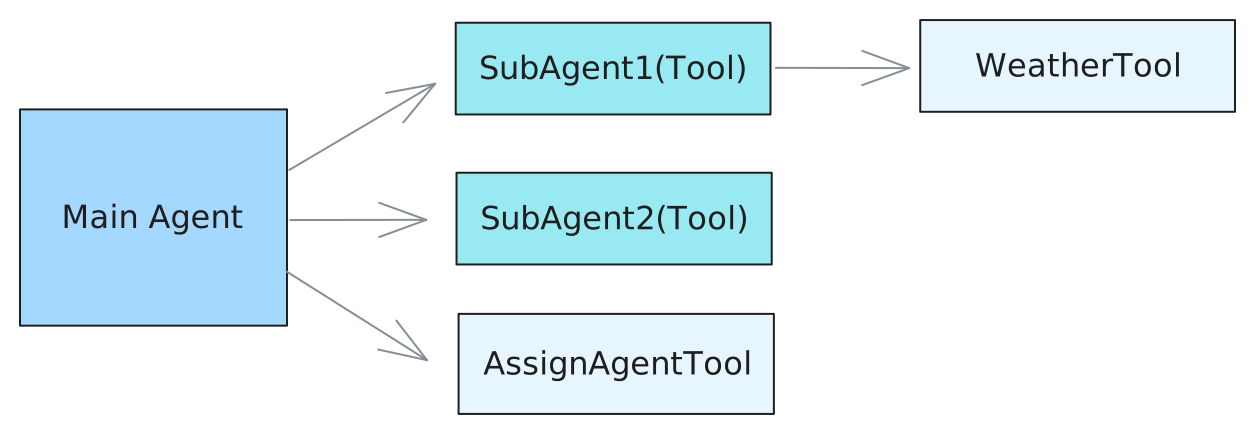
Define Tools:
```py
@dataclass
class AssignAgentTool(FunctionTool[AstrAgentContext]):
"""Main agent uses this tool to decide which sub-agent to delegate a task to."""
name: str = "assign_agent"
description: str = "Assign an agent to a task based on the given query"
parameters: dict = field(
default_factory=lambda: {
"type": "object",
"properties": {
"query": {
"type": "string",
"description": "The query to call the sub-agent with.",
},
},
"required": ["query"],
}
)
async def call(
self, context: ContextWrapper[AstrAgentContext], **kwargs
) -> str | CallToolResult:
# Here you would implement the actual agent assignment logic.
# For demonstration purposes, we'll return a dummy response.
return "Based on the query, you should assign agent 1."
@dataclass
class WeatherTool(FunctionTool[AstrAgentContext]):
"""In this example, sub agent 1 uses this tool to get weather information."""
name: str = "weather"
description: str = "Get weather information for a location"
parameters: dict = field(
default_factory=lambda: {
"type": "object",
"properties": {
"city": {
"type": "string",
"description": "The city to get weather information for.",
},
},
"required": ["city"],
}
)
async def call(
self, context: ContextWrapper[AstrAgentContext], **kwargs
) -> str | CallToolResult:
city = kwargs["city"]
# Here you would implement the actual weather fetching logic.
# For demonstration purposes, we'll return a dummy response.
return f"The current weather in {city} is sunny with a temperature of 25°C."
@dataclass
class SubAgent1(FunctionTool[AstrAgentContext]):
"""Define a sub-agent as a function tool."""
name: str = "subagent1_name"
description: str = "subagent1_description"
parameters: dict = field(
default_factory=lambda: {
"type": "object",
"properties": {
"query": {
"type": "string",
"description": "The query to call the sub-agent with.",
},
},
"required": ["query"],
}
)
async def call(
self, context: ContextWrapper[AstrAgentContext], **kwargs
) -> str | CallToolResult:
ctx = context.context.context
event = context.context.event
logger.info(f"the llm context messages: {context.messages}")
llm_resp = await ctx.tool_loop_agent(
event=event,
chat_provider_id=await ctx.get_current_chat_provider_id(
event.unified_msg_origin
),
prompt=kwargs["query"],
tools=ToolSet([WeatherTool()]),
max_steps=30,
)
return llm_resp.completion_text
@dataclass
class SubAgent2(FunctionTool[AstrAgentContext]):
"""Define a sub-agent as a function tool."""
name: str = "subagent2_name"
description: str = "subagent2_description"
parameters: dict = field(
default_factory=lambda: {
"type": "object",
"properties": {
"query": {
"type": "string",
"description": "The query to call the sub-agent with.",
},
},
"required": ["query"],
}
)
async def call(
self, context: ContextWrapper[AstrAgentContext], **kwargs
) -> str | CallToolResult:
return "I am useless :(, you shouldn't call me :("
```
Then, similarly, invoke the Agent using the `tool_loop_agent()` method:
```py
@filter.command("test")
async def test(self, event: AstrMessageEvent):
umo = event.unified_msg_origin
prov_id = await self.context.get_current_chat_provider_id(umo)
llm_resp = await self.context.tool_loop_agent(
event=event,
chat_provider_id=prov_id,
prompt="Test calling sub-agent for Beijing's weather information.",
system_prompt=(
"You are the main agent. Your task is to delegate tasks to sub-agents based on user queries."
"Before delegating, use the 'assign_agent' tool to determine which sub-agent is best suited for the task."
),
tools=ToolSet([SubAgent1(), SubAgent2(), AssignAgentTool()]),
max_steps=30,
)
yield event.plain_result(llm_resp.completion_text)
```
## Conversation Manager
### Getting the Current LLM Conversation History for a Session
```py
from astrbot.core.conversation_mgr import Conversation
uid = event.unified_msg_origin
conv_mgr = self.context.conversation_manager
curr_cid = await conv_mgr.get_curr_conversation_id(uid)
conversation = await conv_mgr.get_conversation(uid, curr_cid) # Conversation
```
::: details Conversation 类型定义
```py
@dataclass
class Conversation:
"""The conversation entity representing a chat session."""
platform_id: str
"""The platform ID in AstrBot"""
user_id: str
"""The user ID associated with the conversation."""
cid: str
"""The conversation ID, in UUID format."""
history: str = ""
"""The conversation history as a string."""
title: str | None = ""
"""The title of the conversation. For now, it's only used in WebChat."""
persona_id: str | None = ""
"""The persona ID associated with the conversation."""
created_at: int = 0
"""The timestamp when the conversation was created."""
updated_at: int = 0
"""The timestamp when the conversation was last updated."""
```
:::
### Main Methods
#### `new_conversation`
- **Usage**
Create a new conversation in the current session and automatically switch to it.
- **Arguments**
- `unified_msg_origin: str` – In the format `platform_name:message_type:session_id`
- `platform_id: str | None` – Platform identifier, defaults to parsing from `unified_msg_origin`
- `content: list[dict] | None` – Initial message history
- `title: str | None` – Conversation title
- `persona_id: str | None` – Associated persona ID
- **Returns**
`str` – Newly generated UUID conversation ID
#### `switch_conversation`
- **Usage**
Switch the session to a specified conversation.
- **Arguments**
- `unified_msg_origin: str`
- `conversation_id: str`
- **Returns**
`None`
#### `delete_conversation`
- **Usage**
Delete a conversation from the session; if `conversation_id` is `None`, deletes the current conversation.
- **Arguments**
- `unified_msg_origin: str`
- `conversation_id: str | None`
- **Returns**
`None`
#### `get_curr_conversation_id`
- **Usage**
Get the conversation ID currently in use by the session.
- **Arguments**
- `unified_msg_origin: str`
- **Returns**
`str | None` – Current conversation ID, returns `None` if it doesn't exist
#### `get_conversation`
- **Usage**
Get the complete object for a specified conversation; automatically creates it if it doesn't exist and `create_if_not_exists=True`.
- **Arguments**
- `unified_msg_origin: str`
- `conversation_id: str`
- `create_if_not_exists: bool = False`
- **Returns**
`Conversation | None`
#### `get_conversations`
- **Usage**
Retrieve the complete list of conversations for a user or platform.
- **Arguments**
- `unified_msg_origin: str | None` – When `None`, does not filter by user
- `platform_id: str | None`
- **Returns**
`List[Conversation]`
#### `update_conversation`
- **Usage**
Update the title, history, or persona_id of a conversation.
- **Arguments**
- `unified_msg_origin: str`
- `conversation_id: str | None` – Uses the current conversation when `None`
- `history: list[dict] | None`
- `title: str | None`
- `persona_id: str | None`
- **Returns**
`None`
## Persona Manager
`PersonaManager` is responsible for unified loading, caching, and providing CRUD interfaces for all Personas, while maintaining compatibility with the legacy persona format (v3) from before AstrBot 4.x.
During initialization, it automatically reads all personas from the database and generates v3-compatible data for seamless use with legacy code.
```py
persona_mgr = self.context.persona_manager
```
### Main Methods
#### `get_persona`
- **Usage**
Get persona data by persona ID.
- **Arguments**
- `persona_id: str` – Persona ID
- **Returns**
`Persona` – Persona data, returns None if it doesn't exist
- **Raises**
`ValueError` – Raised when it doesn't exist
#### `get_all_personas`
- **Usage**
Retrieve all personas from the database at once.
- **Returns**
`list[Persona]` – Persona list, may be empty
#### `create_persona`
- **Usage**
Create a new persona and immediately write it to the database; automatically refreshes the local cache upon success.
- **Arguments**
- `persona_id: str` – New persona ID (unique)
- `system_prompt: str` – System prompt
- `begin_dialogs: list[str]` – Optional, opening dialogs (even number of entries, alternating user/assistant)
- `tools: list[str]` – Optional, list of allowed tools; `None`=all tools, `[]`=disable all
- **Returns**
`Persona` – Newly created persona object
- **Raises**
`ValueError` – If `persona_id` already exists
#### `update_persona`
- **Usage**
Update any fields of an existing persona and synchronize to database and cache.
- **Arguments**
- `persona_id: str` – Persona ID to update
- `system_prompt: str` – Optional, new system prompt
- `begin_dialogs: list[str]` – Optional, new opening dialogs
- `tools: list[str]` – Optional, new tool list; semantics same as `create_persona`
- **Returns**
`Persona` – Updated persona object
- **Raises**
`ValueError` – If `persona_id` doesn't exist
#### `delete_persona`
- **Usage**
Delete the specified persona and clean up both database and cache.
- **Arguments**
- `persona_id: str` – Persona ID to delete
- **Raises**
`ValueError` – If `persona_id` doesn't exist
#### `get_default_persona_v3`
- **Usage**
Get the default persona (v3 format) to use based on the current session configuration.
Falls back to `DEFAULT_PERSONALITY` if configuration doesn't specify one or the specified persona doesn't exist.
- **Arguments**
- `umo: str | MessageSession | None` – Session identifier, used to read user-level configuration
- **Returns**
`Personality` – Default persona object in v3 format
::: details Persona / Personality 类型定义
```py
class Persona(SQLModel, table=True):
"""Persona is a set of instructions for LLMs to follow.
It can be used to customize the behavior of LLMs.
"""
__tablename__ = "personas"
id: int = Field(primary_key=True, sa_column_kwargs={"autoincrement": True})
persona_id: str = Field(max_length=255, nullable=False)
system_prompt: str = Field(sa_type=Text, nullable=False)
begin_dialogs: Optional[list] = Field(default=None, sa_type=JSON)
"""a list of strings, each representing a dialog to start with"""
tools: Optional[list] = Field(default=None, sa_type=JSON)
"""None means use ALL tools for default, empty list means no tools, otherwise a list of tool names."""
created_at: datetime = Field(default_factory=lambda: datetime.now(timezone.utc))
updated_at: datetime = Field(
default_factory=lambda: datetime.now(timezone.utc),
sa_column_kwargs={"onupdate": datetime.now(timezone.utc)},
)
__table_args__ = (
UniqueConstraint(
"persona_id",
name="uix_persona_id",
),
)
class Personality(TypedDict):
"""LLM Persona class.
Starting from v4.0.0 and later, it's recommended to use the Persona class above. Additionally, the mood_imitation_dialogs field has been deprecated.
"""
prompt: str
name: str
begin_dialogs: list[str]
mood_imitation_dialogs: list[str]
"""Mood imitation dialog preset. Deprecated since v4.0.0 and later."""
tools: list[str] | None
"""Tool list. None means use all tools, empty list means don't use any tools"""
```
:::
|