

File size: 11,712 Bytes
d439dc1 | 1 2 3 4 5 6 7 8 9 10 11 12 13 14 15 16 17 18 19 20 21 22 23 24 25 26 27 28 29 30 31 32 33 34 35 36 37 38 39 40 41 42 43 44 45 46 47 48 49 50 51 52 53 54 55 56 57 58 59 60 61 62 63 64 65 66 67 68 69 70 71 72 73 74 75 76 77 78 79 80 81 82 83 84 85 86 87 88 89 90 91 92 93 94 95 96 97 98 99 100 101 102 103 104 105 106 107 108 109 110 111 112 113 114 115 116 117 118 119 120 121 122 123 124 125 126 127 128 129 130 131 132 133 134 135 136 137 138 139 140 141 142 143 144 145 146 147 148 149 150 151 152 153 154 155 156 157 158 159 160 161 162 163 164 165 166 167 168 169 170 171 172 173 174 175 176 177 178 179 180 181 182 183 184 185 186 187 188 189 190 191 192 193 194 195 196 197 198 199 200 201 202 203 204 205 206 207 208 209 210 211 212 213 214 215 216 217 218 219 220 221 222 223 224 225 226 227 228 229 230 231 232 233 234 235 236 237 238 239 240 241 242 243 244 245 246 | # 15 minutes to get started with MMEngine
In this tutorial, we'll take training a ResNet-50 model on CIFAR-10 dataset as an example. We will build a complete and configurable pipeline for both training and validation in only 80 lines of code with `MMEgnine`.
The whole process includes the following steps:
1. [Build a Model](#build-a-model)
2. [Build a Dataset and DataLoader](#build-a-dataset-and-dataloader)
3. [Build a Evaluation Metrics](#build-a-evaluation-metrics)
4. [Build a Runner and Run the Task](#build-a-runner-and-run-the-task)
## Build a Model
First, we need to build a **model**. In MMEngine, the model should inherit from `BaseModel`. Aside from parameters representing inputs from the dataset, its `forward` method needs to accept an extra argument called `mode`:
- for training, the value of `mode` is "loss," and the `forward` method should return a `dict` containing the key "loss".
- for validation, the value of `mode` is "predict", and the forward method should return results containing both predictions and labels.
```python
import torch.nn.functional as F
import torchvision
from mmengine.model import BaseModel
class MMResNet50(BaseModel):
def __init__(self):
super().__init__()
self.resnet = torchvision.models.resnet50()
def forward(self, imgs, labels, mode):
x = self.resnet(imgs)
if mode == 'loss':
return {'loss': F.cross_entropy(x, labels)}
elif mode == 'predict':
return x, labels
```
## Build a Dataset and DataLoader
Next, we need to create **Dataset** and **DataLoader** for training and validation.
For basic training and validation, we can simply use built-in datasets supported in TorchVision.
```python
import torchvision.transforms as transforms
from torch.utils.data import DataLoader
norm_cfg = dict(mean=[0.491, 0.482, 0.447], std=[0.202, 0.199, 0.201])
train_dataloader = DataLoader(batch_size=32,
shuffle=True,
dataset=torchvision.datasets.CIFAR10(
'data/cifar10',
train=True,
download=True,
transform=transforms.Compose([
transforms.RandomCrop(32, padding=4),
transforms.RandomHorizontalFlip(),
transforms.ToTensor(),
transforms.Normalize(**norm_cfg)
])))
val_dataloader = DataLoader(batch_size=32,
shuffle=False,
dataset=torchvision.datasets.CIFAR10(
'data/cifar10',
train=False,
download=True,
transform=transforms.Compose([
transforms.ToTensor(),
transforms.Normalize(**norm_cfg)
])))
```
## Build a Evaluation Metrics
To validate and test the model, we need to define a **Metric** called accuracy to evaluate the model. This metric needs inherit from `BaseMetric` and implements the `process` and `compute_metrics` methods where the `process` method accepts the output of the dataset and other outputs when `mode="predict"`. The output data at this scenario is a batch of data. After processing this batch of data, we save the information to `self.results` property.
`compute_metrics` accepts a `results` parameter. The input `results` of `compute_metrics` is all the information saved in `process` (In the case of a distributed environment, `results` are the information collected from all `process` in all the processes). Use these information to calculate and return a `dict` that holds the results of the evaluation metrics
```python
from mmengine.evaluator import BaseMetric
class Accuracy(BaseMetric):
def process(self, data_batch, data_samples):
score, gt = data_samples
# save the middle result of a batch to `self.results`
self.results.append({
'batch_size': len(gt),
'correct': (score.argmax(dim=1) == gt).sum().cpu(),
})
def compute_metrics(self, results):
total_correct = sum(item['correct'] for item in results)
total_size = sum(item['batch_size'] for item in results)
# return the dict containing the eval results
# the key is the name of the metric name
return dict(accuracy=100 * total_correct / total_size)
```
## Build a Runner and Run the Task
Now we can build a **Runner** with previously defined `Model`, `DataLoader`, and `Metrics`, and some other configs shown as follows:
```python
from torch.optim import SGD
from mmengine.runner import Runner
runner = Runner(
# the model used for training and validation.
# Needs to meet specific interface requirements
model=MMResNet50(),
# working directory which saves training logs and weight files
work_dir='./work_dir',
# train dataloader needs to meet the PyTorch data loader protocol
train_dataloader=train_dataloader,
# optimize wrapper for optimization with additional features like
# AMP, gradtient accumulation, etc
optim_wrapper=dict(optimizer=dict(type=SGD, lr=0.001, momentum=0.9)),
# trainging coinfs for specifying training epoches, verification intervals, etc
train_cfg=dict(by_epoch=True, max_epochs=5, val_interval=1),
# validation dataloaer also needs to meet the PyTorch data loader protocol
val_dataloader=val_dataloader,
# validation configs for specifying additional parameters required for validation
val_cfg=dict(),
# validation evaluator. The default one is used here
val_evaluator=dict(type=Accuracy),
)
runner.train()
```
Finally, let's put all the codes above together into a complete script that uses the `MMEngine` executor for training and validation:
<a href="https://colab.research.google.com/github/open-mmlab/mmengine/blob/main/docs/zh_cn/tutorials/get_started.ipynb" target="_parent"><img src="https://colab.research.google.com/assets/colab-badge.svg" alt="Open in Colab"/></a>
```python
import torch.nn.functional as F
import torchvision
import torchvision.transforms as transforms
from torch.optim import SGD
from torch.utils.data import DataLoader
from mmengine.evaluator import BaseMetric
from mmengine.model import BaseModel
from mmengine.runner import Runner
class MMResNet50(BaseModel):
def __init__(self):
super().__init__()
self.resnet = torchvision.models.resnet50()
def forward(self, imgs, labels, mode):
x = self.resnet(imgs)
if mode == 'loss':
return {'loss': F.cross_entropy(x, labels)}
elif mode == 'predict':
return x, labels
class Accuracy(BaseMetric):
def process(self, data_batch, data_samples):
score, gt = data_samples
self.results.append({
'batch_size': len(gt),
'correct': (score.argmax(dim=1) == gt).sum().cpu(),
})
def compute_metrics(self, results):
total_correct = sum(item['correct'] for item in results)
total_size = sum(item['batch_size'] for item in results)
return dict(accuracy=100 * total_correct / total_size)
norm_cfg = dict(mean=[0.491, 0.482, 0.447], std=[0.202, 0.199, 0.201])
train_dataloader = DataLoader(batch_size=32,
shuffle=True,
dataset=torchvision.datasets.CIFAR10(
'data/cifar10',
train=True,
download=True,
transform=transforms.Compose([
transforms.RandomCrop(32, padding=4),
transforms.RandomHorizontalFlip(),
transforms.ToTensor(),
transforms.Normalize(**norm_cfg)
])))
val_dataloader = DataLoader(batch_size=32,
shuffle=False,
dataset=torchvision.datasets.CIFAR10(
'data/cifar10',
train=False,
download=True,
transform=transforms.Compose([
transforms.ToTensor(),
transforms.Normalize(**norm_cfg)
])))
runner = Runner(
model=MMResNet50(),
work_dir='./work_dir',
train_dataloader=train_dataloader,
optim_wrapper=dict(optimizer=dict(type=SGD, lr=0.001, momentum=0.9)),
train_cfg=dict(by_epoch=True, max_epochs=5, val_interval=1),
val_dataloader=val_dataloader,
val_cfg=dict(),
val_evaluator=dict(type=Accuracy),
)
runner.train()
```
Training log would be similar to this:
```
2022/08/22 15:51:53 - mmengine - INFO -
------------------------------------------------------------
System environment:
sys.platform: linux
Python: 3.8.12 (default, Oct 12 2021, 13:49:34) [GCC 7.5.0]
CUDA available: True
numpy_random_seed: 1513128759
GPU 0: NVIDIA GeForce GTX 1660 SUPER
CUDA_HOME: /usr/local/cuda
...
2022/08/22 15:51:54 - mmengine - INFO - Checkpoints will be saved to /home/mazerun/work_dir by HardDiskBackend.
2022/08/22 15:51:56 - mmengine - INFO - Epoch(train) [1][10/1563] lr: 1.0000e-03 eta: 0:18:23 time: 0.1414 data_time: 0.0077 memory: 392 loss: 5.3465
2022/08/22 15:51:56 - mmengine - INFO - Epoch(train) [1][20/1563] lr: 1.0000e-03 eta: 0:11:29 time: 0.0354 data_time: 0.0077 memory: 392 loss: 2.7734
2022/08/22 15:51:56 - mmengine - INFO - Epoch(train) [1][30/1563] lr: 1.0000e-03 eta: 0:09:10 time: 0.0352 data_time: 0.0076 memory: 392 loss: 2.7789
2022/08/22 15:51:57 - mmengine - INFO - Epoch(train) [1][40/1563] lr: 1.0000e-03 eta: 0:08:00 time: 0.0353 data_time: 0.0073 memory: 392 loss: 2.5725
2022/08/22 15:51:57 - mmengine - INFO - Epoch(train) [1][50/1563] lr: 1.0000e-03 eta: 0:07:17 time: 0.0347 data_time: 0.0073 memory: 392 loss: 2.7382
2022/08/22 15:51:57 - mmengine - INFO - Epoch(train) [1][60/1563] lr: 1.0000e-03 eta: 0:06:49 time: 0.0347 data_time: 0.0072 memory: 392 loss: 2.5956
2022/08/22 15:51:58 - mmengine - INFO - Epoch(train) [1][70/1563] lr: 1.0000e-03 eta: 0:06:28 time: 0.0348 data_time: 0.0072 memory: 392 loss: 2.7351
...
2022/08/22 15:52:50 - mmengine - INFO - Saving checkpoint at 1 epochs
2022/08/22 15:52:51 - mmengine - INFO - Epoch(val) [1][10/313] eta: 0:00:03 time: 0.0122 data_time: 0.0047 memory: 392
2022/08/22 15:52:51 - mmengine - INFO - Epoch(val) [1][20/313] eta: 0:00:03 time: 0.0122 data_time: 0.0047 memory: 308
2022/08/22 15:52:51 - mmengine - INFO - Epoch(val) [1][30/313] eta: 0:00:03 time: 0.0123 data_time: 0.0047 memory: 308
...
2022/08/22 15:52:54 - mmengine - INFO - Epoch(val) [1][313/313] accuracy: 35.7000
```
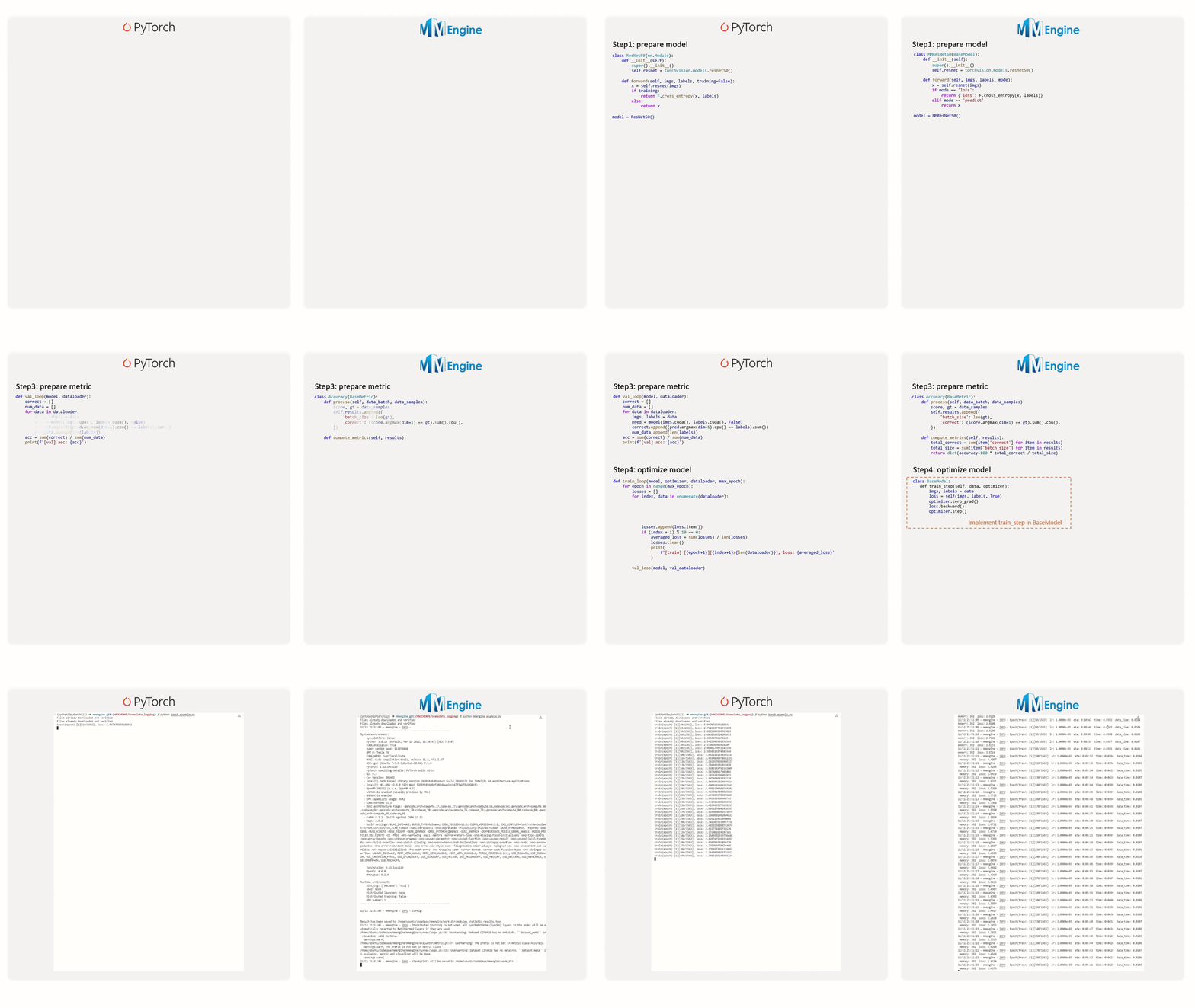
The corresponding implementation of PyTorch and MMEngine:
In addition to these basic components, you can also use **executor** to easily combine and configure various training techniques, such as enabling mixed-precision training and gradient accumulation (see [OptimWrapper](../tutorials/optim_wrapper.md)), configuring the learning rate decay curve (see [Metrics & Evaluator](../tutorials/evaluation.md)), and etc.
|