
Building Multi-Agent Systems for Airline Operations: A2A Protocol and MCP Integration with KaibanJS



Introduction
The airline industry faces significant operational challenges in group booking management. Manual processing, 24-72 hour response times, and growing backlogs result in missed revenue opportunities. According to research by Kaiban, one major airline had over 250 unprocessed quote requests, and post-pandemic workforce reductions led to a 57% drop in group revenue for some carriers.
This article demonstrates how to build a multi-agent system using KaibanJS that automates group booking quote generation, integrating with the Kaiban.io platform through the A2A (Agent-to-Agent) protocol and MCP (Model Context Protocol). We'll explore how these technologies enable agents to autonomously manage workflow state, interact with platform resources, and orchestrate complex business processes.
The Challenge: Manual Group Booking Operations
Group booking requests arrive through unstructured channels—emails, forms, or phone calls. Human agents must manually interpret each request, check availability, apply pricing rules, and generate quotes. This process typically takes 24-72 hours, creating several problems:
- Manual Processing: Each request requires human interpretation and data entry
- Delayed Response Times: Slow turnaround erodes conversion rates and customer loyalty
- Missed Revenue: Growing backlogs mean potential revenue loss
- Resource Constraints: Reduced teams struggle to scale operations
Solution Architecture: Multi-Agent Systems with KaibanJS
KaibanJS is a multi-agent framework designed for building collaborative AI agent systems. It enables you to define agents with specific roles, tasks with clear objectives, and teams that orchestrate complex workflows. Unlike single-agent systems, KaibanJS allows multiple specialized agents to work together, each handling a specific aspect of the problem.
Key Concepts
- Agents: Specialized AI entities with defined roles and goals
- Tasks: Specific actions that agents perform with clear inputs and outputs
- Teams: Orchestration of multiple agents and tasks in a coordinated workflow
- Tools: External capabilities that agents can invoke (APIs, databases, MCP servers)
The Kaiban.io Platform: Enterprise Agent Orchestration
Kaiban.io is an enterprise workflow management and agent orchestration platform specifically designed for airline operations. It provides:
- Visual Kanban Boards: Real-time visibility into agent workflows
- Card-Based Workflow: Each work item is represented as a card that moves through states
- A2A Protocol: Standardized communication between agents and the platform
- MCP Server: Model Context Protocol server for tool-based agent interactions
The platform is SDK-agnostic, meaning agents built with any framework (KaibanJS, LangChain, Mastra, etc.) can integrate through standardized protocols.
Integration Approaches: A2A Protocol and MCP
Our example demonstrates two key integration technologies:
A2A (Agent-to-Agent) Protocol
The A2A protocol enables standardized communication between the Kaiban.io platform and your agents. When a card is created or moved in a Kaiban board, the platform sends an A2A message containing:
- Card metadata (
card_id,board_id,team_id) - Activity information (type, actor, changes)
- Context for the agent to process
// Executor receives A2A activity
const activity = a2aRequest.body.data.activities[0];
const cardId = activity.card_id;
const boardId = activity.board_id;
const teamId = activity.team_id;
MCP (Model Context Protocol)
MCP is an open protocol that enables AI applications to securely access external data sources and tools. The Kaiban.io platform provides an MCP server that exposes card and board operations as tools:
get_card: Fetch card details by IDmove_card: Move card between columns (todo → doing → done → blocked)update_card: Update card content, status, or metadatacreate_card_activities: Log activities for audit trails
Instead of using a traditional SDK, agents invoke these tools directly, giving them fine-grained control over platform interactions.
Architecture: Multi-Agent Team for Group Booking Quotes
Our solution uses a sequential team with 5 tasks and 4 specialized agents:
Team Flow
Task 0: Get Card & Move to Doing (Kaiban Card Sync Agent)
  ↓
Task 1: Extract & Validate Inquiry (Inquiry Extraction & Validation Agent)
  ↓
Task 2: Availability & Pricing (Availability & Pricing Agent)
  ↓
Task 3: Generate Quote (Quote Generation Agent)
  ↓
Task 4: Update Card & Move to Done (Kaiban Card Sync Agent)
Agent Specialization
- Kaiban Card Sync Agent: Manages card lifecycle using MCP tools
- Inquiry Extraction & Validation Agent: Parses unstructured text and validates required fields
- Availability & Pricing Agent: Checks availability and calculates pricing using mock tools
- Quote Generation Agent: Produces the final quote text
Implementation: Kaiban MCP Client
The MCP client connects to the Kaiban.io MCP server using the @modelcontextprotocol/sdk with Streamable HTTP transport. It converts JSON Schema tool definitions from the MCP server into Zod schemas that KaibanJS agents can understand:
import { Client } from '@modelcontextprotocol/sdk/client/index.js';
import { StreamableHTTPClientTransport } from '@modelcontextprotocol/sdk/client/streamableHttp.js';
import { convertJsonSchemaToZod } from 'zod-from-json-schema';
import { z } from 'zod';

async function getMcpClient(): Promise<Client> {
  const transport = new StreamableHTTPClientTransport(new URL(mcpUrl), {
    requestInit: {
      headers: {
        Authorization: `Bearer ${process.env.KAIBAN_API_TOKEN}`,
      },
    },
    reconnectionOptions: {
      initialReconnectionDelay: 1000,
      maxReconnectionDelay: 30000,
      reconnectionDelayGrowFactor: 1.5,
      maxRetries: 5,
    },
  });

  const client = new Client({
    name: 'kaiban-group-booking-quote-client',
    version: '1.0.0',
  });

  await client.connect(transport);
  return client;
}
Converting MCP Tools to KaibanJS Format
The client converts each MCP tool's JSON Schema input definition to a Zod schema, ensuring agents receive proper parameter definitions:
export async function getKaibanTools(): Promise<KaibanJSTool[]> {
  const client = await getMcpClient();
  const { tools: mcpTools } = await client.listTools();

  return mcpTools.map((t) => {
    const schema = inputSchemaToZod(t.inputSchema, t.name);
    return {
      name: t.name,
      description: t.description ?? `MCP tool: ${t.name}`,
      schema,
      async invoke(input: Record<string, unknown>): Promise<string> {
        const result = await client.callTool({ name: t.name, arguments: input });
        return stringifyToolContent(result.content);
      },
    };
  });
}
This conversion is crucial—without proper schemas, LLMs struggle to understand tool parameters, leading to excessive retries and incorrect invocations.
Multi-Agent Team Definition
The team is defined using KaibanJS primitives:
const kaibanCardSyncAgent = new Agent({
  name: 'Kaiban Card Sync Agent',
  role: 'Kaiban Platform Sync',
  goal: 'Use Kaiban MCP tools to get card, move card to doing/done, update card result, and create card activities.',
  background: 'Uses get_card, move_card, update_card, and create_card_activities from the Kaiban MCP server.',
  tools: kaibanTools, // MCP tools exposed as KaibanJS tools
});

const inquiryExtractionValidationAgent = new Agent({
  name: 'Inquiry Extraction & Validation Agent',
  role: 'Group Booking Data Specialist',
  goal: 'Extract group booking details from unstructured text and validate that all required fields are present.',
  background: 'Expert in parsing travel requests from emails, forms, and free text.',
});

// ... additional agents

const team = new Team({
  name: 'Group Booking Quote Team',
  agents: [
    kaibanCardSyncAgent,
    inquiryExtractionValidationAgent,
    availabilityPricingAgent,
    quoteGenerationAgent,
  ],
  tasks: [
    getCardAndMoveToDoingTask,
    extractAndValidateInquiryTask,
    availabilityAndPricingTask,
    generateQuoteTask,
    updateCardWithQuoteAndMoveToDoneTask,
  ],
  inputs: {
    card_id,
    board_id,
    team_id,
    agent_id,
    agent_name,
  },
});
Task 0: Card Lifecycle Management via MCP
The first task demonstrates how agents interact with the platform using MCP tools:
const getCardAndMoveToDoingTask = new Task({
  title: 'Get Card and Move to Doing',
  description: `For card_id {card_id}:
1. Call get_card with card_id to fetch the card.
2. Extract the description field (customer inquiry text).
3. If column_key is "todo", call move_card to "doing".
4. Optionally call create_card_activities to log changes.
5. Return userMessage set to the card description.`,
  agent: kaibanCardSyncAgent,
  expectedOutput: 'Object with userMessage set to the card description.',
  outputSchema: z.object({
    userMessage: z.string().describe('The card description text (customer inquiry).'),
  }),
});
The agent receives MCP tools with proper Zod schemas, enabling it to correctly invoke get_card, move_card, and create_card_activities with the right parameters.
End-to-End Flow
- Kaiban.io Platform: A card is created with a group booking inquiry in the description
- A2A Message: The platform sends an A2A activity to the agent endpoint
- Executor: Parses the activity, validates the card via MCP
get_card, and starts the team - Task 0: Agent uses MCP tools to get the card and move it to "doing"
- Tasks 1-3: Agents extract, validate, check availability, and generate the quote
- Task 4: Agent uses MCP tools to update the card with the quote and move it to "done"
- Error Handling: If any step fails, the executor calls MCP
move_cardto "blocked"
Benefits of Multi-Agent Architecture
1. Specialization
Each agent focuses on a specific capability:
- Card management (MCP operations)
- Data extraction and validation
- Business logic (availability, pricing)
- Content generation (quote writing)
2. Scalability
Agents can be reused across different workflows. The Kaiban Card Sync Agent, for example, can be used in any workflow that needs card lifecycle management.
3. Maintainability
Clear separation of concerns makes the system easier to understand, test, and modify.
4. Observability
The Kaiban.io platform provides real-time visibility into agent operations through visual boards, making it easy to monitor workflow progress and identify bottlenecks.
MCP vs SDK: Why Tool-Based Integration?
Traditional SDK integration requires:
- Learning SDK-specific APIs
- Tight coupling to SDK versions
- Limited flexibility in how agents interact with the platform
MCP-based integration offers:
- Standardized Protocol: MCP is an open standard, not vendor-specific
- Tool-Based Design: Agents invoke tools naturally, aligning with LLM tool-calling patterns
- Schema Discovery: Tools expose their schemas, enabling automatic validation
- Framework Agnostic: Any framework that supports tool calling can use MCP
Configuration
The example requires minimal configuration:
# MCP Connection
KAIBAN_MCP_URL=https://<tenant>-<env>.kaiban.io/mcps/kaiban/mcp
KAIBAN_API_TOKEN=your-token

# Or use tenant-based URL construction
KAIBAN_TENANT=your-tenant
KAIBAN_ENVIRONMENT=prod  # or dev, staging

# LLM Provider
OPENAI_API_KEY=your-key

# A2A Endpoint
A2A_BASE_URL=https://your-public-url
Error Handling
The system implements robust error handling:
try {
  const team = await createGroupBookingQuoteTeam(context);
  await team.start();
} catch (error) {
  // Executor calls MCP move_card to blocked
  await moveCardToBlocked(cardId, boardId, teamId, actor);
  throw error;
}
Failed workflows are automatically moved to "blocked" for manual review, ensuring no requests are lost.
Testing
The example includes comprehensive tests that mock both MCP and KaibanJS components:
vi.mock('../src/agents/airline-group-booking-quote/controller/kaiban-mcp-client', () => ({
  getKaibanTools: vi.fn(async () => []),
  getCard: vi.fn(async (cardId: string) => ({
    id: cardId,
    description: 'We need a quote for 25 people LHR to MIA...',
    column_key: 'todo',
  })),
  moveCardToBlocked: vi.fn(async () => {}),
}));
This allows testing without requiring actual Kaiban.io or OpenAI API calls.
Real-World Impact
This architecture addresses the challenges identified in airline group booking operations:
- Instant Response: Quotes generated in seconds instead of days
- Zero Backlog: All requests are processed automatically
- Scalability: Handle unlimited requests without increasing headcount
- Consistency: Standardized quote format and pricing logic
- Audit Trail: All actions logged via card activities
Extending the System
The multi-agent architecture makes it easy to extend functionality:
- Additional Agents: Add agents for payment processing, seat assignment, or customer communication
- New Tools: Integrate real availability APIs, payment gateways, or CRM systems
- Workflow Variants: Create different team configurations for different booking types
- Learning: Agents can learn from historical data to improve quote accuracy
Conclusion
Building multi-agent systems with KaibanJS, integrated with the Kaiban.io platform via A2A and MCP, provides a powerful approach to automating complex business processes. The combination of:
- Multi-agent orchestration for specialized task handling
- A2A protocol for standardized platform communication
- MCP for tool-based agent interactions
- Visual workflow management through Kaiban.io boards
creates a robust, scalable, and maintainable system for airline operations automation.
The example demonstrates how these technologies work together to transform manual, time-consuming processes into automated, intelligent workflows that can scale with business needs.
Demo Video
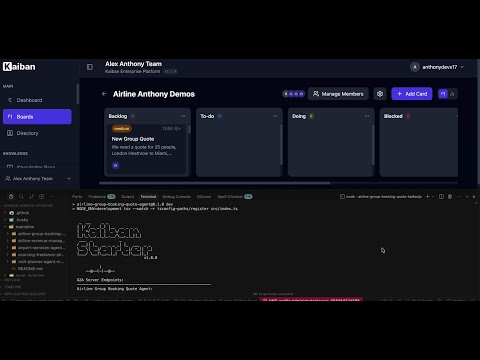
Watch the system in action! This video demonstrates how the KaibanJS group booking quote team integrates with the Kaiban.io platform via A2A and MCP:
Video Link: https://www.youtube.com/watch?v=Grg5ZUJZ4JM
The demo shows:
- Cards being created in the Kaiban.io platform
- A2A protocol triggering the KaibanJS agent
- Multi-agent team processing the inquiry through all 5 tasks
- MCP tools managing card lifecycle (get, move, update)
- Real-time workflow visualization on the Kaiban board
Resources
- KaibanJS Documentation: https://docs.kaibanjs.com
- Kaiban.io Platform: https://www.kaiban.io
- MCP Specification: https://modelcontextprotocol.io
- Example Repository: https://github.com/kaiban-ai/kaiban-agents-starter
- Use Case: AI Agent for Airlines: Instant Group Booking Quote Automation
Next Steps
- Explore the Example: Clone the repository and run the group booking quote agent
- Customize Agents: Modify agent roles and tasks for your specific use case
- Add Real Tools: Replace mock tools with actual APIs (availability, pricing, payment)
- Extend Workflows: Add agents for booking completion, customer communication, or reporting
- Deploy to Production: Use the Kaiban.io platform to manage and monitor your agents
This article demonstrates how modern AI agent frameworks, standardized protocols, and enterprise platforms combine to solve real-world business challenges in the airline industry.